2026 National 5 Computing Science marking instructions
Source: Scottish Qualifications Authority (SQA) / Qualifications Scotland. This is a StemInteract HTML companion, not an official HTML edition. Selectable text is supplied alongside original page images. Use the images or original PDF for equations, powers, fractions, vector notation, tables and diagrams; text extraction cannot fully preserve mathematical layout.
Jump to a question
PDF page 1
Selectable page text
National

                   Qualifications
                   2026

                2026   Computing      Science

                         National    5

  Question     Paper   Finalised   Marking    Instructions

These marking instructions have been prepared by examination teams for use by Qualifications
Scotland appointed markers when marking external course assessments.

The information in this document may be reproduced in support of Qualifications Scotland
qualifications only on a non-commercial basis. If it is reproduced, Qualifications Scotland must be
clearly acknowledged as the source. If it is to be reproduced for any other purpose, written permission
must be obtained from Qualifications Scotland.

© Qualifications Scotland 2026
PDF page 2
Selectable page text
General marking principles for National 5 Computing Science

This information is provided to help you understand the general principles you must apply when
marking candidate responses to questions in this paper. These principles must be read in
conjunction with the detailed marking instructions, which identify the key features required in
candidate responses.

(a) Marks for each candidate response must always be assigned in line with these general marking
   principles and the detailed marking instructions for this assessment.

(b) Always use positive marking. This means candidates accumulate marks for the demonstration of
   relevant skills, knowledge and understanding; marks are not deducted.

(c) If a candidate response is not covered by either the principles or detailed marking instructions,
   and you are uncertain how to assess it, you must seek guidance from your team leader.

(d) Award marks regardless of spelling, as long as the meaning is unambiguous. This applies to all
   responses, including code. Award marks as per the detailed marking instructions, regardless of
   syntax errors, if the intention of the coding is clear.

(e) For questions where candidates are asked to design or write code, a sample response is shown in
   the detailed marking instructions. This will not be the only valid response. You must use the
   detailed marking instructions and additional guidance to ensure that you consider alternative
   approaches and nuances of different programming languages. If in doubt you should refer to your
   Team Leader.

(f) A correct response can be negated if the candidate includes an extra, incorrect response which
   demonstrates they do not know the correct answer. For example, in a ‘state’ question where the
   only correct answer is ‘white’, if the candidate answers ‘white orange’, you should not award the
   mark.

(g) If a candidate puts a score through a response and makes a further attempt, you should only
   mark the further attempt. If no further attempt is made and the original is legible, you should
   mark the original response.

(h) Where an incorrect response is carried forward and used correctly in a following part of the
   question, you should give credit for subsequent responses that are correct with regard to the
   original error. Candidates should not be penalised more than once for the same error.

(i) Only award marks for a valid response to the question asked. Where candidates are asked to:
    • Identify, name, give or state, they need only name or present in brief form.
    • describe, they must provide a statement or structure of characteristics and/or features. This
      will be more than an outline or a list. It may refer to, for example, a concept, process,
      experiment, situation, or facts, in the context of and appropriate to the question. Candidates
      must make the same number of factual/appropriate points as there are marks available in the
      question.
    • explain, they must relate cause and/or effect and/or make relationships between things
      clear, in the context of the question or a specific area within the question.
    • write code, they must write recognisable code, not prose nor a diagram.
    • design, they must use a design technique appropriate to the problem. Award marks as per the
      detailed marking instructions, regardless of errors in the exemplification of the technique, if
      the intention of the design is clear.

(j) In the marking instructions, if a word is underlined then it is essential; if a word is in brackets()
   then it is not essential. Words separated by/are alternatives.

                                page 02
PDF page 3
Question 1Question 2Question 3Question 4Question 5Question 6Question 7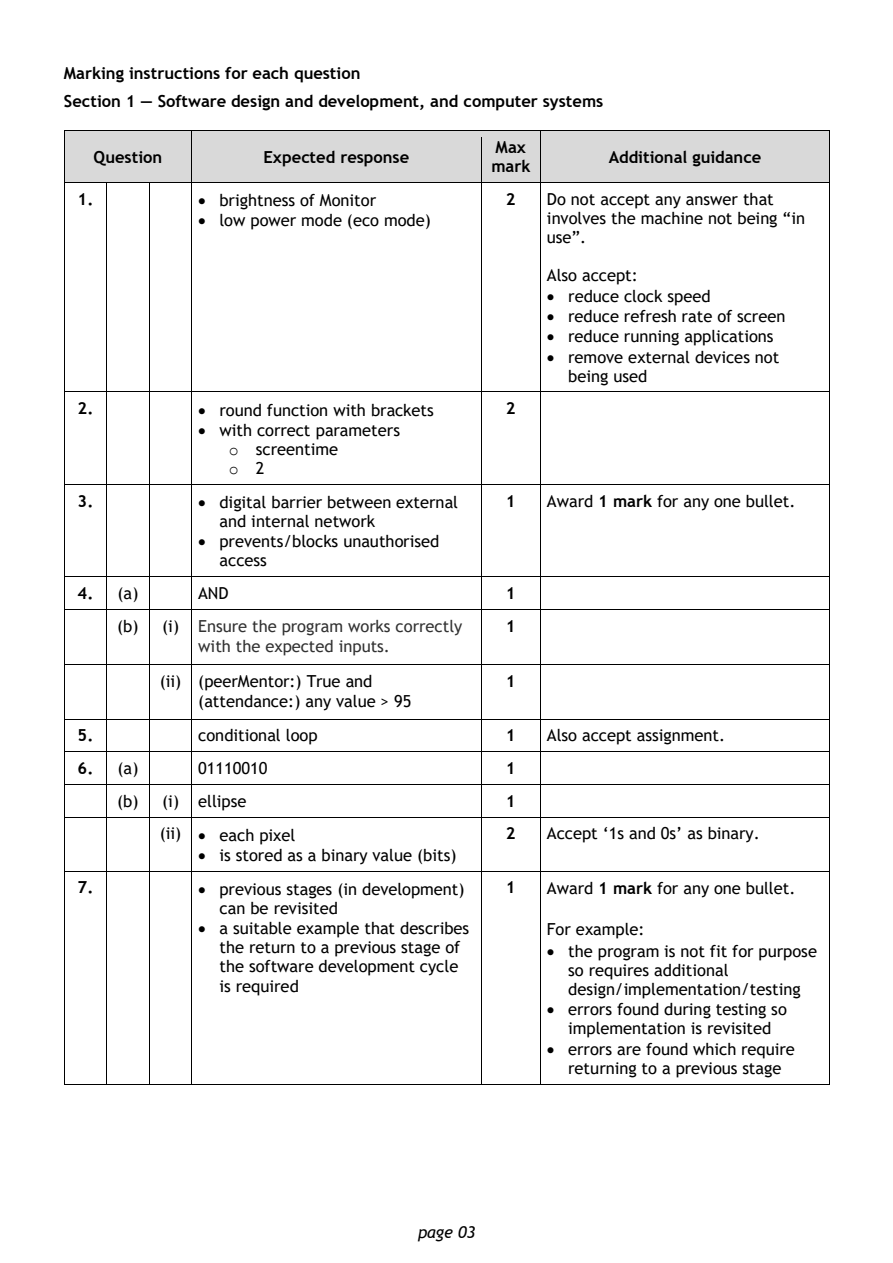
Selectable page text
Marking instructions for each question

Section 1 — Software design and development, and computer systems

                                        Max
   Question       Expected response               Additional guidance
                                       mark
 1.         • brightness of Monitor      2  Do not accept any answer that
            • low power mode (eco mode)     involves the machine not being “in
                                            use”.

                                            Also accept:
                                            • reduce clock speed
                                            • reduce refresh rate of screen
                                            • reduce running applications
                                            • remove external devices not
                                              being used

 2.         • round function with brackets 2
            • with correct parameters
               o  screentime
               o  2
 3.         • digital barrier between external 1 Award 1 mark for any one bullet.
              and internal network
            • prevents/blocks unauthorised
              access

 4.  (a)    AND                          1

     (b) (i) Ensure the program works correctly 1
            with the expected inputs.

         (ii) (peerMentor:) True and     1
            (attendance:) any value > 95
 5.         conditional loop             1  Also accept assignment.

 6.  (a)    01110010                     1

     (b) (i) ellipse                     1
         (ii) • each pixel               2  Accept ‘1s and 0s’ as binary.
            • is stored as a binary value (bits)

 7.         • previous stages (in development) 1 Award 1 mark for any one bullet.
              can be revisited
            • a suitable example that describes For example:
              the return to a previous stage of • the program is not fit for purpose
              the software development cycle  so requires additional
              is required                     design/implementation/testing
                                            • errors found during testing so
                                              implementation is revisited
                                            • errors are found which require
                                              returning to a previous stage

                                page 03
PDF page 4
Question 8Question 9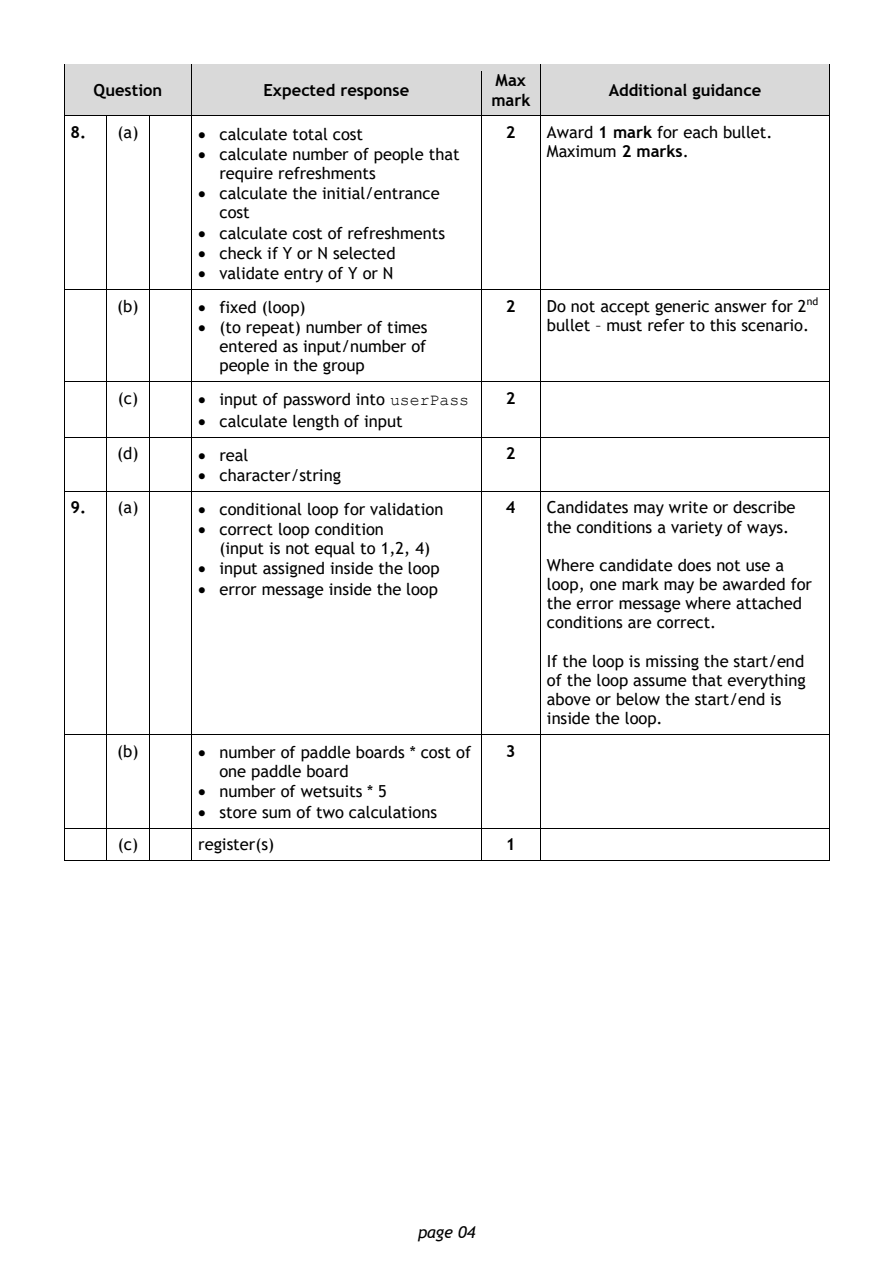
Selectable page text
Max
   Question       Expected response               Additional guidance
                                       mark
8.   (a)    • calculate total cost       2  Award 1 mark for each bullet.
            • calculate number of people that Maximum 2 marks.
              require refreshments
            • calculate the initial/entrance
              cost
            • calculate cost of refreshments
            • check if Y or N selected
            • validate entry of Y or N
     (b)    • fixed (loop)               2  Do not accept generic answer for 2nd
            • (to repeat) number of times   bullet – must refer to this scenario.
              entered as input/number of
              people in the group

     (c)    • input of password into userPass 2
            • calculate length of input

     (d)    • real                       2
            • character/string

9.   (a)    • conditional loop for validation 4 Candidates may write or describe
            • correct loop condition        the conditions a variety of ways.
              (input is not equal to 1,2, 4)
            • input assigned inside the loop Where candidate does not use a
            • error message inside the loop loop, one mark may be awarded for
                                            the error message where attached
                                            conditions are correct.

                                            If the loop is missing the start/end
                                            of the loop assume that everything
                                            above or below the start/end is
                                            inside the loop.
     (b)    • number of paddle boards * cost of 3
              one paddle board
            • number of wetsuits * 5
            • store sum of two calculations

     (c)    register(s)                  1

                                page 04
PDF page 5
Question 10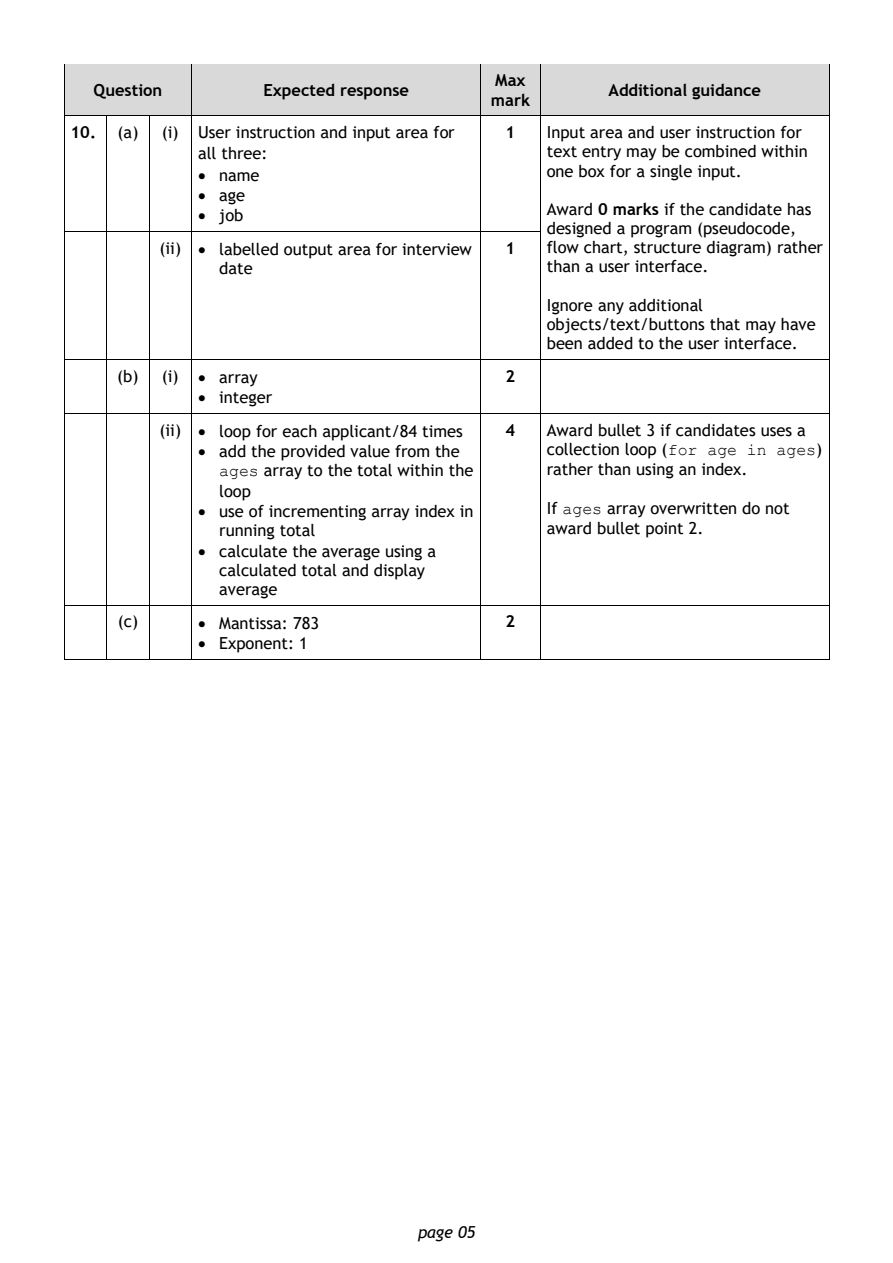
Selectable page text
Max
   Question       Expected response               Additional guidance
                                       mark
10.  (a) (i) User instruction and input area for 1 Input area and user instruction for
            all three:                      text entry may be combined within
            • name                          one box for a single input.
            • age
                                            Award 0 marks if the candidate has
            • job
                                            designed a program (pseudocode,
         (ii) • labelled output area for interview 1 flow chart, structure diagram) rather
              date                          than a user interface.
                                            Ignore any additional
                                            objects/text/buttons that may have
                                            been added to the user interface.
     (b) (i) • array                    2
            • integer

         (ii) • loop for each applicant/84 times 4 Award bullet 3 if candidates uses a
            • add the provided value from the collection loop (for age in ages)
              ages array to the total within the rather than using an index.
              loop
            • use of incrementing array index in If ages array overwritten do not
              running total                 award bullet point 2.
            • calculate the average using a
              calculated total and display
              average
     (c)    • Mantissa: 783             2

            • Exponent: 1

                                page 05
PDF page 6
Question 11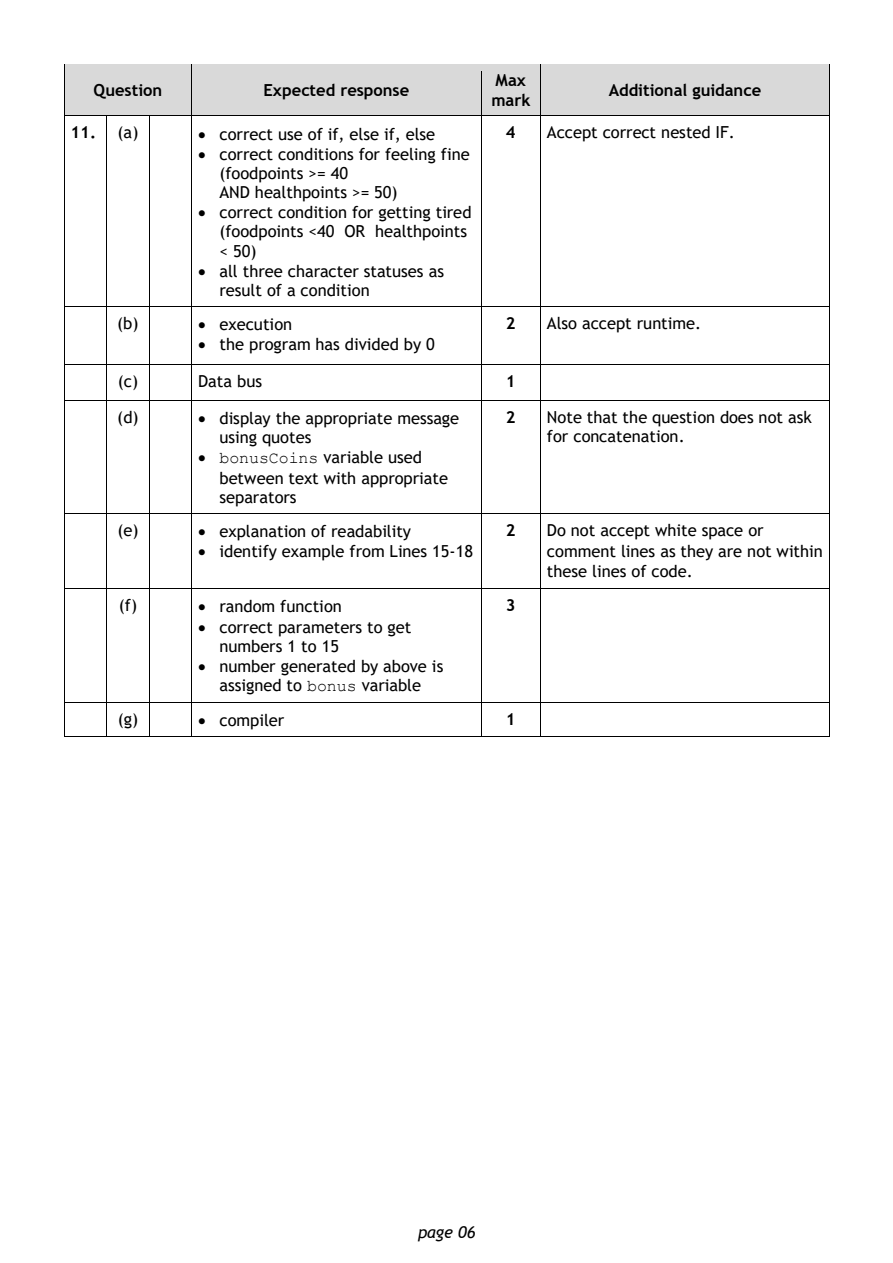
Selectable page text
Max
   Question       Expected response               Additional guidance
                                       mark
11.  (a)    • correct use of if, else if, else 4 Accept correct nested IF.
            • correct conditions for feeling fine
              (foodpoints >= 40
              AND healthpoints >= 50)
            • correct condition for getting tired
              (foodpoints <40 OR healthpoints
              < 50)
            • all three character statuses as
              result of a condition
     (b)    • execution                  2  Also accept runtime.
            • the program has divided by 0

     (c)    Data bus                     1

     (d)    • display the appropriate message 2 Note that the question does not ask
              using quotes                  for concatenation.
            • bonusCoins variable used
              between text with appropriate
              separators

     (e)    • explanation of readability 2  Do not accept white space or
            • identify example from Lines 15-18 comment lines as they are not within
                                            these lines of code.

     (f)    • random function            3
            • correct parameters to get
              numbers 1 to 15
            • number generated by above is
              assigned to bonus variable

     (g)    • compiler                   1

                                page 06
PDF page 7
Question 12Question 13Question 14Question 15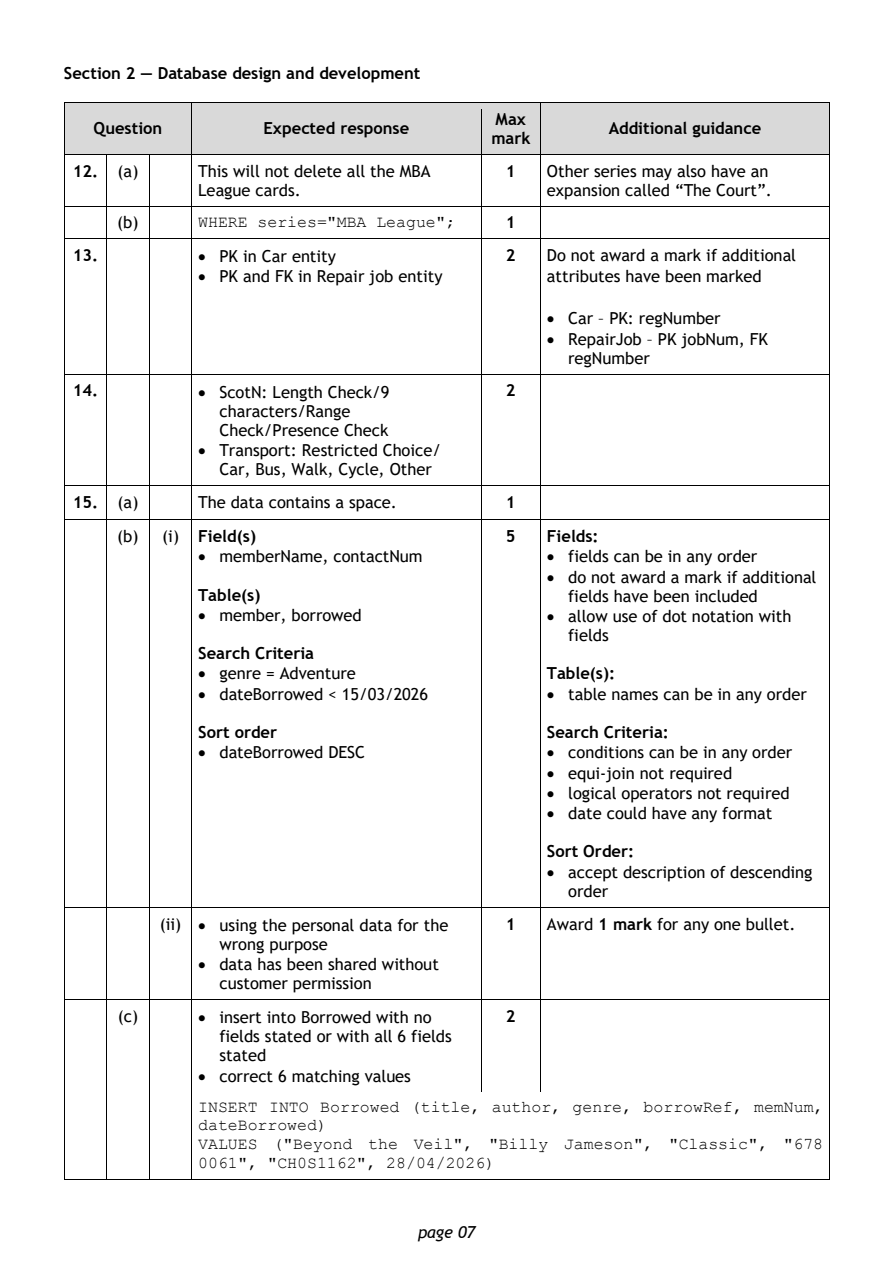
Selectable page text
Section 2 — Database design and development

                                        Max
   Question       Expected response               Additional guidance
                                       mark
 12. (a)    This will not delete all the MBA 1 Other series may also have an
            League cards.                   expansion called “The Court”.
     (b)    WHERE series="MBA League";   1

 13.        • PK in Car entity           2  Do not award a mark if additional
            • PK and FK in Repair job entity attributes have been marked

                                            • Car – PK: regNumber
                                            • RepairJob – PK jobNum, FK
                                              regNumber

 14.        • ScotN: Length Check/9      2
              characters/Range
              Check/Presence Check
            • Transport: Restricted Choice/
              Car, Bus, Walk, Cycle, Other
 15. (a)    The data contains a space.   1

     (b) (i) Field(s)                    5  Fields:
            • memberName, contactNum        • fields can be in any order
                                            • do not award a mark if additional
            Table(s)                          fields have been included
            • member, borrowed              • allow use of dot notation with
                                              fields
            Search Criteria
            • genre = Adventure             Table(s):
            • dateBorrowed < 15/03/2026     • table names can be in any order

            Sort order                      Search Criteria:
            • dateBorrowed DESC             • conditions can be in any order
                                            • equi-join not required
                                            • logical operators not required
                                            • date could have any format

                                            Sort Order:
                                            • accept description of descending
                                              order

         (ii) • using the personal data for the 1 Award 1 mark for any one bullet.
              wrong purpose
            • data has been shared without
              customer permission

     (c)    • insert into Borrowed with no 2
              fields stated or with all 6 fields
              stated
            • correct 6 matching values
            INSERT INTO Borrowed (title, author, genre, borrowRef, memNum,
            dateBorrowed)
            VALUES ("Beyond the Veil", "Billy Jameson", "Classic", "678
            0061", "CH0S1162", 28/04/2026)

                                page 07
PDF page 8
Question 16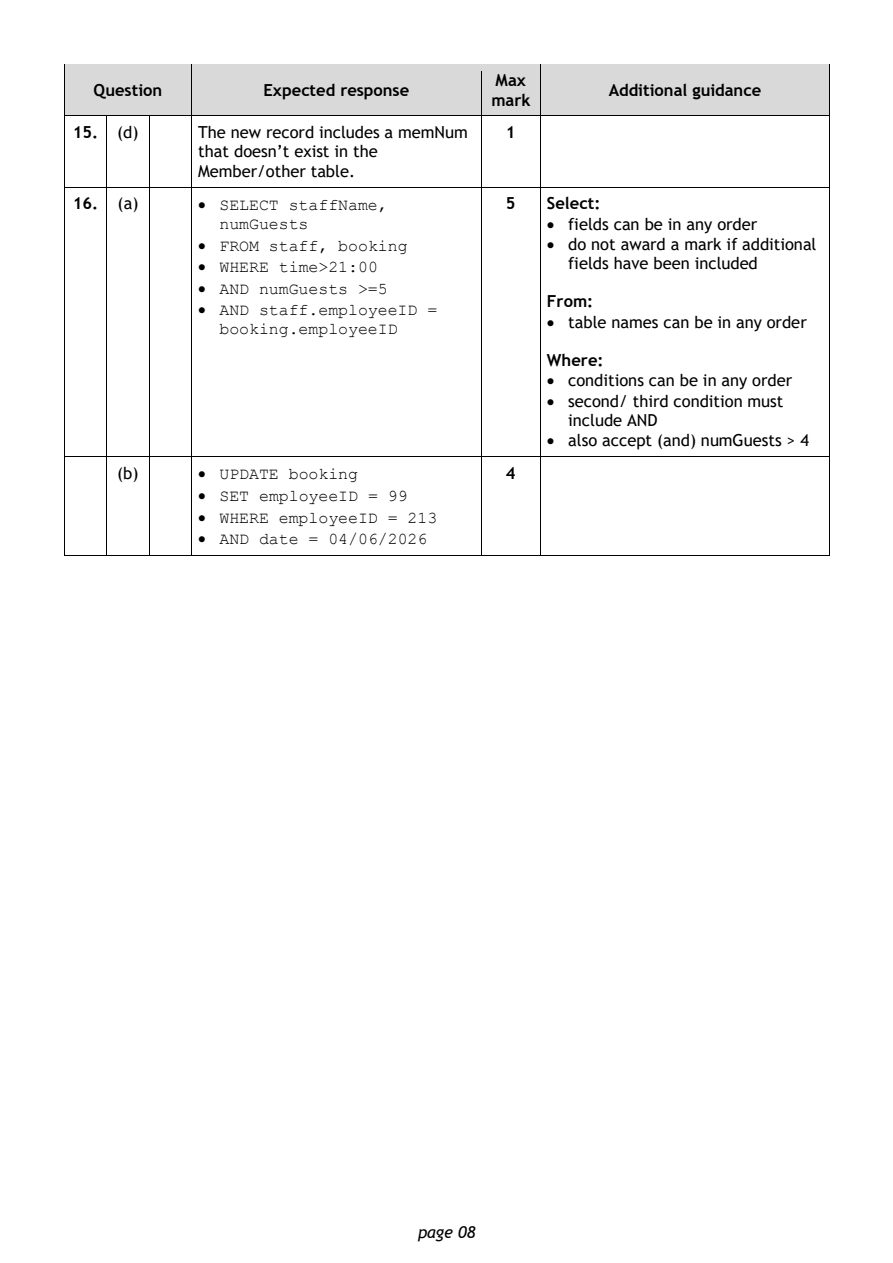
Selectable page text
Max
  Question       Expected response               Additional guidance
                                      mark
15. (d)    The new record includes a memNum 1
           that doesn’t exist in the
           Member/other table.
16. (a)    • SELECT staffName,          5  Select:
             numGuests                     • fields can be in any order
           • FROM staff, booking           • do not award a mark if additional
           • WHERE time>21:00                fields have been included
           • AND numGuests >=5
                                           From:
           • AND staff.employeeID =
                                           • table names can be in any order
             booking.employeeID
                                           Where:
                                           • conditions can be in any order
                                           • second/ third condition must
                                             include AND
                                           • also accept (and) numGuests > 4
    (b)    • UPDATE booking             4
           • SET employeeID = 99
           • WHERE employeeID = 213
           • AND date = 04/06/2026

                               page 08
PDF page 9
Question 17Question 18Question 19Question 20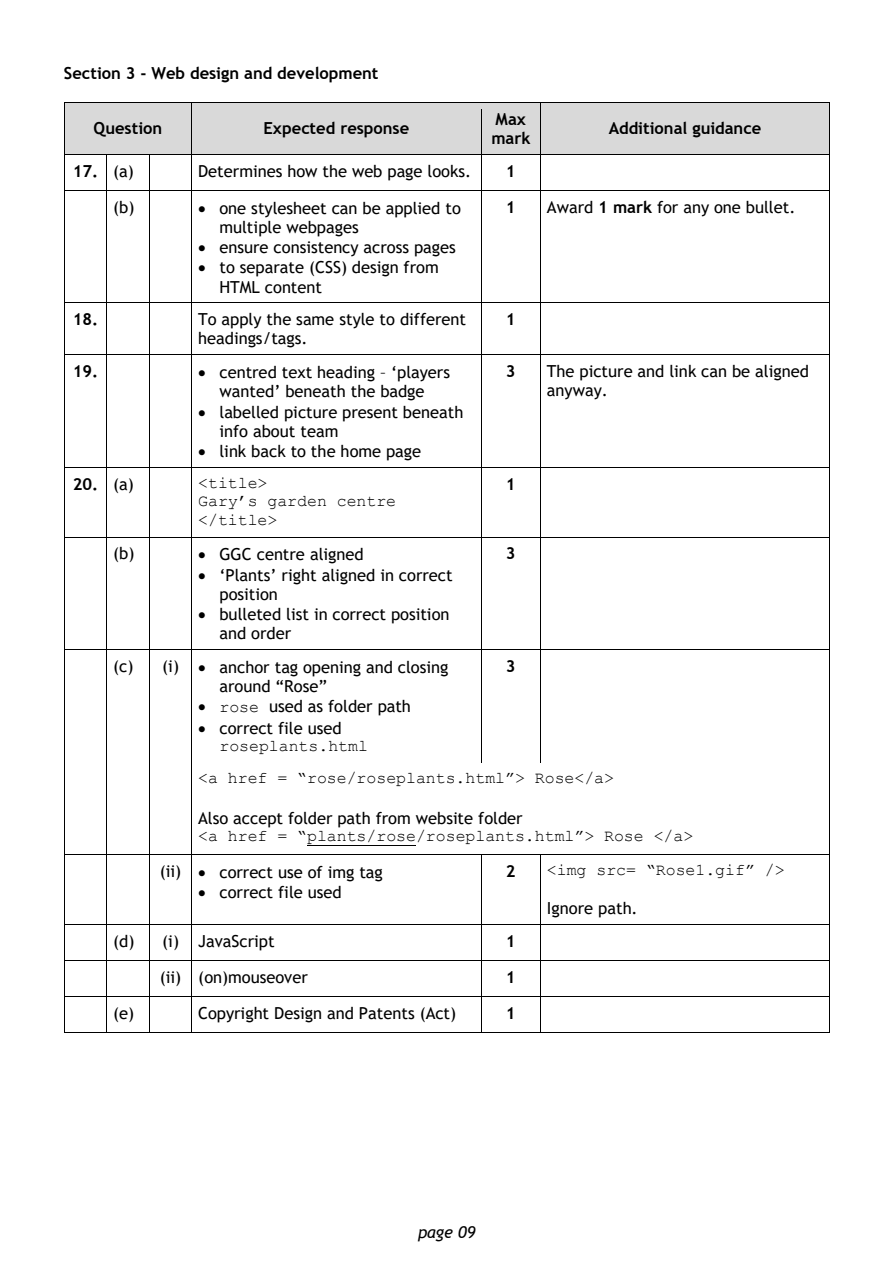
Selectable page text
Section 3 - Web design and development

                                        Max
   Question       Expected response               Additional guidance
                                       mark
 17. (a)    Determines how the web page looks. 1
    (b)     • one stylesheet can be applied to 1 Award 1 mark for any one bullet.
              multiple webpages
            • ensure consistency across pages
            • to separate (CSS) design from
              HTML content

 18.        To apply the same style to different 1
            headings/tags.

 19.        • centred text heading – ‘players 3 The picture and link can be aligned
              wanted’ beneath the badge     anyway.
            • labelled picture present beneath
              info about team
            • link back to the home page
 20. (a)    <title>                      1
            Gary’s garden centre
            </title>

    (b)     • GGC centre aligned         3
            • ‘Plants’ right aligned in correct
              position
            • bulleted list in correct position
              and order

    (c)  (i) • anchor tag opening and closing 3
              around “Rose”
            • rose used as folder path
            • correct file used
              roseplants.html
            <a href = “rose/roseplants.html”> Rose</a>

            Also accept folder path from website folder
            <a href = “plants/rose/roseplants.html”> Rose </a>
         (ii) • correct use of img tag   2  <img src= “Rose1.gif” />
            • correct file used
                                            Ignore path.

    (d)  (i) JavaScript                  1

         (ii) (on)mouseover              1

    (e)     Copyright Design and Patents (Act) 1

                                page 09
PDF page 10
Question 21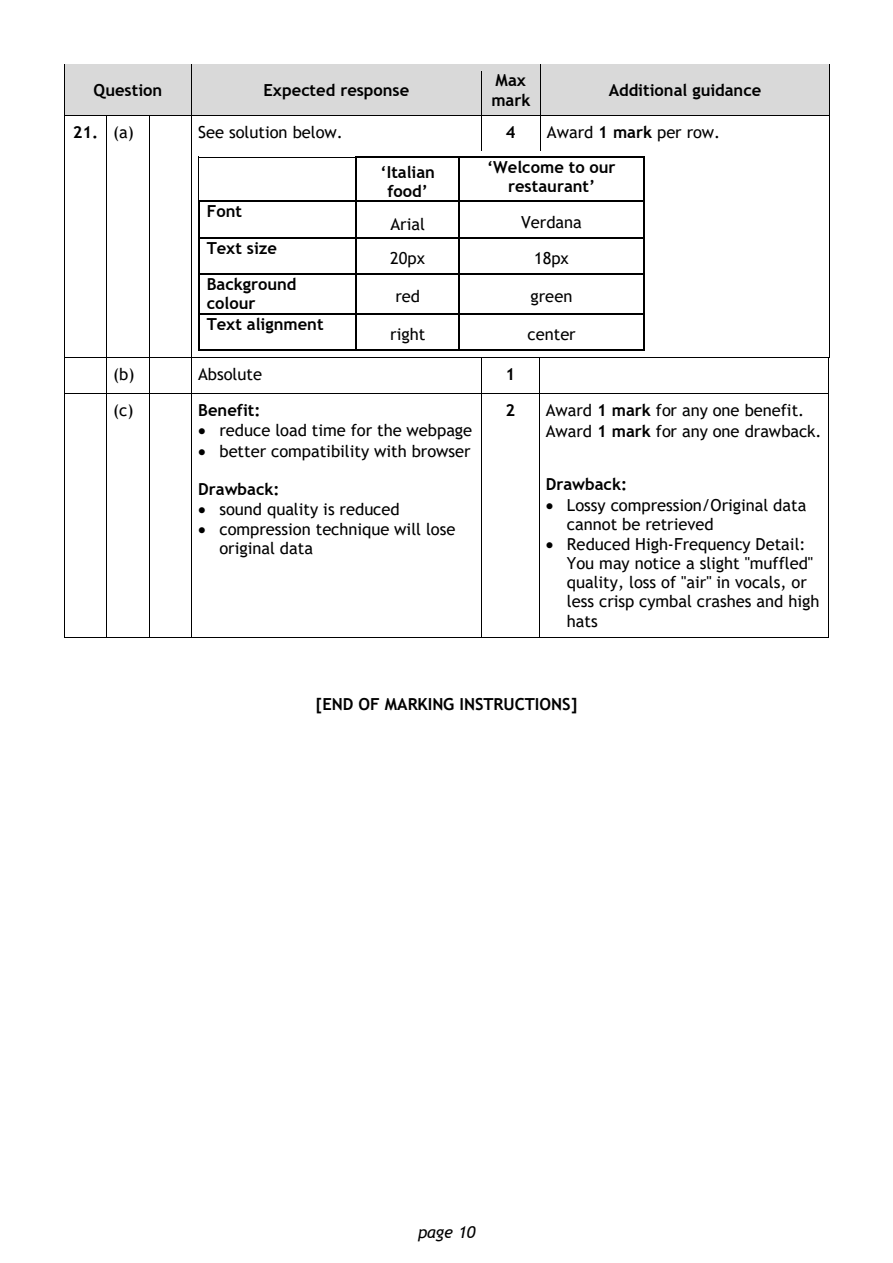
Selectable page text
Max
  Question       Expected response               Additional guidance
                                      mark
21. (a)    See solution below.          4  Award 1 mark per row.
                            ‘Italian  ‘Welcome to our
                             food’      restaurant’
            Font
                             Arial       Verdana
            Text size
                             20px         18px
            Background
                             red          green
            colour
            Text alignment
                             right        center
   (b)     Absolute                    1

   (c)     Benefit:                    2   Award 1 mark for any one benefit.
           • reduce load time for the webpage Award 1 mark for any one drawback.
           • better compatibility with browser

           Drawback:                       Drawback:
           • sound quality is reduced      • Lossy compression/Original data
                                             cannot be retrieved
           • compression technique will lose
             original data                 • Reduced High-Frequency Detail:
                                             You may notice a slight "muffled"
                                             quality, loss of "air" in vocals, or
                                             less crisp cymbal crashes and high
                                             hats

                      [END OF MARKING INSTRUCTIONS]

                               page 10