2024 National 5 Computing Science marking instructions
Source: Scottish Qualifications Authority (SQA) / Qualifications Scotland. This is a StemInteract HTML companion, not an official HTML edition. Selectable text is supplied alongside original page images. Use the images or original PDF for equations, powers, fractions, vector notation, tables and diagrams; text extraction cannot fully preserve mathematical layout.
Jump to a question
PDF page 1
Selectable page text
National

                   Qualifications
                   2024

                2024   Computing      Science

                         National    5

  Question     Paper   Finalised   Marking    Instructions

© Scottish Qualifications Authority 2024

These marking instructions have been prepared by examination teams for use by SQA appointed
markers when marking external course assessments.

The information in this document may be reproduced in support of SQA qualifications only on a non-
commercial basis. If it is reproduced, SQA must be clearly acknowledged as the source. If it is to be
reproduced for any other purpose, written permission must be obtained from permissions@sqa.org.uk.
PDF page 2
Selectable page text
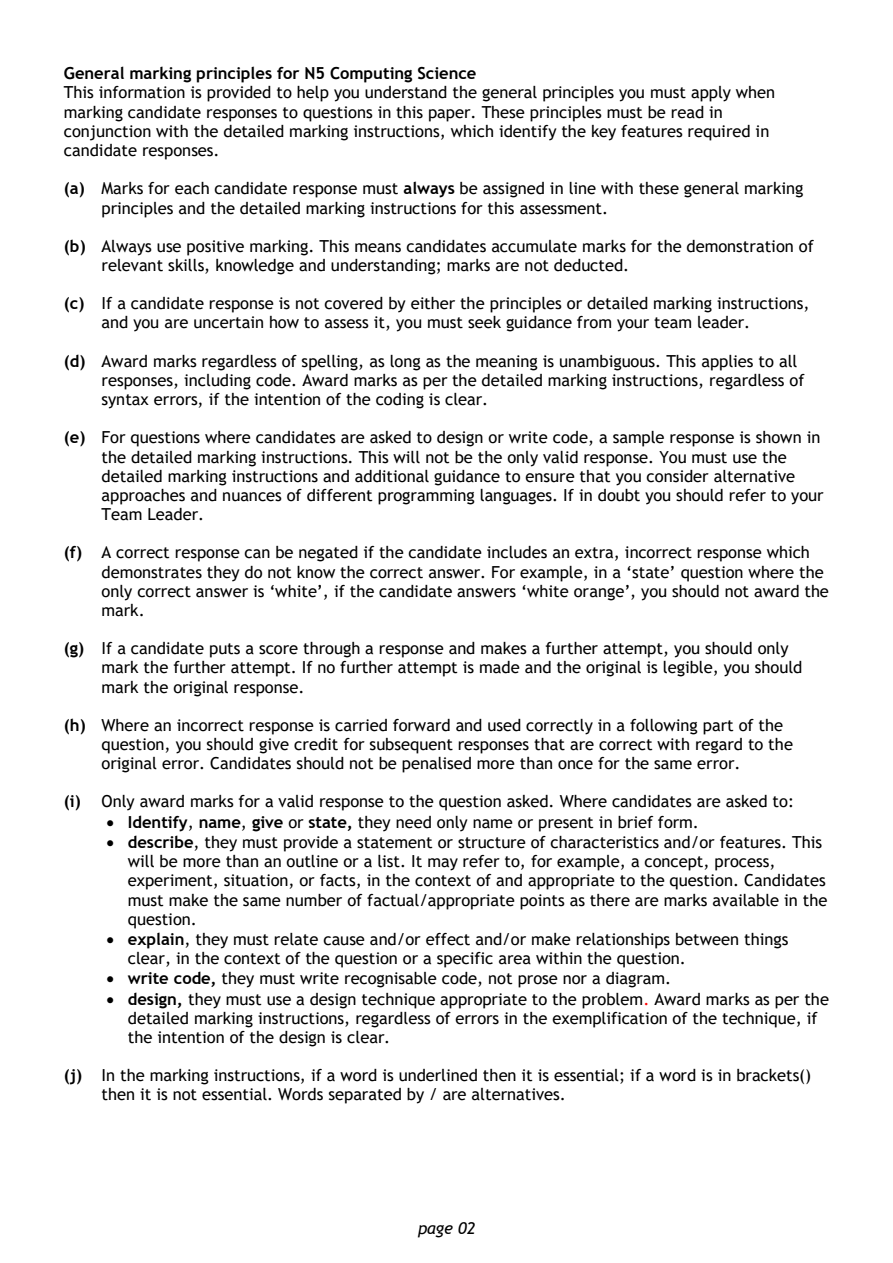
General marking principles for N5 Computing Science
This information is provided to help you understand the general principles you must apply when
marking candidate responses to questions in this paper. These principles must be read in
conjunction with the detailed marking instructions, which identify the key features required in
candidate responses.

(a) Marks for each candidate response must always be assigned in line with these general marking
   principles and the detailed marking instructions for this assessment.

(b) Always use positive marking. This means candidates accumulate marks for the demonstration of
   relevant skills, knowledge and understanding; marks are not deducted.

(c) If a candidate response is not covered by either the principles or detailed marking instructions,
   and you are uncertain how to assess it, you must seek guidance from your team leader.

(d) Award marks regardless of spelling, as long as the meaning is unambiguous. This applies to all
   responses, including code. Award marks as per the detailed marking instructions, regardless of
   syntax errors, if the intention of the coding is clear.

(e) For questions where candidates are asked to design or write code, a sample response is shown in
   the detailed marking instructions. This will not be the only valid response. You must use the
   detailed marking instructions and additional guidance to ensure that you consider alternative
   approaches and nuances of different programming languages. If in doubt you should refer to your
   Team Leader.

(f) A correct response can be negated if the candidate includes an extra, incorrect response which
   demonstrates they do not know the correct answer. For example, in a ‘state’ question where the
   only correct answer is ‘white’, if the candidate answers ‘white orange’, you should not award the
   mark.

(g) If a candidate puts a score through a response and makes a further attempt, you should only
   mark the further attempt. If no further attempt is made and the original is legible, you should
   mark the original response.

(h) Where an incorrect response is carried forward and used correctly in a following part of the
   question, you should give credit for subsequent responses that are correct with regard to the
   original error. Candidates should not be penalised more than once for the same error.

(i) Only award marks for a valid response to the question asked. Where candidates are asked to:
    • Identify, name, give or state, they need only name or present in brief form.
    • describe, they must provide a statement or structure of characteristics and/or features. This
      will be more than an outline or a list. It may refer to, for example, a concept, process,
      experiment, situation, or facts, in the context of and appropriate to the question. Candidates
      must make the same number of factual/appropriate points as there are marks available in the
      question.
    • explain, they must relate cause and/or effect and/or make relationships between things
      clear, in the context of the question or a specific area within the question.
    • write code, they must write recognisable code, not prose nor a diagram.
    • design, they must use a design technique appropriate to the problem. Award marks as per the
      detailed marking instructions, regardless of errors in the exemplification of the technique, if
      the intention of the design is clear.

(j) In the marking instructions, if a word is underlined then it is essential; if a word is in brackets()
   then it is not essential. Words separated by / are alternatives.

                                page 02
PDF page 3
Question 1Question 2Question 3Question 4Question 5Question 6Question 7Question 8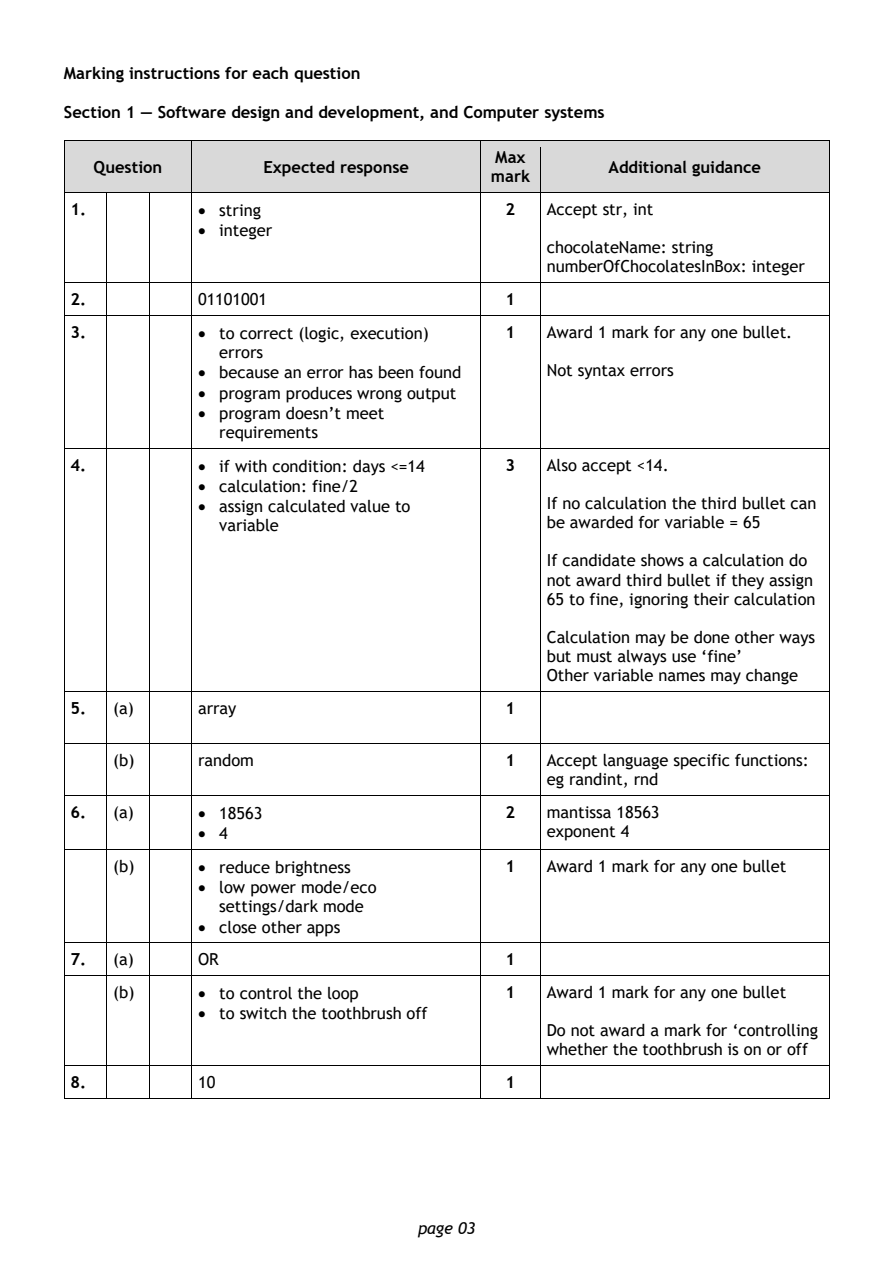
Selectable page text
Marking instructions for each question

Section 1 — Software design and development, and Computer systems

                                        Max
   Question       Expected response               Additional guidance
                                       mark
1.          • string                    2   Accept str, int
            • integer
                                            chocolateName: string
                                            numberOfChocolatesInBox: integer
2.          01101001                    1

3.          • to correct (logic, execution) 1 Award 1 mark for any one bullet.
              errors
            • because an error has been found Not syntax errors
            • program produces wrong output
            • program doesn’t meet
              requirements
4.          • if with condition: days <=14 3 Also accept <14.

            • calculation: fine/2
            • assign calculated value to    If no calculation the third bullet can
              variable                      be awarded for variable = 65
                                            If candidate shows a calculation do
                                            not award third bullet if they assign
                                            65 to fine, ignoring their calculation

                                            Calculation may be done other ways
                                            but must always use ‘fine’
                                            Other variable names may change

5.  (a)     array                       1

    (b)     rando(m                     1   Accept language specific functions:
                                            eg randint, rnd
6.  (a)     • 18563                     2   mantissa 18563
            • 4                             exponent 4

    (b)     • reduce brightness         1   Award 1 mark for any one bullet
            • low power mode/eco
              settings/dark mode
            • close other apps

7.  (a)     OR                          1
    (b)     • to control the loop       1   Award 1 mark for any one bullet

            • to switch the toothbrush off
                                            Do not award a mark for ‘controlling
                                            whether the toothbrush is on or off
8.          10                          1

                                page 03
PDF page 4
Question 9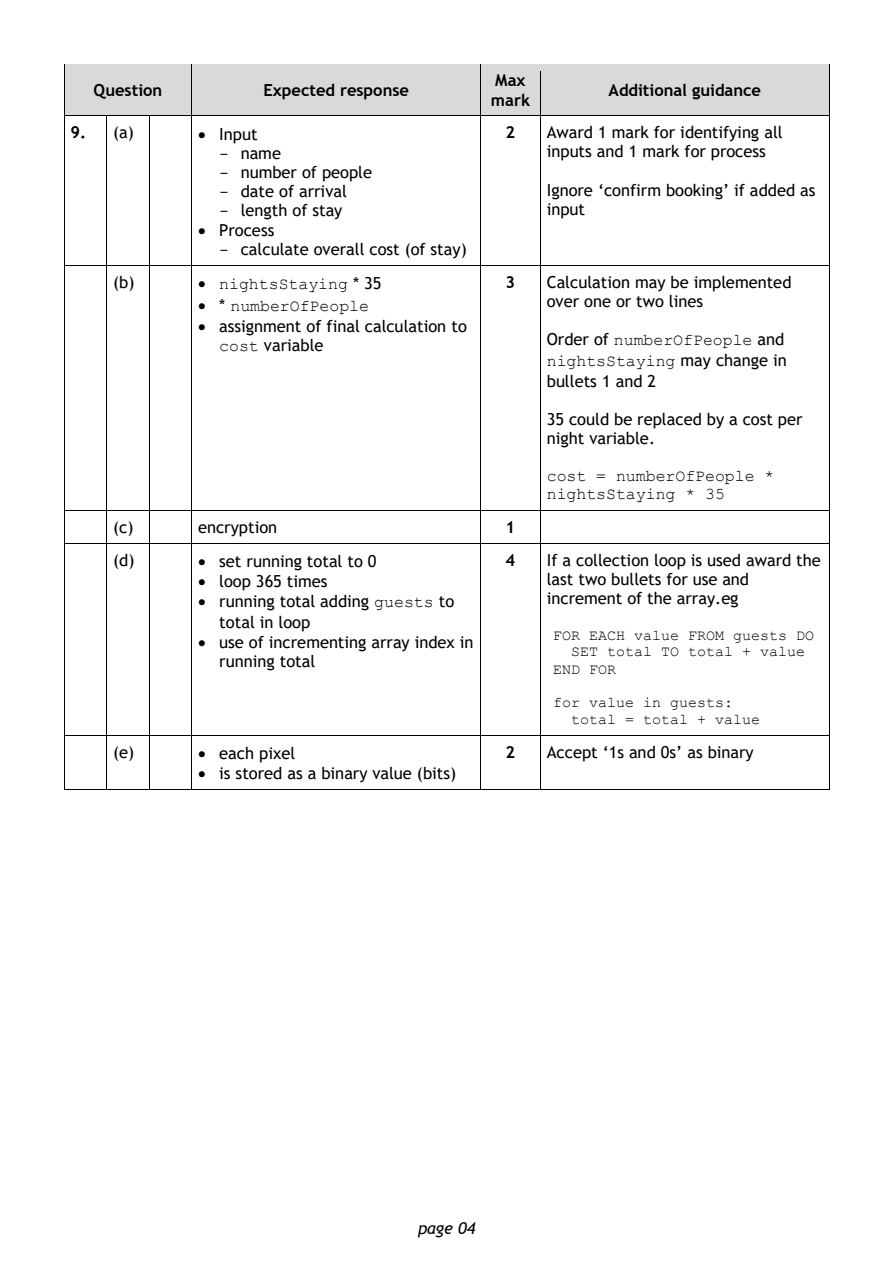
Selectable page text
Max
   Question       Expected response               Additional guidance
                                       mark
9.  (a)     • Input                     2   Award 1 mark for identifying all
              - name                        inputs and 1 mark for process
              - number of people
              - date of arrival             Ignore ‘confirm booking’ if added as
              - length of stay              input
            • Process
              - calculate overall cost (of stay)
    (b)     • nightsStaying * 35        3   Calculation may be implemented
            • * numberOfPeople              over one or two lines
            • assignment of final calculation to
                                            Order of numberOfPeople and
              cost variable
                                            nightsStaying may change in
                                            bullets 1 and 2
                                            35 could be replaced by a cost per
                                            night variable.

                                            cost = numberOfPeople *
                                            nightsStaying * 35

    (c)     encryption                  1
    (d)     • set running total to 0    4   If a collection loop is used award the
            • loop 365 times                last two bullets for use and
            • running total adding guests to increment of the array.eg

              total in loop
                                             FOR EACH value FROM guests DO
            • use of incrementing array index in
                                               SET total TO total + value
              running total
                                             END FOR
                                             for value in guests:
                                               total = total + value
    (e)     • each pixel                2   Accept ‘1s and 0s’ as binary
            • is stored as a binary value (bits)

                                page 04
PDF page 5
Question 10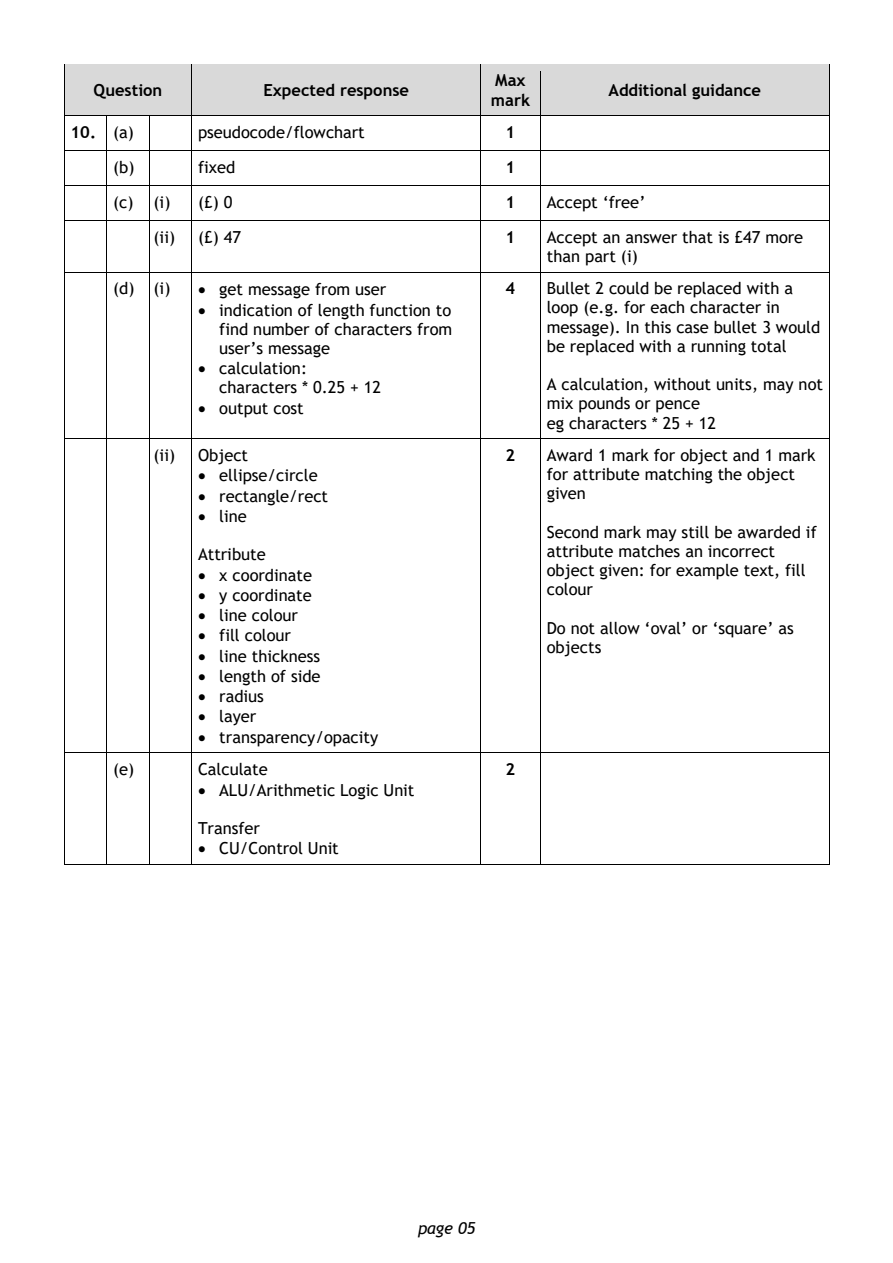
Selectable page text
Max
   Question       Expected response               Additional guidance
                                       mark
10. (a)     pseudocode/flowchart        1
    (b)     fixed                       1

    (c) (i) (£) 0                       1   Accept ‘free’

        (ii) (£) 47                     1   Accept an answer that is £47 more
                                            than part (i)
    (d) (i) • get message from user     4   Bullet 2 could be replaced with a

            • indication of length function to loop (e.g. for each character in
              find number of characters from message). In this case bullet 3 would
              user’s message                be replaced with a running total
            • calculation:
              characters * 0.25 + 12        A calculation, without units, may not
            • output cost                   mix pounds or pence
                                            eg characters * 25 + 12
        (ii) Object                     2   Award 1 mark for object and 1 mark
            • ellipse/circle                for attribute matching the object
            • rectangle/rect                given
            • line
                                            Second mark may still be awarded if
            Attribute                       attribute matches an incorrect
            • x coordinate                  object given: for example text, fill
                                            colour
            • y coordinate
            • line colour
                                            Do not allow ‘oval’ or ‘square’ as
            • fill colour
                                            objects
            • line thickness
            • length of side
            • radius
            • layer
            • transparency/opacity
    (e)     Calculate                   2
            • ALU/Arithmetic Logic Unit
            Transfer
            • CU/Control Unit

                                page 05
PDF page 6
Question 11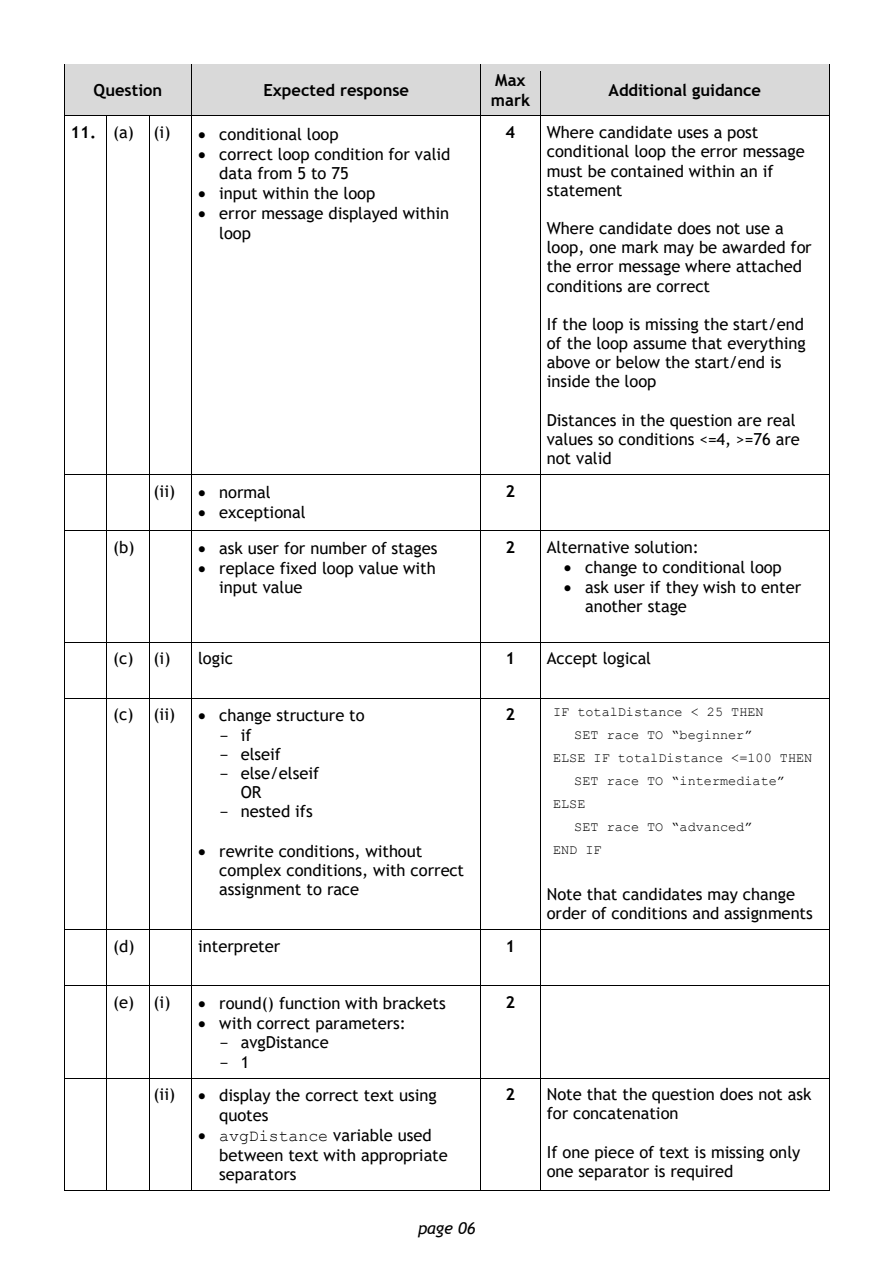
Selectable page text
Max
   Question       Expected response               Additional guidance
                                       mark
11. (a) (i) • conditional loop          4   Where candidate uses a post
            • correct loop condition for valid conditional loop the error message
              data from 5 to 75             must be contained within an if
            • input within the loop         statement
            • error message displayed within
              loop                          Where candidate does not use a
                                            loop, one mark may be awarded for
                                            the error message where attached
                                            conditions are correct
                                            If the loop is missing the start/end
                                            of the loop assume that everything
                                            above or below the start/end is
                                            inside the loop

                                            Distances in the question are real
                                            values so conditions <=4, >=76 are
                                            not valid

        (ii) • normal                   2
            • exceptional

    (b)     • ask user for number of stages 2 Alternative solution:
            • replace fixed loop value with   • change to conditional loop
              input value                     • ask user if they wish to enter
                                                another stage

    (c) (i) logic                       1   Accept logical

    (c) (ii) • change structure to      2    IF totalDistance < 25 THEN
              - if                             SET race TO “beginner”
              - elseif                       ELSE IF totalDistance <=100 THEN
              - else/elseif
                                               SET race TO “intermediate”
                OR
                                             ELSE
              - nested ifs
                                               SET race TO “advanced”
            • rewrite conditions, without    END IF
              complex conditions, with correct
              assignment to race
                                            Note that candidates may change
                                            order of conditions and assignments
    (d)     interpreter                 1
    (e) (i) • round() function with brackets 2
            • with correct parameters:
              - avgDistance
              - 1

        (ii) • display the correct text using 2 Note that the question does not ask
              quotes                        for concatenation
            • avgDistance variable used
              between text with appropriate If one piece of text is missing only
              separators                    one separator is required

                                page 06
PDF page 7
Question 12Question 13Question 14Question 15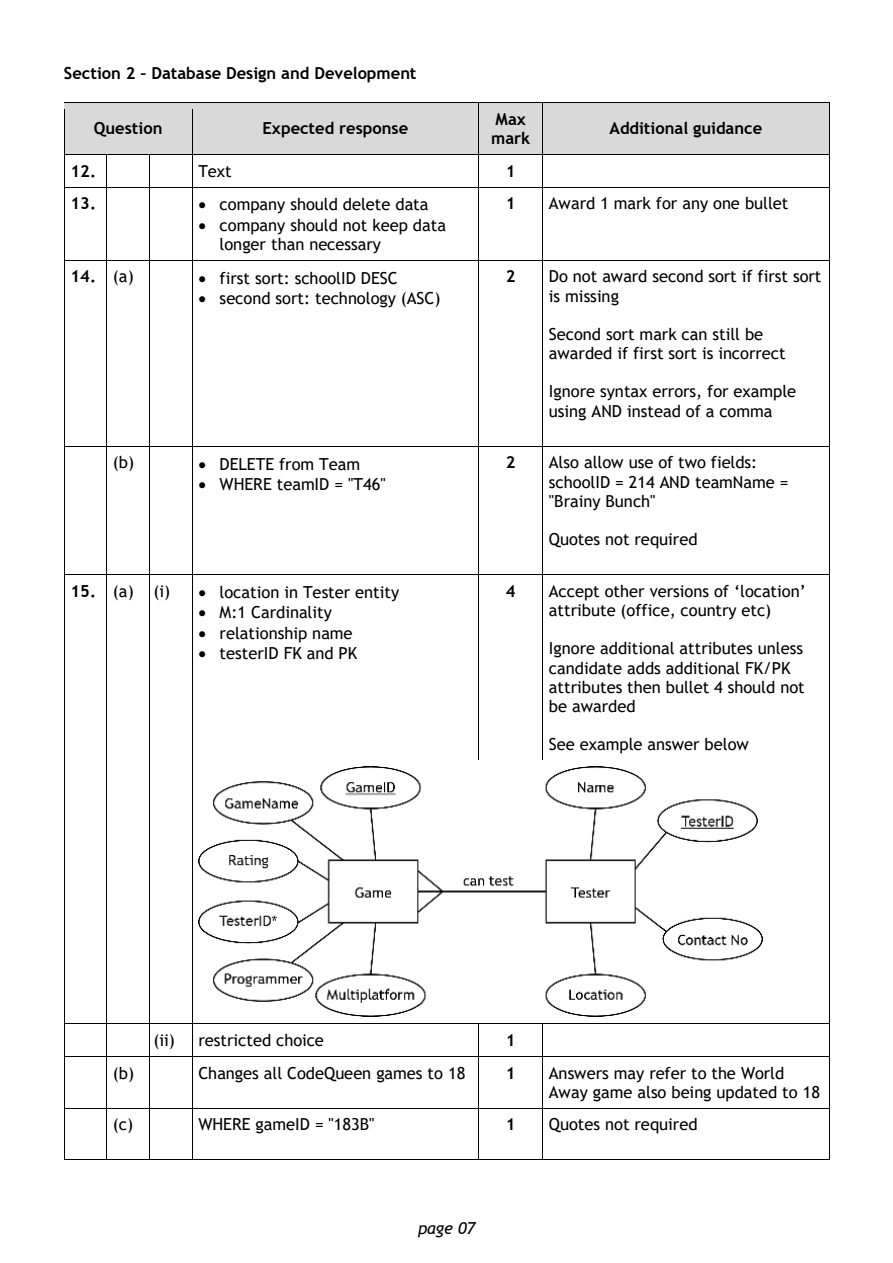
Selectable page text
Section 2 – Database Design and Development

                                        Max
   Question       Expected response               Additional guidance
                                       mark
12.         Text                         1
13.         • company should delete data 1  Award 1 mark for any one bullet
            • company should not keep data
              longer than necessary

14. (a)     • first sort: schoolID DESC  2  Do not award second sort if first sort
            • second sort: technology (ASC) is missing

                                            Second sort mark can still be
                                            awarded if first sort is incorrect

                                            Ignore syntax errors, for example
                                            using AND instead of a comma

    (b)     • DELETE from Team           2  Also allow use of two fields:
            • WHERE teamID = "T46"          schoolID = 214 AND teamName =
                                            "Brainy Bunch"

                                            Quotes not required

15. (a) (i) • location in Tester entity  4  Accept other versions of ‘location’
            • M:1 Cardinality               attribute (office, country etc)
            • relationship name
            • testerID FK and PK            Ignore additional attributes unless
                                            candidate adds additional FK/PK
                                            attributes then bullet 4 should not
                                            be awarded

                                            S ee example answer below

        (ii) restricted choice           1

    (b)     Changes all CodeQueen games to 18 1 Answers may refer to the World
                                            Away game also being updated to 18
    (c)     WHERE gameID = "183B"        1  Quotes not required

                                page 07
PDF page 8
Question 16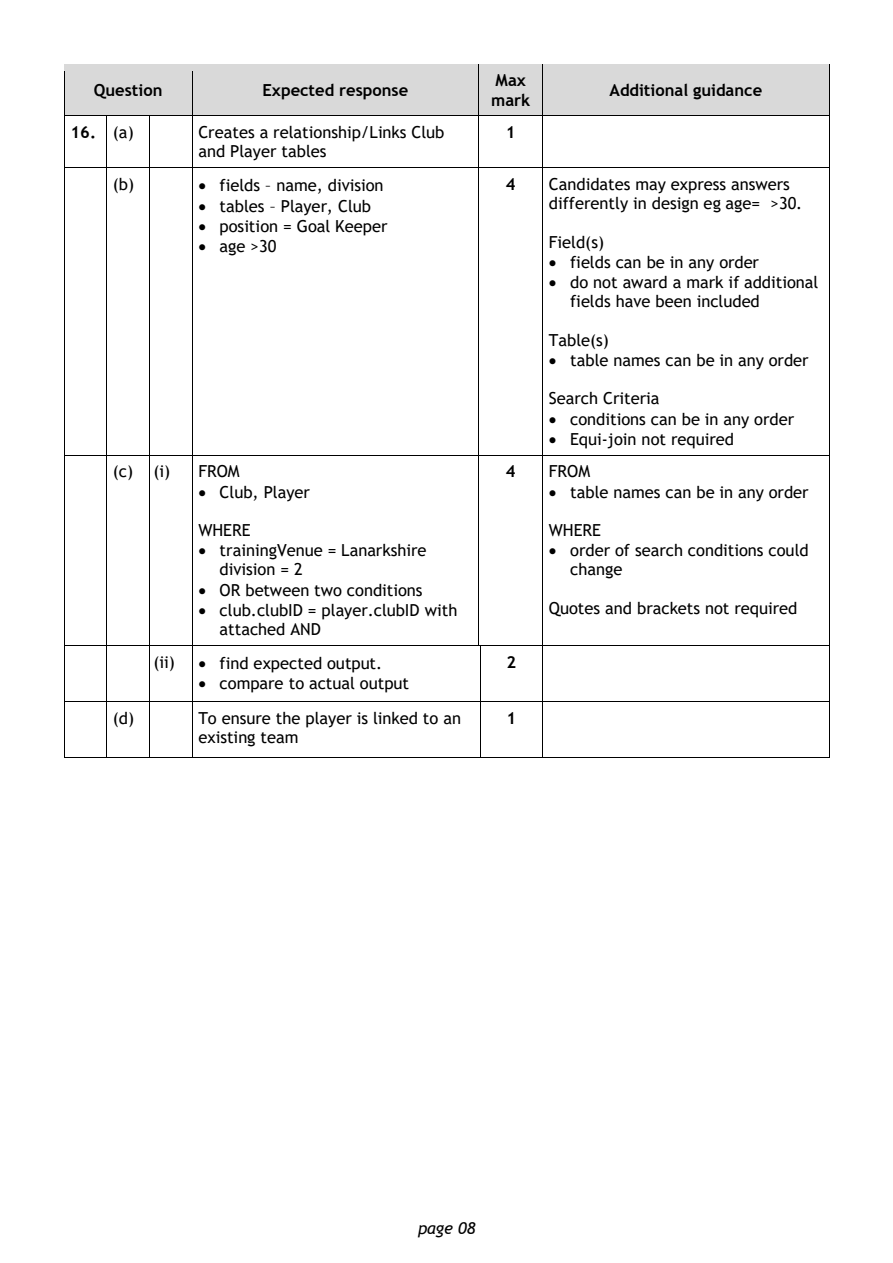
Selectable page text
Max
   Question       Expected response               Additional guidance
                                       mark
16. (a)     Creates a relationship/Links Club 1
            and Player tables
    (b)     • fields – name, division    4  Candidates may express answers
            • tables – Player, Club         differently in design eg age= >30.
            • position = Goal Keeper
            • age >30                       Field(s)
                                            • fields can be in any order
                                            • do not award a mark if additional
                                              fields have been included

                                            Table(s)
                                            • table names can be in any order

                                            Search Criteria
                                            • conditions can be in any order
                                            • Equi-join not required

    (c) (i) FROM                         4  FROM
            • Club, Player                  • table names can be in any order

            WHERE                           WHERE
            • trainingVenue = Lanarkshire   • order of search conditions could
              division = 2                    change
            • OR between two conditions
            • club.clubID = player.clubID with Quotes and brackets not required
              attached AND

        (ii) • find expected output.     2
            • compare to actual output
    (d)     To ensure the player is linked to an 1
            existing team

                                page 08
PDF page 9
Question 17Question 18Question 19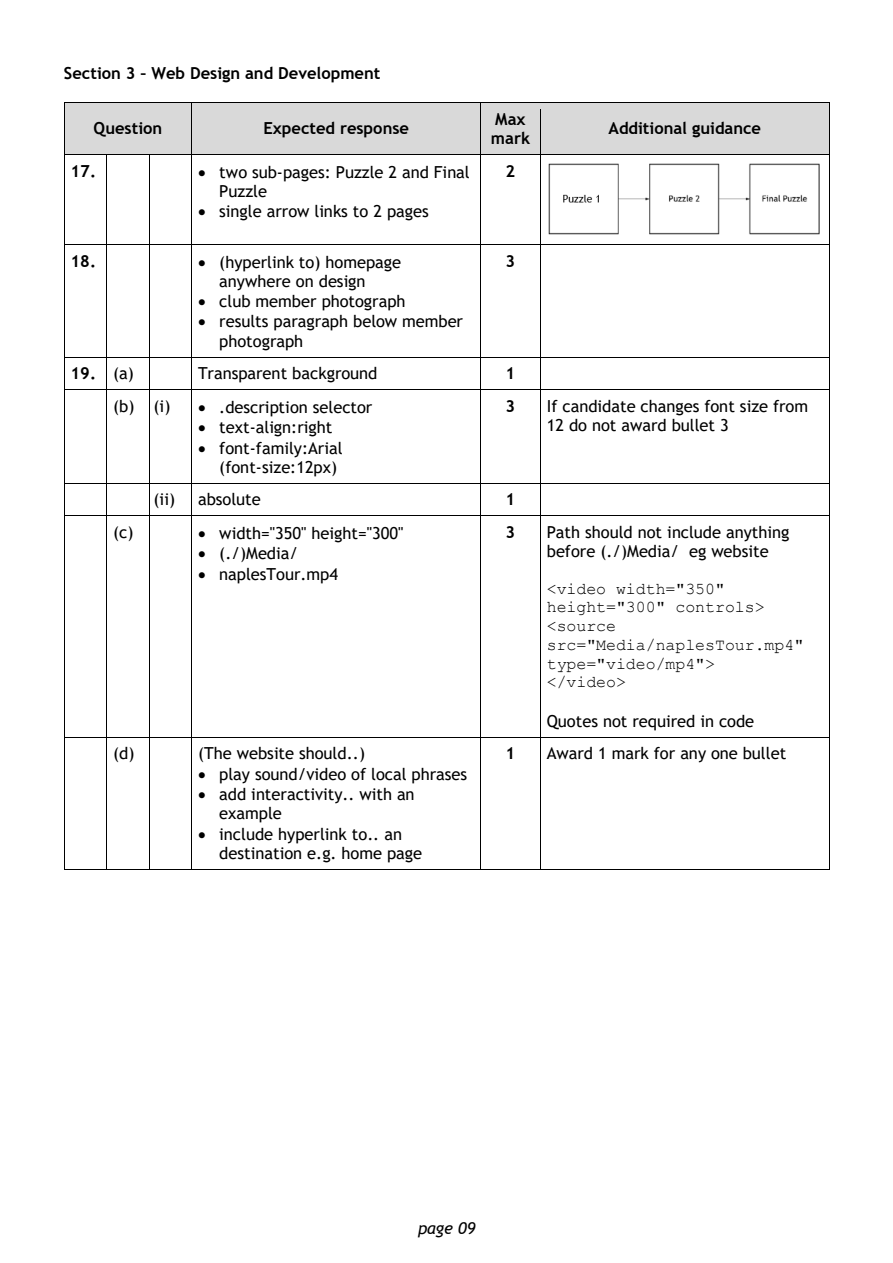
Selectable page text
Section 3 – Web Design and Development

                                        Max
   Question       Expected response               Additional guidance
                                       mark
17.         • two sub-pages: Puzzle 2 and Final 2
              Puzzle
            • single arrow links to 2 pages

18.         • (hyperlink to) homepage   3
              anywhere on design
            • club member photograph
            • results paragraph below member
              photograph

19. (a)     Transparent background      1
    (b) (i) • .description selector     3   If candidate changes font size from

            • text-align:right              1 2 do not award bullet 3
            • font-family:Arial
              (font-size:12px)
        (ii) absolute                   1

    (c)     • width="350" height="300"  3   Path should not include anything
            • (./)Media/                    before (./)Media/ eg website
            • naplesTour.mp4
                                            <video width="350"
                                            height="300" controls>
                                            <source
                                            src="Media/naplesTour.mp4"
                                            type="video/mp4">
                                            </video>

                                            Quotes not required in code
    (d)     (The website should..)      1   Award 1 mark for any one bullet
            • play sound/video of local phrases
            • add interactivity.. with an
              example
            • include hyperlink to.. an
              destination e.g. home page

                                page 09
PDF page 10
Question 20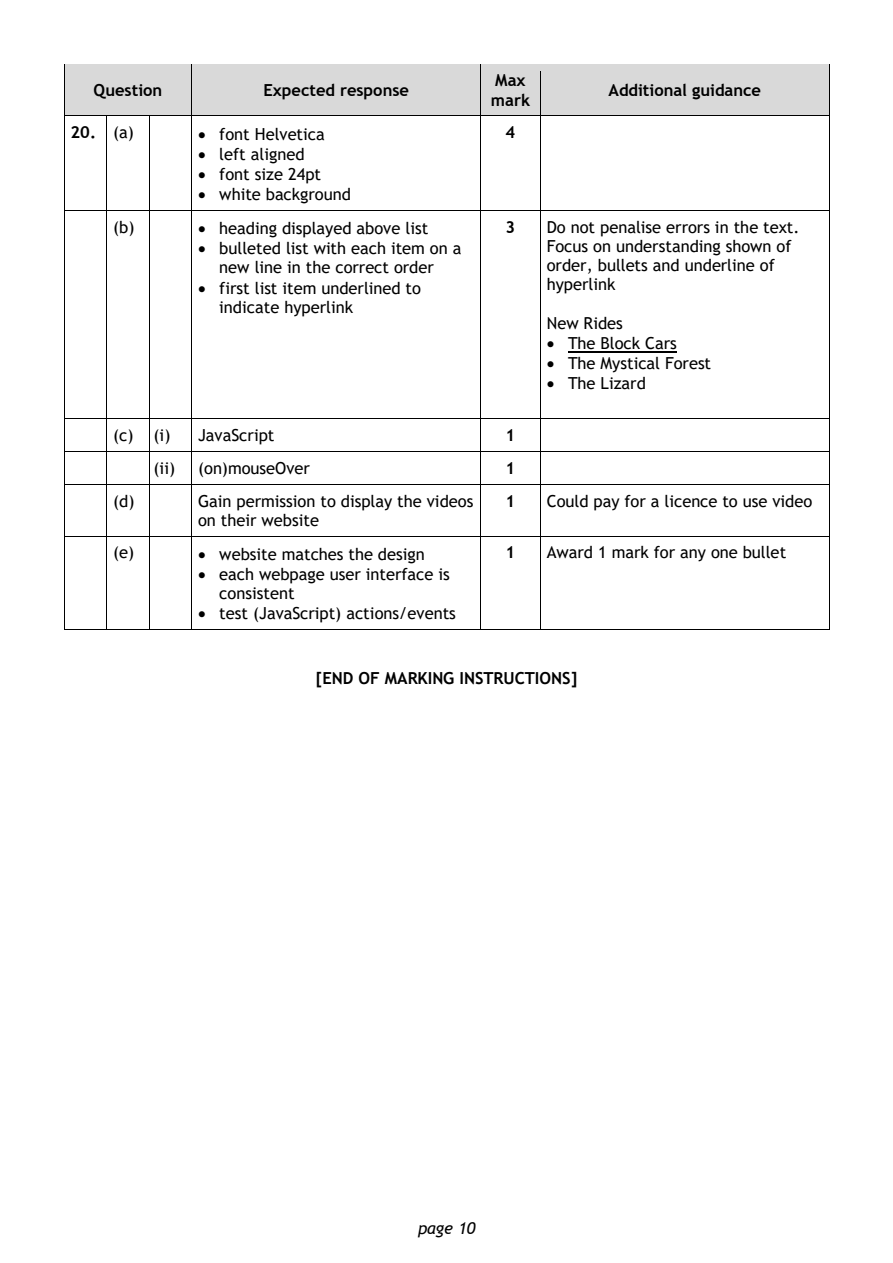
Selectable page text
Max
   Question       Expected response               Additional guidance
                                       mark
20. (a)     • font Helvetica            4
            • left aligned
            • font size 24pt
            • white background
    (b)     • heading displayed above list 3 Do not penalise errors in the text.
            • bulleted list with each item on a Focus on understanding shown of
              new line in the correct order order, bullets and underline of
            • first list item underlined to hyperlink
              indicate hyperlink
                                            New Rides
                                            • The Block Cars
                                            • The Mystical Forest
                                            • The Lizard

    (c) (i) JavaScript                  1

        (ii) (on)mouseOver              1
    (d)     Gain permission to display the videos 1 Could pay for a licence to use video
            on their website

    (e)     • website matches the design 1  Award 1 mark for any one bullet
            • each webpage user interface is
              consistent
            • test (JavaScript) actions/events

                       [END OF MARKING INSTRUCTIONS]

                                page 10