2026 Higher Computing Science marking instructions
Source: Scottish Qualifications Authority (SQA) / Qualifications Scotland. This is a StemInteract HTML companion, not an official HTML edition. Selectable text is supplied alongside original page images. Use the images or original PDF for equations, powers, fractions, vector notation, tables and diagrams; text extraction cannot fully preserve mathematical layout.
Jump to a question
PDF page 1
Selectable page text
National

                  Qualifications
                  2026

                2026   Computing      Science

                            Higher

  Question     Paper   Finalised   Marking    Instructions

These marking instructions have been prepared by examination teams for use by Qualifications
Scotland appointed markers when marking external course assessments.

The information in this document may be reproduced in support of Qualifications Scotland
qualifications only on a non-commercial basis. If it is reproduced, Qualifications Scotland must be
clearly acknowledged as the source. If it is to be reproduced for any other purpose, written permission
must be obtained from Qualifications Scotland.

 © Qualifications Scotland 2026
PDF page 2
Selectable page text
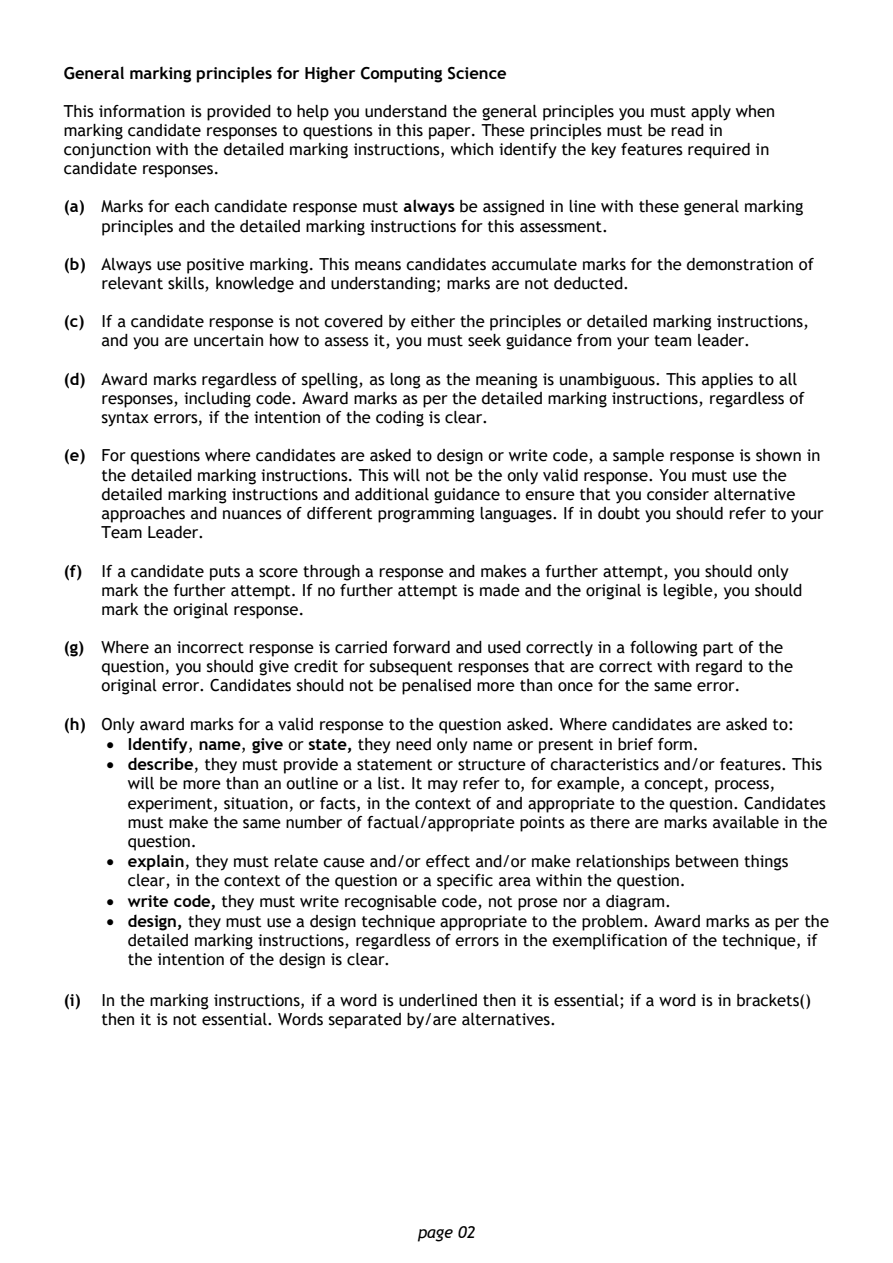
General marking principles for Higher Computing Science

This information is provided to help you understand the general principles you must apply when
marking candidate responses to questions in this paper. These principles must be read in
conjunction with the detailed marking instructions, which identify the key features required in
candidate responses.

(a) Marks for each candidate response must always be assigned in line with these general marking
   principles and the detailed marking instructions for this assessment.

(b) Always use positive marking. This means candidates accumulate marks for the demonstration of
   relevant skills, knowledge and understanding; marks are not deducted.

(c) If a candidate response is not covered by either the principles or detailed marking instructions,
   and you are uncertain how to assess it, you must seek guidance from your team leader.

(d) Award marks regardless of spelling, as long as the meaning is unambiguous. This applies to all
   responses, including code. Award marks as per the detailed marking instructions, regardless of
   syntax errors, if the intention of the coding is clear.

(e) For questions where candidates are asked to design or write code, a sample response is shown in
   the detailed marking instructions. This will not be the only valid response. You must use the
   detailed marking instructions and additional guidance to ensure that you consider alternative
   approaches and nuances of different programming languages. If in doubt you should refer to your
   Team Leader.

(f) If a candidate puts a score through a response and makes a further attempt, you should only
   mark the further attempt. If no further attempt is made and the original is legible, you should
   mark the original response.

(g) Where an incorrect response is carried forward and used correctly in a following part of the
   question, you should give credit for subsequent responses that are correct with regard to the
   original error. Candidates should not be penalised more than once for the same error.

(h) Only award marks for a valid response to the question asked. Where candidates are asked to:
    • Identify, name, give or state, they need only name or present in brief form.
    • describe, they must provide a statement or structure of characteristics and/or features. This
      will be more than an outline or a list. It may refer to, for example, a concept, process,
      experiment, situation, or facts, in the context of and appropriate to the question. Candidates
      must make the same number of factual/appropriate points as there are marks available in the
      question.
    • explain, they must relate cause and/or effect and/or make relationships between things
      clear, in the context of the question or a specific area within the question.
    • write code, they must write recognisable code, not prose nor a diagram.
    • design, they must use a design technique appropriate to the problem. Award marks as per the
      detailed marking instructions, regardless of errors in the exemplification of the technique, if
      the intention of the design is clear.

(i) In the marking instructions, if a word is underlined then it is essential; if a word is in brackets()
   then it is not essential. Words separated by/are alternatives.

                                page 02
PDF page 3
Question 1Question 2Question 3Question 4Question 5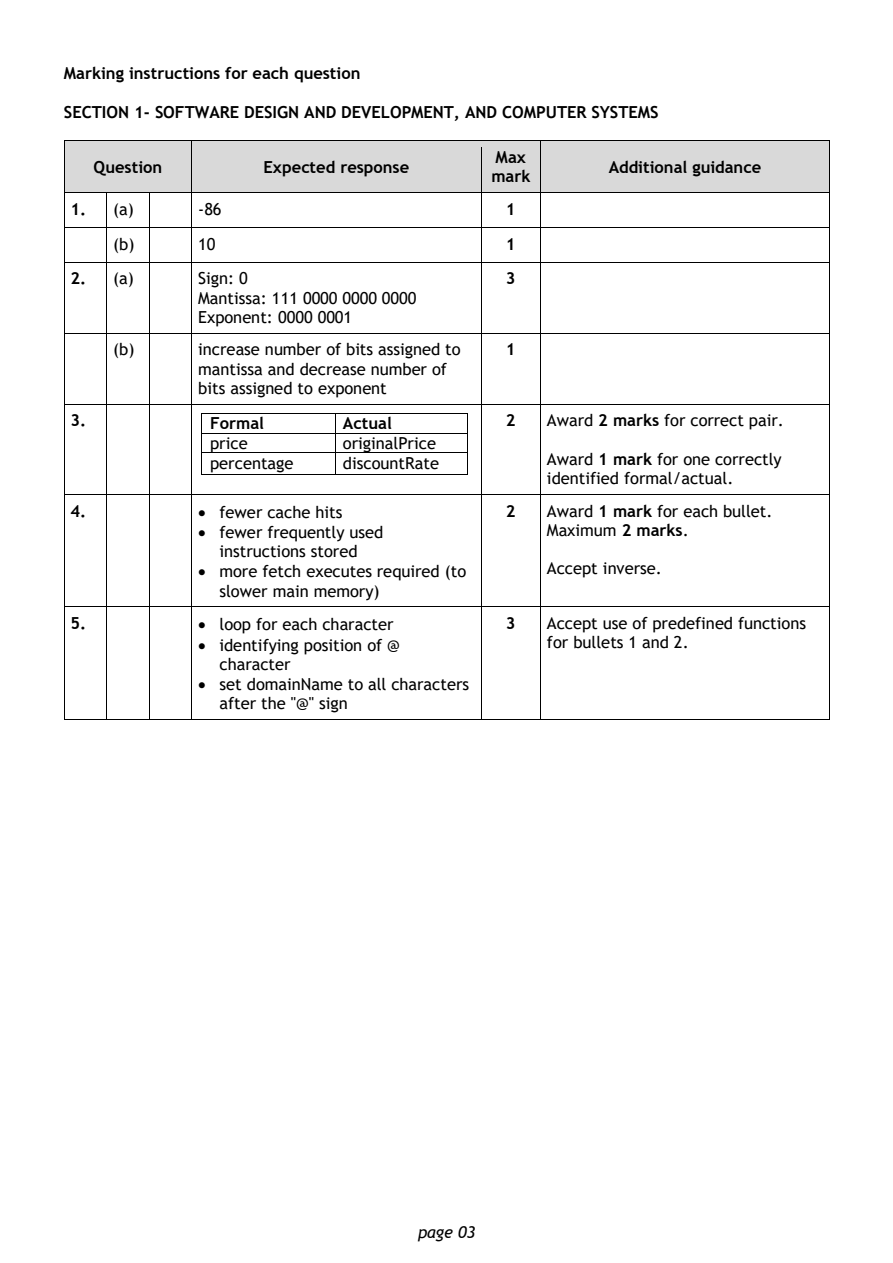
Selectable page text
Marking instructions for each question

SECTION 1- SOFTWARE DESIGN AND DEVELOPMENT, AND COMPUTER SYSTEMS

                                        Max
   Question       Expected response               Additional guidance
                                       mark
1.  (a)     -86                          1
    (b)     10                           1

2.  (a)     Sign: 0                      3
            Mantissa: 111 0000 0000 0000
            Exponent: 0000 0001

    (b)     increase number of bits assigned to 1
            mantissa and decrease number of
            bits assigned to exponent
3.           Formal       Actual         2  Award 2 marks for correct pair.
             price        originalPrice
             percentage   discountRate      Award 1 mark for one correctly
                                            identified formal/actual.

4.          • fewer cache hits           2  Award 1 mark for each bullet.
            • fewer frequently used         Maximum 2 marks.
              instructions stored
            • more fetch executes required (to Accept inverse.
              slower main memory)

5.          • loop for each character    3  Accept use of predefined functions
            • identifying position of @     for bullets 1 and 2.
              character
            • set domainName to all characters
              after the "@" sign

                                page 03
PDF page 4
Question 6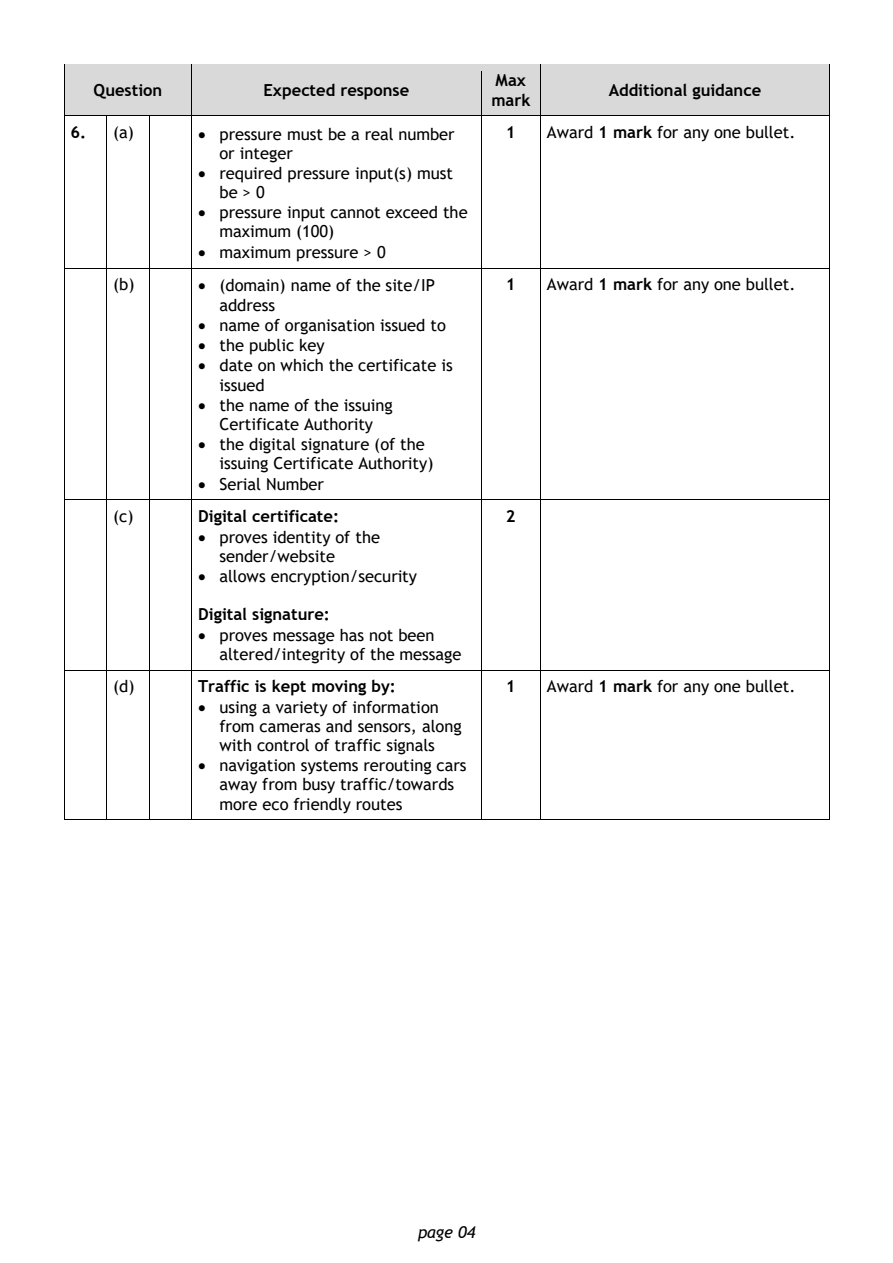
Selectable page text
Max
   Question       Expected response               Additional guidance
                                       mark
6.  (a)     • pressure must be a real number 1 Award 1 mark for any one bullet.
              or integer
            • required pressure input(s) must
              be > 0
            • pressure input cannot exceed the
              maximum (100)
            • maximum pressure > 0
    (b)     • (domain) name of the site/IP 1 Award 1 mark for any one bullet.
              address
            • name of organisation issued to
            • the public key
            • date on which the certificate is
              issued
            • the name of the issuing
              Certificate Authority
            • the digital signature (of the
              issuing Certificate Authority)
            • Serial Number

    (c)     Digital certificate:         2
            • proves identity of the
              sender/website
            • allows encryption/security

            Digital signature:
            • proves message has not been
              altered/integrity of the message

    (d)     Traffic is kept moving by:   1  Award 1 mark for any one bullet.
            • using a variety of information
              from cameras and sensors, along
              with control of traffic signals
            • navigation systems rerouting cars
              away from busy traffic/towards
              more eco friendly routes

                                page 04
PDF page 5
Question 7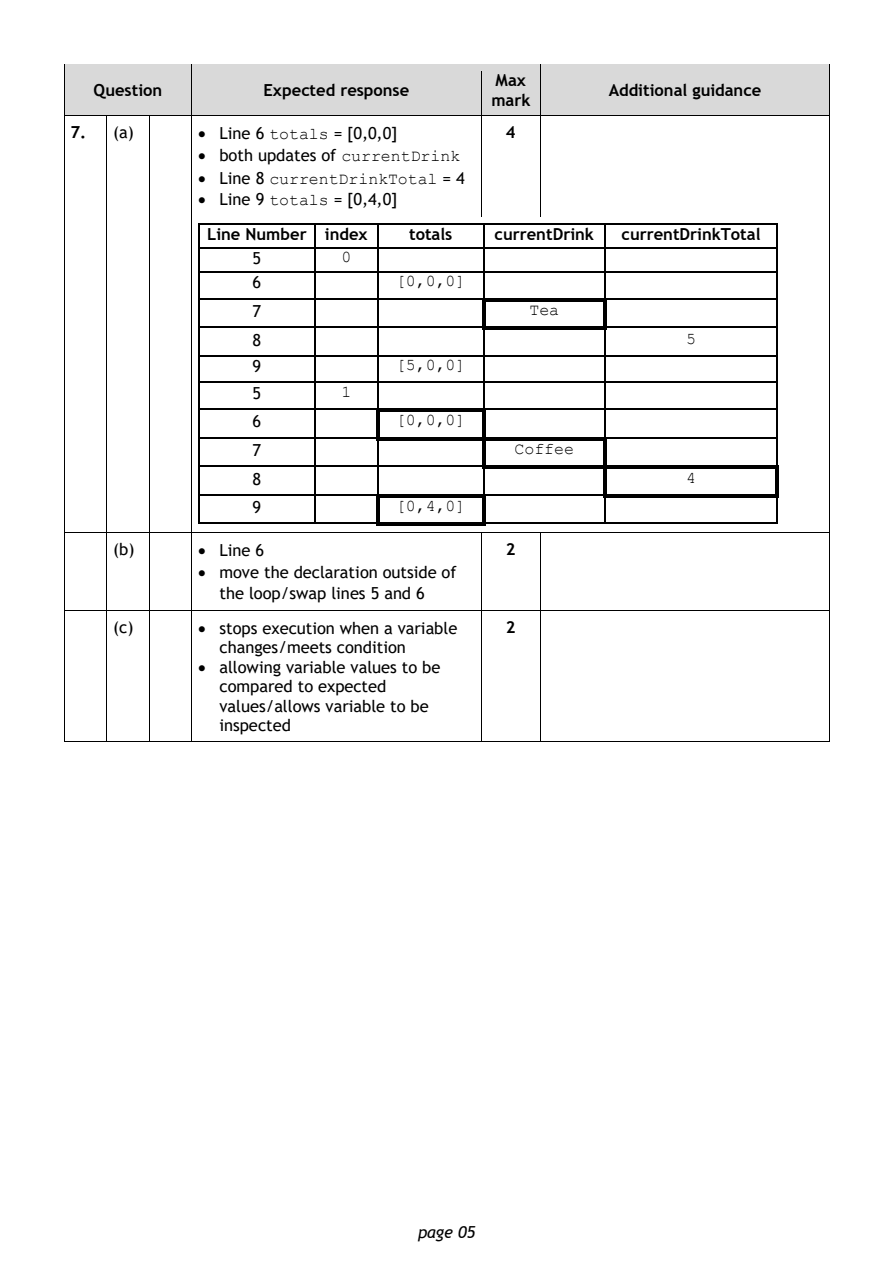
Selectable page text
Max
   Question       Expected response               Additional guidance
                                       mark
7.  (a)     • Line 6 totals = [0,0,0]    4
            • both updates of currentDrink
            • Line 8 currentDrinkTotal = 4
            • Line 9 totals = [0,4,0]

             Line Number index  totals currentDrink currentDrinkTotal
                 5       0
                 6            [0,0,0]

                 7                         Tea
                 8                                       5
                 9            [5,0,0]

                 5       1
                 6            [0,0,0]

                 7                       Coffee
                 8                                       4

                 9            [0,4,0]

    (b)     • Line 6                     2
            • move the declaration outside of
              the loop/swap lines 5 and 6

    (c)     • stops execution when a variable 2
              changes/meets condition
            • allowing variable values to be
              compared to expected
              values/allows variable to be
              inspected

                                page 05
PDF page 6
Question 8Question 9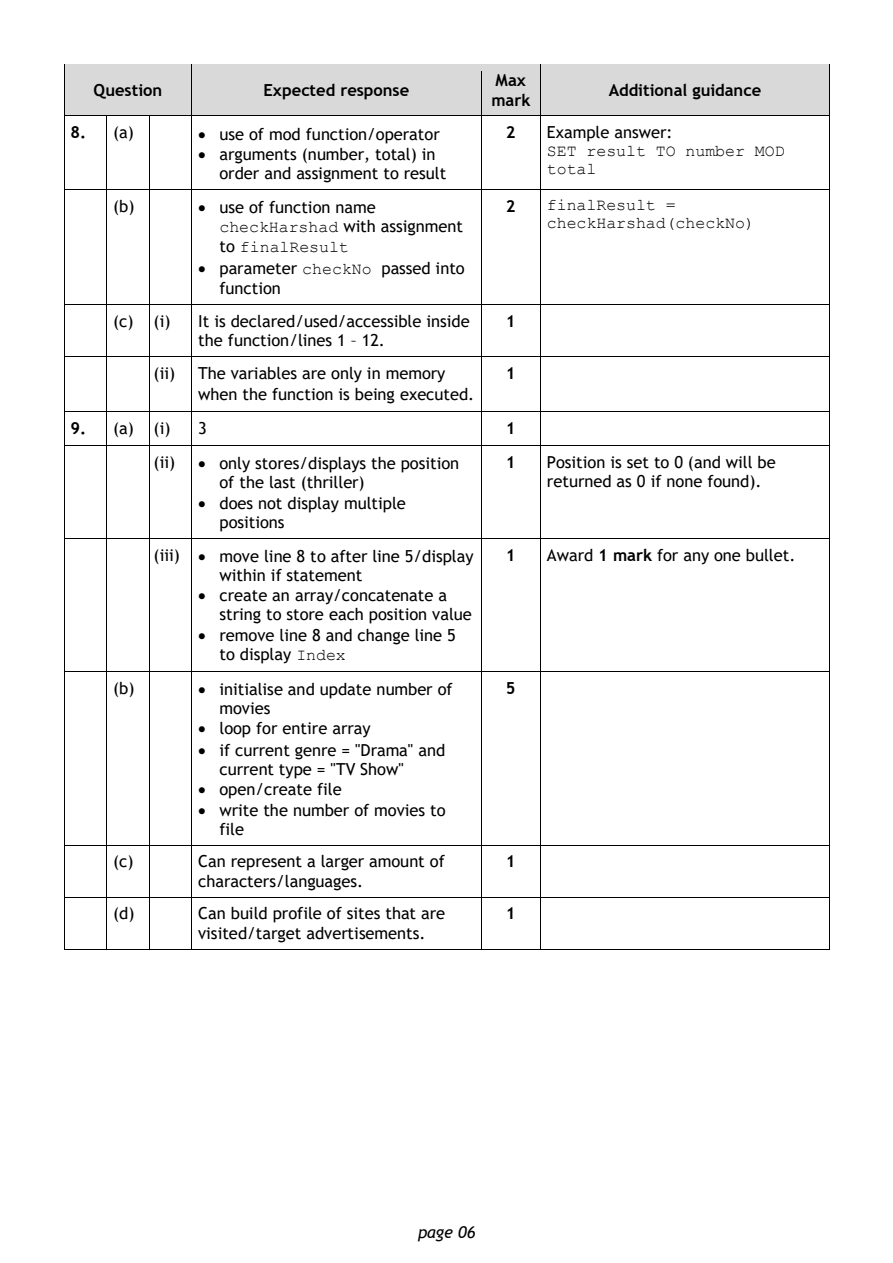
Selectable page text
Max
   Question       Expected response               Additional guidance
                                       mark
8.  (a)     • use of mod function/operator 2 Example answer:
            • arguments (number, total) in  SET result TO number MOD
                                            total
              order and assignment to result
    (b)     • use of function name       2  finalResult =
              checkHarshad with assignment  checkHarshad(checkNo)
              to finalResult
            • parameter checkNo passed into
              function
    (c) (i) It is declared/used/accessible inside 1
            the function/lines 1 – 12.

        (ii) The variables are only in memory 1
            when the function is being executed.

9.  (a) (i) 3                            1
        (ii) • only stores/displays the position 1 Position is set to 0 (and will be
              of the last (thriller)        returned as 0 if none found).
            • does not display multiple
              positions

        (iii) • move line 8 to after line 5/display 1 Award 1 mark for any one bullet.
              within if statement
            • create an array/concatenate a
              string to store each position value
            • remove line 8 and change line 5
              to display Index

    (b)     • initialise and update number of 5
              movies
            • loop for entire array
            • if current genre = "Drama" and
              current type = "TV Show"
            • open/create file
            • write the number of movies to
              file

    (c)     Can represent a larger amount of 1
            characters/languages.
    (d)     Can build profile of sites that are 1
            visited/target advertisements.

                                page 06
PDF page 7
Question 10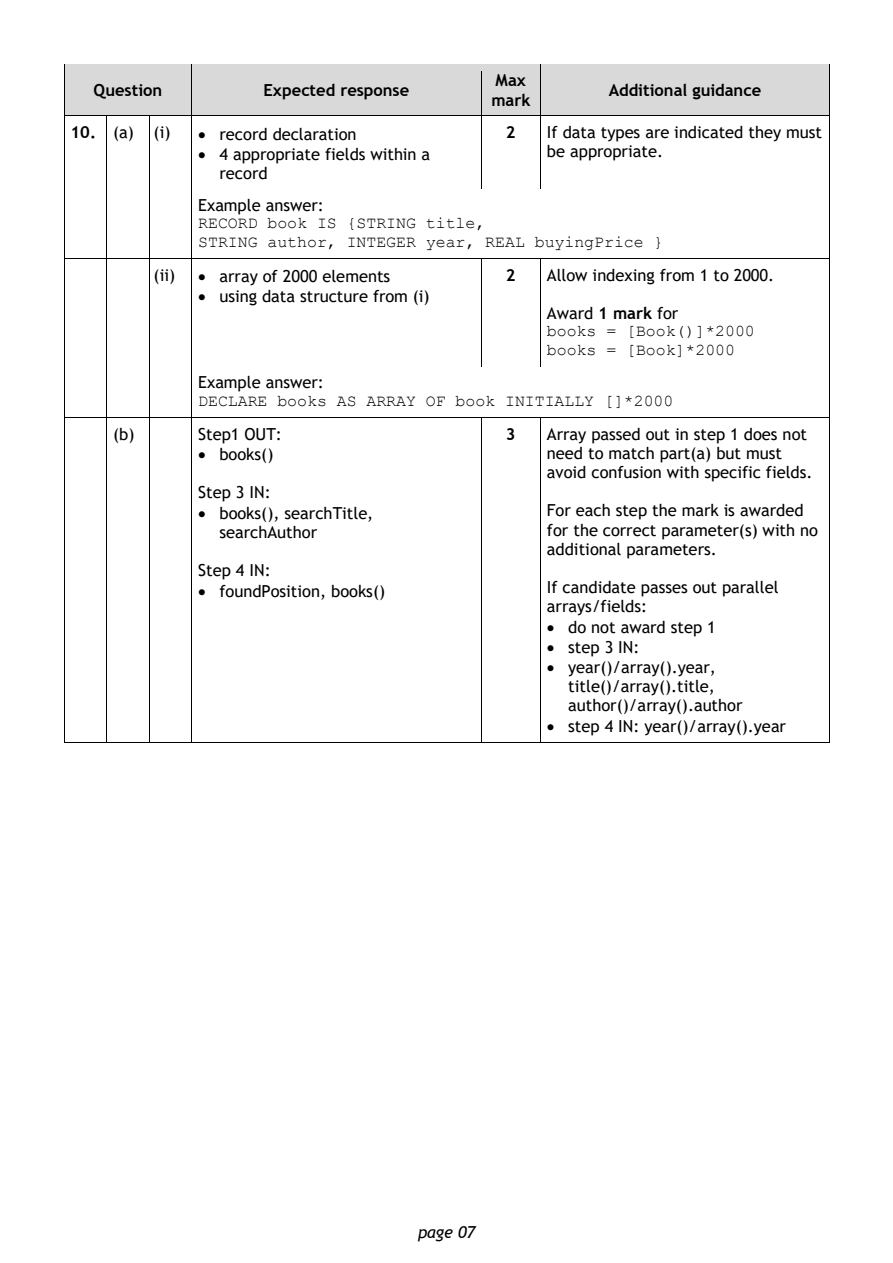
Selectable page text
Max
   Question       Expected response               Additional guidance
                                       mark
10. (a) (i) • record declaration         2  If data types are indicated they must
            • 4 appropriate fields within a be appropriate.
              record
            Example answer:
            RECORD book IS {STRING title,
            STRING author, INTEGER year, REAL buyingPrice }

        (ii) • array of 2000 elements    2  Allow indexing from 1 to 2000.
            • using data structure from (i)
                                            Award 1 mark for
                                            books = [Book()]*2000
                                            books = [Book]*2000
            Example answer:
            DECLARE books AS ARRAY OF book INITIALLY []*2000

    (b)     Step1 OUT:                   3  Array passed out in step 1 does not
            • books()                       need to match part(a) but must
                                            avoid confusion with specific fields.
            Step 3 IN:
            • books(), searchTitle,         For each step the mark is awarded
              searchAuthor                  for the correct parameter(s) with no
                                            additional parameters.
            Step 4 IN:
            • foundPosition, books()        If candidate passes out parallel
                                            arrays/fields:
                                            • do not award step 1
                                            • step 3 IN:
                                            • year()/array().year,
                                              title()/array().title,
                                              author()/array().author
                                            • step 4 IN: year()/array().year

                                page 07
PDF page 8
Selectable page text
Max
   Question        Expected response              Additional guidance
                                       mark
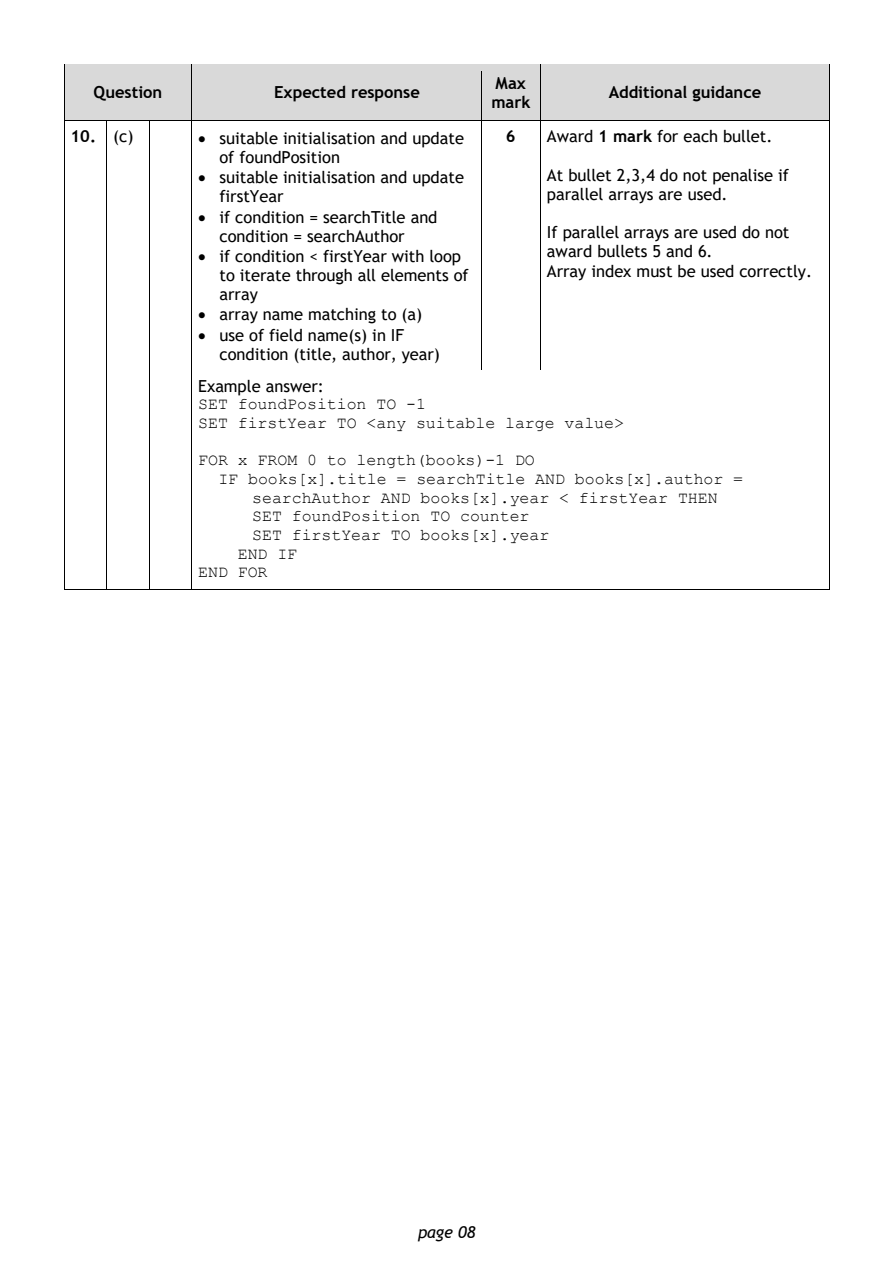
10. (c)     • suitable initialisation and update 6 Award 1 mark for each bullet.
              of foundPosition
            • suitable initialisation and update At bullet 2,3,4 do not penalise if
              firstYear                     parallel arrays are used.
            • if condition = searchTitle and
              condition = searchAuthor      If parallel arrays are used do not
            • if condition < firstYear with loop award bullets 5 and 6.
              to iterate through all elements of Array index must be used correctly.
              array
            • array name matching to (a)
            • use of field name(s) in IF
              condition (title, author, year)
            Example answer:
            SET foundPosition TO -1
            SET firstYear TO <any suitable large value>

            FOR x FROM 0 to length(books)-1 DO
              IF books[x].title = searchTitle AND books[x].author =
                 searchAuthor AND books[x].year < firstYear THEN
                 SET foundPosition TO counter
                 SET firstYear TO books[x].year
                END IF
            END FOR

                                page 08
PDF page 9
Question 11Question 12Question 13Question 14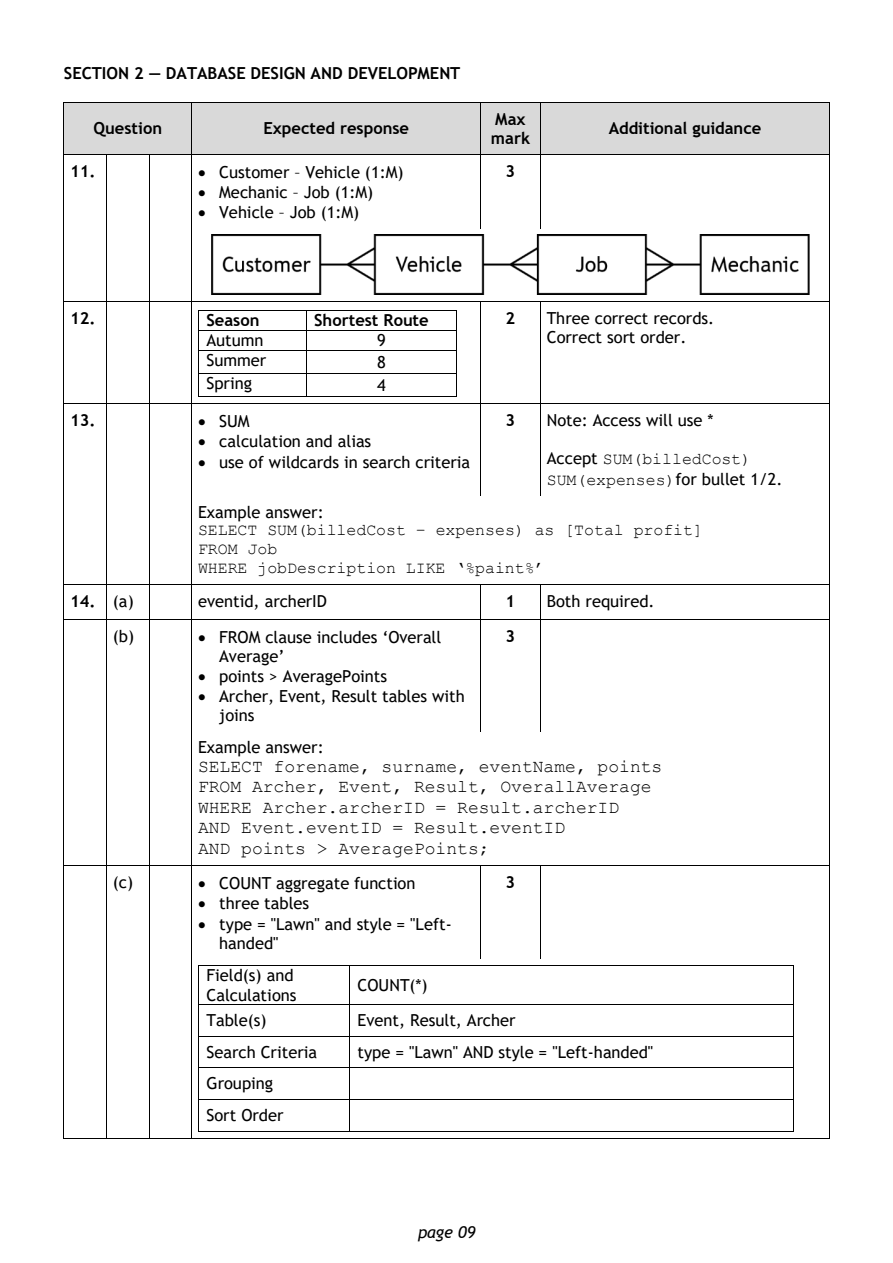
Selectable page text
SECTION 2 — DATABASE DESIGN AND DEVELOPMENT

                                        Max
   Question       Expected response               Additional guidance
                                       mark
11.         • Customer – Vehicle (1:M)  3
            • Mechanic – Job (1:M)
            • Vehicle – Job (1:M)

12.          Season    Shortest Route   2   Three correct records.
             Autumn          9              Correct sort order.
             Summer          8
             Spring          4

13.         • SUM                       3   Note: Access will use *
            • calculation and alias
            • use of wildcards in search criteria Accept SUM(billedCost)
                                            SUM(expenses)for bullet 1/2.

            Example answer:
            SELECT SUM(billedCost – expenses) as [Total profit]
            FROM Job
            WHERE jobDescription LIKE ‘%paint%’
14. (a)     eventid, archerID           1   Both required.

    (b)     • FROM clause includes ‘Overall 3
              Average’
            • points > AveragePoints
            • Archer, Event, Result tables with
              joins

            Example answer:
            SELECT forename, surname, eventName, points
            FROM Archer, Event, Result, OverallAverage
            WHERE Archer.archerID = Result.archerID
            AND Event.eventID = Result.eventID
            AND points > AveragePoints;

    (c)     • COUNT aggregate function  3
            • three tables
            • type = "Lawn" and style = "Left-
              handed"

             Field(s) and
                           COUNT(*)
             Calculations
             Table(s)      Event, Result, Archer
             Search Criteria type = "Lawn" AND style = "Left-handed"
             Grouping

             Sort Order

                                page 09
PDF page 10
Question 15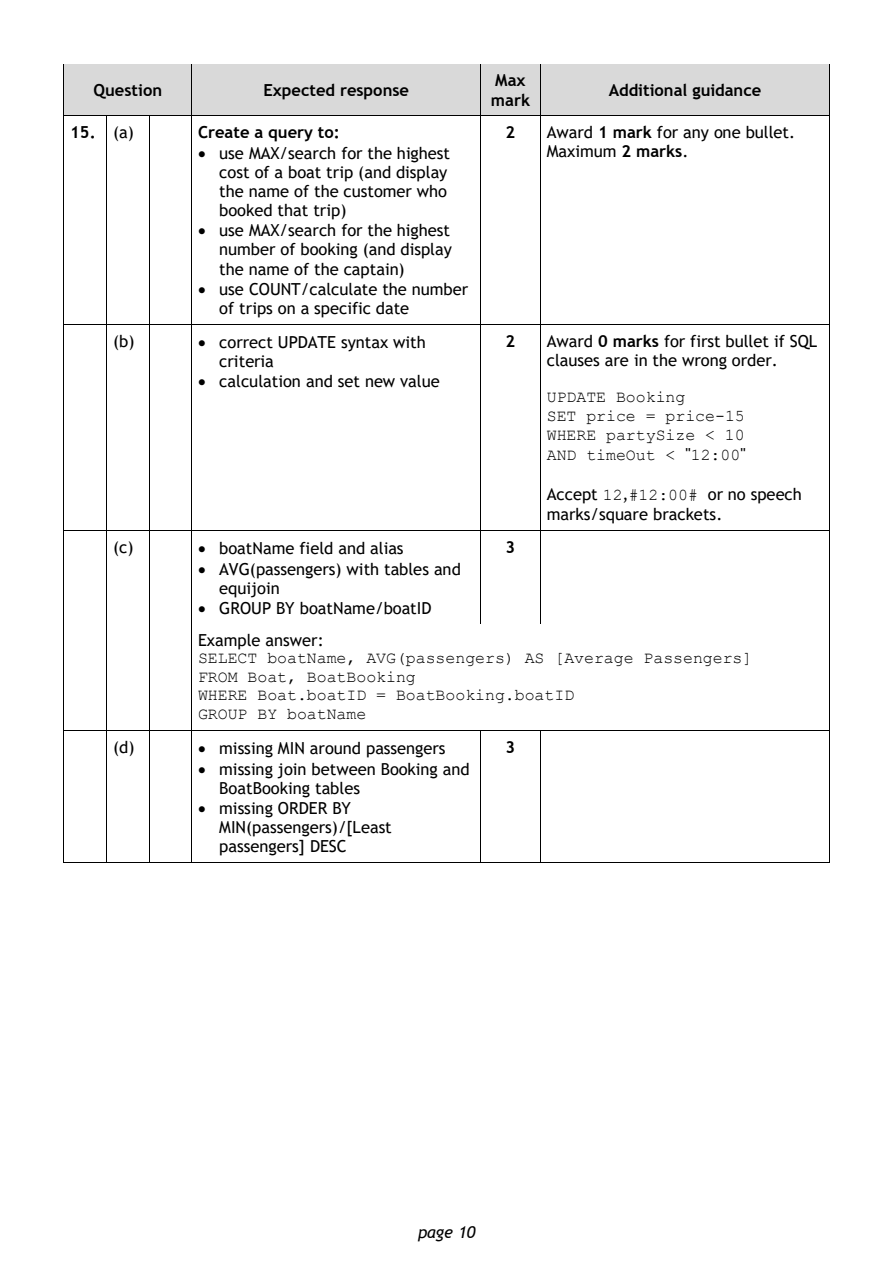
Selectable page text
Max
   Question       Expected response               Additional guidance
                                       mark
15. (a)     Create a query to:          2   Award 1 mark for any one bullet.
            • use MAX/search for the highest Maximum 2 marks.
              cost of a boat trip (and display
              the name of the customer who
              booked that trip)
            • use MAX/search for the highest
              number of booking (and display
              the name of the captain)
            • use COUNT/calculate the number
              of trips on a specific date
    (b)     • correct UPDATE syntax with 2  Award 0 marks for first bullet if SQL
              criteria                      clauses are in the wrong order.
            • calculation and set new value
                                            UPDATE Booking
                                            SET price = price-15
                                            WHERE partySize < 10
                                            AND timeOut < "12:00"

                                            Accept 12,#12:00# or no speech
                                            marks/square brackets.

    (c)     • boatName field and alias  3
            • AVG(passengers) with tables and
              equijoin
            • GROUP BY boatName/boatID
            Example answer:
            SELECT boatName, AVG(passengers) AS [Average Passengers]
            FROM Boat, BoatBooking
            WHERE Boat.boatID = BoatBooking.boatID
            GROUP BY boatName

    (d)     • missing MIN around passengers 3
            • missing join between Booking and
              BoatBooking tables
            • missing ORDER BY
              MIN(passengers)/[Least
              passengers] DESC

                                page 10
PDF page 11
Question 16Question 17Question 18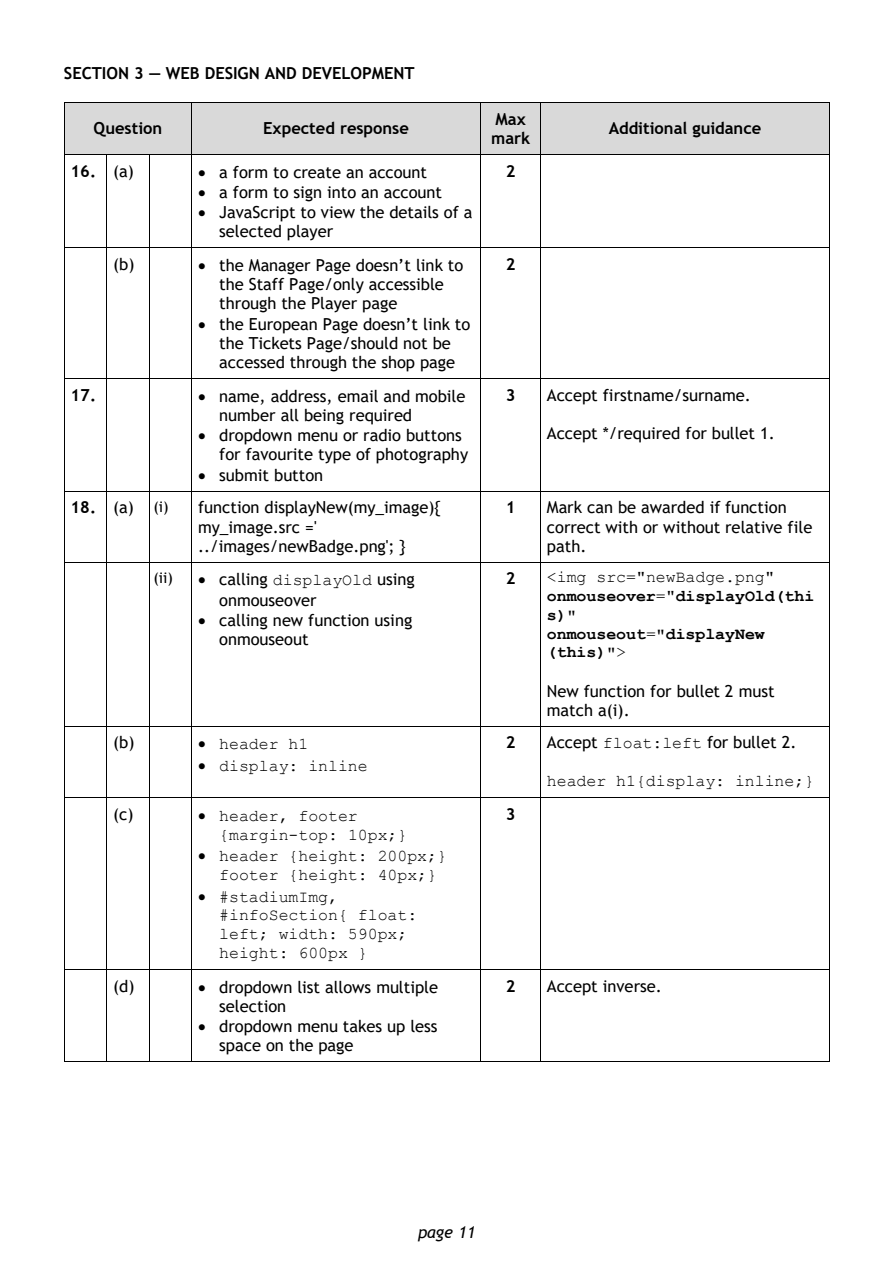
Selectable page text
SECTION 3 — WEB DESIGN AND DEVELOPMENT

                                        Max
   Question       Expected response               Additional guidance
                                       mark
16. (a)     • a form to create an account 2
            • a form to sign into an account
            • JavaScript to view the details of a
              selected player
    (b)     • the Manager Page doesn’t link to 2
              the Staff Page/only accessible
              through the Player page
            • the European Page doesn’t link to
              the Tickets Page/should not be
              accessed through the shop page

17.         • name, address, email and mobile 3 Accept firstname/surname.
              number all being required
            • dropdown menu or radio buttons Accept */required for bullet 1.
              for favourite type of photography
            • submit button

18. (a) (i) function displayNew(my_image){ 1 Mark can be awarded if function
            my_image.src ='                 correct with or without relative file
            ../images/newBadge.png'; }      path.
        (ii) • calling displayOld using  2  <img src="newBadge.png"
                                            onmouseover="displayOld(thi
              onmouseover
                                            s)"
            • calling new function using
                                            onmouseout="displayNew
              onmouseout
                                            (this)">
                                            New function for bullet 2 must
                                            match a(i).
    (b)     • header h1                  2  Accept float:left for bullet 2.
            • display: inline
                                            header h1{display: inline;}
    (c)     • header, footer             3
              {margin-top: 10px;}
            • header {height: 200px;}
              footer {height: 40px;}
            • #stadiumImg,
              #infoSection{ float:
              left; width: 590px;
              height: 600px }
    (d)     • dropdown list allows multiple 2 Accept inverse.
              selection
            • dropdown menu takes up less
              space on the page

                                page 11
PDF page 12
Question 19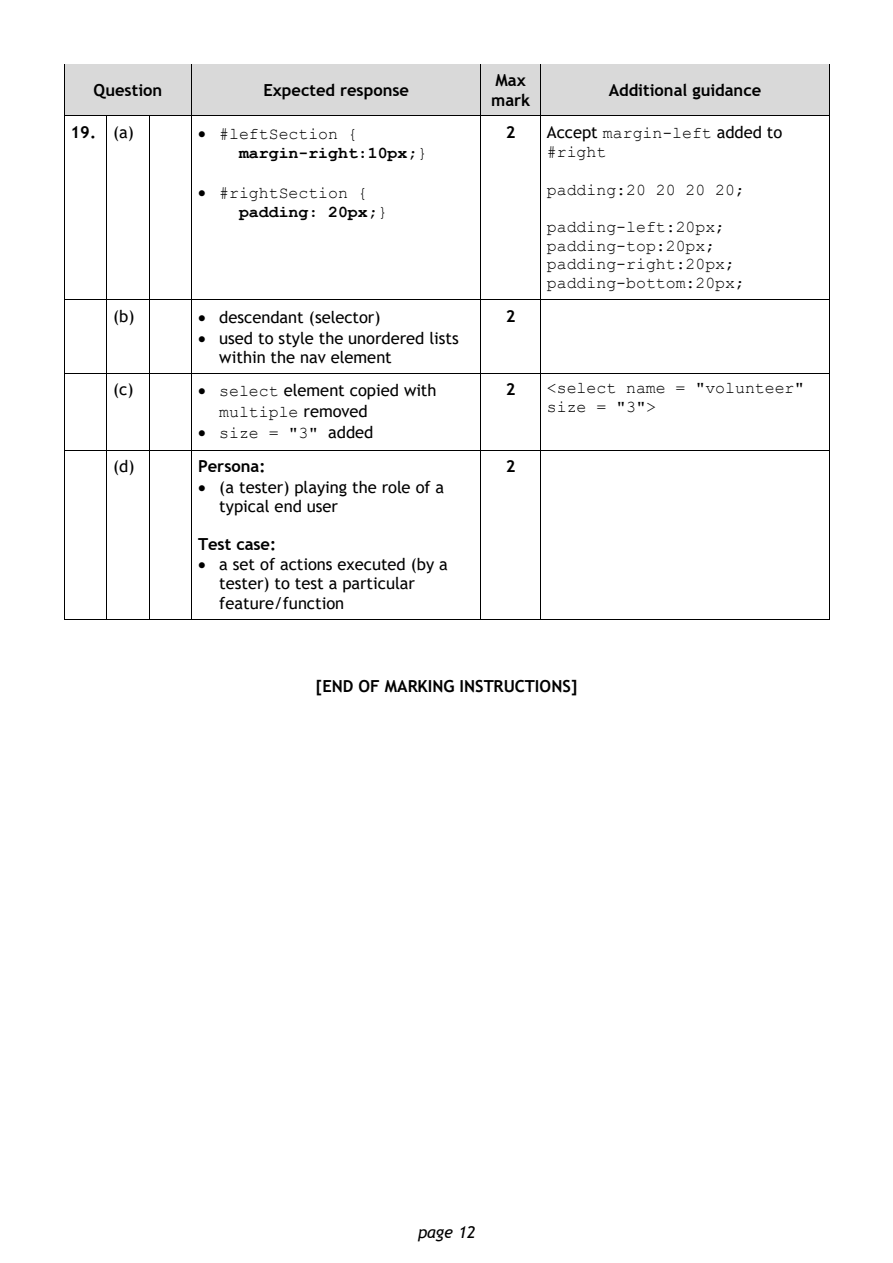
Selectable page text
Max
   Question       Expected response               Additional guidance
                                       mark
19. (a)     • #leftSection {             2  Accept margin-left added to
                margin-right:10px;}         #right
            • #rightSection {               padding:20 20 20 20;
                padding: 20px;}
                                            padding-left:20px;
                                            padding-top:20px;
                                            padding-right:20px;
                                            padding-bottom:20px;

    (b)     • descendant (selector)      2
            • used to style the unordered lists
              within the nav element

    (c)     • select element copied with 2  <select name = "volunteer"
                                            size = "3">
              multiple removed
            • size = "3" added
    (d)     Persona:                     2
            • (a tester) playing the role of a
              typical end user

            Test case:
            • a set of actions executed (by a
              tester) to test a particular
              feature/function

                       [END OF MARKING INSTRUCTIONS]

                                page 12