2025 Higher Computing Science marking instructions
Source: Scottish Qualifications Authority (SQA) / Qualifications Scotland. This is a StemInteract HTML companion, not an official HTML edition. Selectable text is supplied alongside original page images. Use the images or original PDF for equations, powers, fractions, vector notation, tables and diagrams; text extraction cannot fully preserve mathematical layout.
Jump to a question
PDF page 1

Selectable page text
National
Qualifications
2025
2025 Computing Science
Higher
Question Paper Finalised Marking Instructions
Scottish Qualifications Authority 2025
These marking instructions have been prepared by examination teams for use by SQA appointed
markers when marking external course assessments.
The information in this document may be reproduced in support of SQA qualifications only on a non-
commercial basis. If it is reproduced, SQA must be clearly acknowledged as the source. If it is to be
reproduced for any other purpose, written permission must be obtained from permissions@sqa.org.uk.
©PDF page 2
Selectable page text
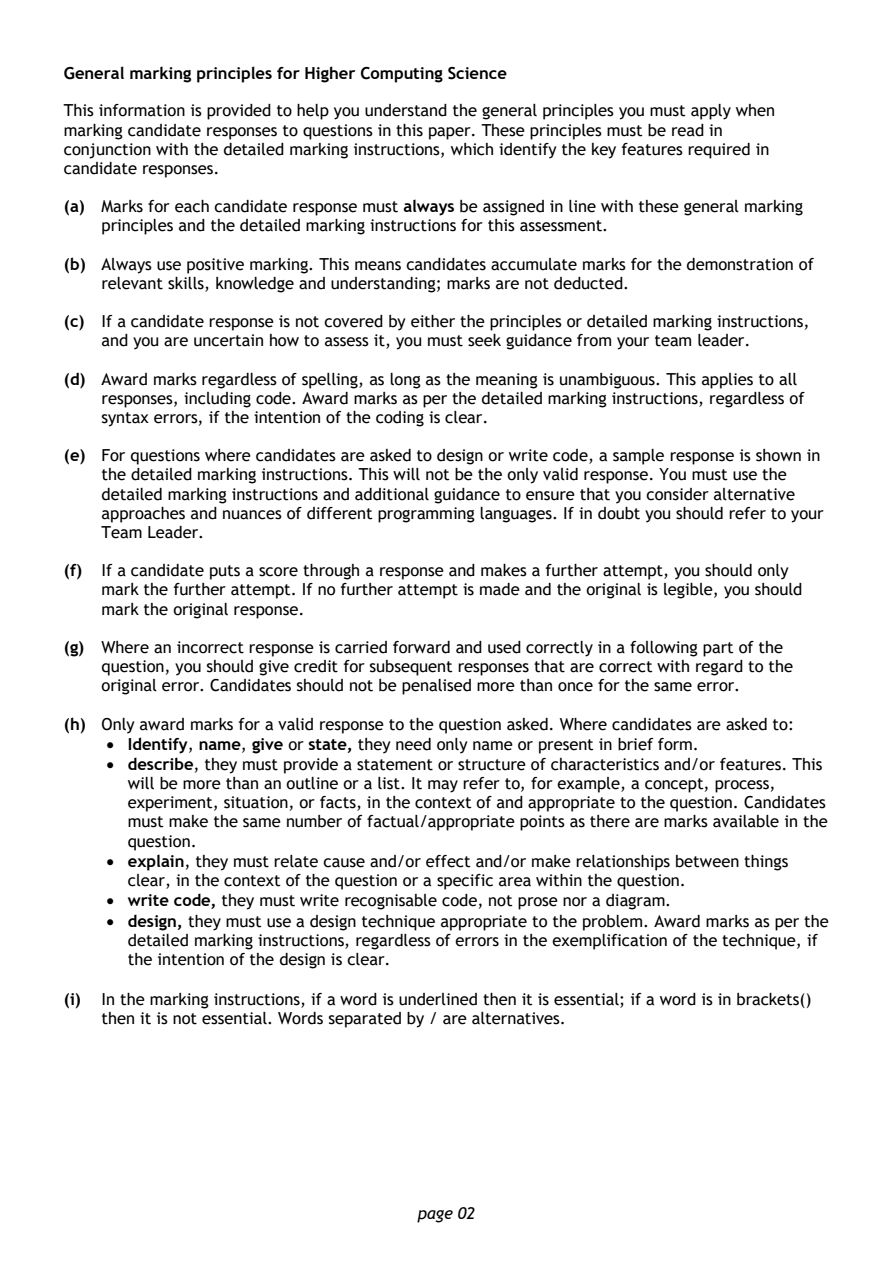
General marking principles for Higher Computing Science

This information is provided to help you understand the general principles you must apply when
marking candidate responses to questions in this paper. These principles must be read in
conjunction with the detailed marking instructions, which identify the key features required in
candidate responses.

(a) Marks for each candidate response must always be assigned in line with these general marking
   principles and the detailed marking instructions for this assessment.

(b) Always use positive marking. This means candidates accumulate marks for the demonstration of
   relevant skills, knowledge and understanding; marks are not deducted.

(c) If a candidate response is not covered by either the principles or detailed marking instructions,
   and you are uncertain how to assess it, you must seek guidance from your team leader.

(d) Award marks regardless of spelling, as long as the meaning is unambiguous. This applies to all
   responses, including code. Award marks as per the detailed marking instructions, regardless of
   syntax errors, if the intention of the coding is clear.

(e) For questions where candidates are asked to design or write code, a sample response is shown in
   the detailed marking instructions. This will not be the only valid response. You must use the
   detailed marking instructions and additional guidance to ensure that you consider alternative
   approaches and nuances of different programming languages. If in doubt you should refer to your
   Team Leader.

(f) If a candidate puts a score through a response and makes a further attempt, you should only
   mark the further attempt. If no further attempt is made and the original is legible, you should
   mark the original response.

(g) Where an incorrect response is carried forward and used correctly in a following part of the
   question, you should give credit for subsequent responses that are correct with regard to the
   original error. Candidates should not be penalised more than once for the same error.

(h) Only award marks for a valid response to the question asked. Where candidates are asked to:
    • Identify, name, give or state, they need only name or present in brief form.
    • describe, they must provide a statement or structure of characteristics and/or features. This
      will be more than an outline or a list. It may refer to, for example, a concept, process,
      experiment, situation, or facts, in the context of and appropriate to the question. Candidates
      must make the same number of factual/appropriate points as there are marks available in the
      question.
    • explain, they must relate cause and/or effect and/or make relationships between things
      clear, in the context of the question or a specific area within the question.
    • write code, they must write recognisable code, not prose nor a diagram.
    • design, they must use a design technique appropriate to the problem. Award marks as per the
      detailed marking instructions, regardless of errors in the exemplification of the technique, if
      the intention of the design is clear.

(i) In the marking instructions, if a word is underlined then it is essential; if a word is in brackets()
   then it is not essential. Words separated by / are alternatives.

                                page 02
PDF page 3
Question 1Question 2Question 3Question 4Question 5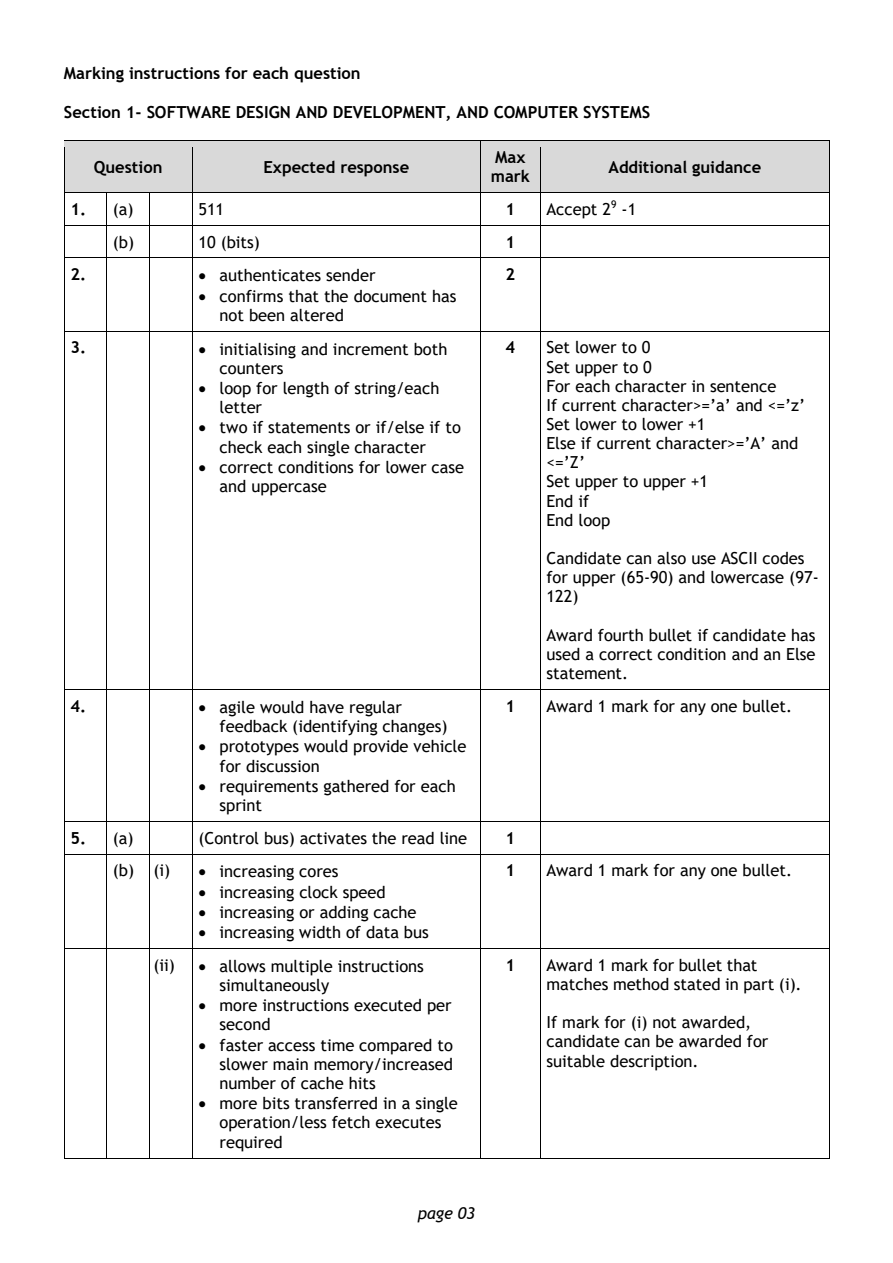
Selectable page text
Marking instructions for each question

Section 1- SOFTWARE DESIGN AND DEVELOPMENT, AND COMPUTER SYSTEMS

                                        Max
   Question       Expected response               Additional guidance
                                       mark
1.  (a)     511                         1   Accept 29 -1
    (b)     10 (bits)                   1

2.          • authenticates sender      2
            • confirms that the document has
              not been altered

3.          • initialising and increment both 4 Set lower to 0
              counters                      Set upper to 0
            • loop for length of string/each For each character in sentence
              letter                        If current character>=’a’ and <=’z’
            • two if statements or if/else if to Set lower to lower +1
              check each single character   Else if current character>=’A’ and
            • correct conditions for lower case <=’Z’
              and uppercase                 Set upper to upper +1
                                            End if
                                            End loop
                                            Candidate can also use ASCII codes
                                            for upper (65-90) and lowercase (97-
                                            122)

                                            Award fourth bullet if candidate has
                                            used a correct condition and an Else
                                            statement.

4.          • agile would have regular  1   Award 1 mark for any one bullet.
              feedback (identifying changes)
            • prototypes would provide vehicle
              for discussion
            • requirements gathered for each
              sprint

5.  (a)     (Control bus) activates the read line 1
    (b) (i) • increasing cores          1   Award 1 mark for any one bullet.
            • increasing clock speed
            • increasing or adding cache
            • increasing width of data bus

        (ii) • allows multiple instructions 1 Award 1 mark for bullet that
              simultaneously                matches method stated in part (i).
            • more instructions executed per
              second                        If mark for (i) not awarded,
            • faster access time compared to candidate can be awarded for
              slower main memory/increased  suitable description.
              number of cache hits
            • more bits transferred in a single
              operation/less fetch executes
              required

                                page 03
PDF page 4
Question 6Question 7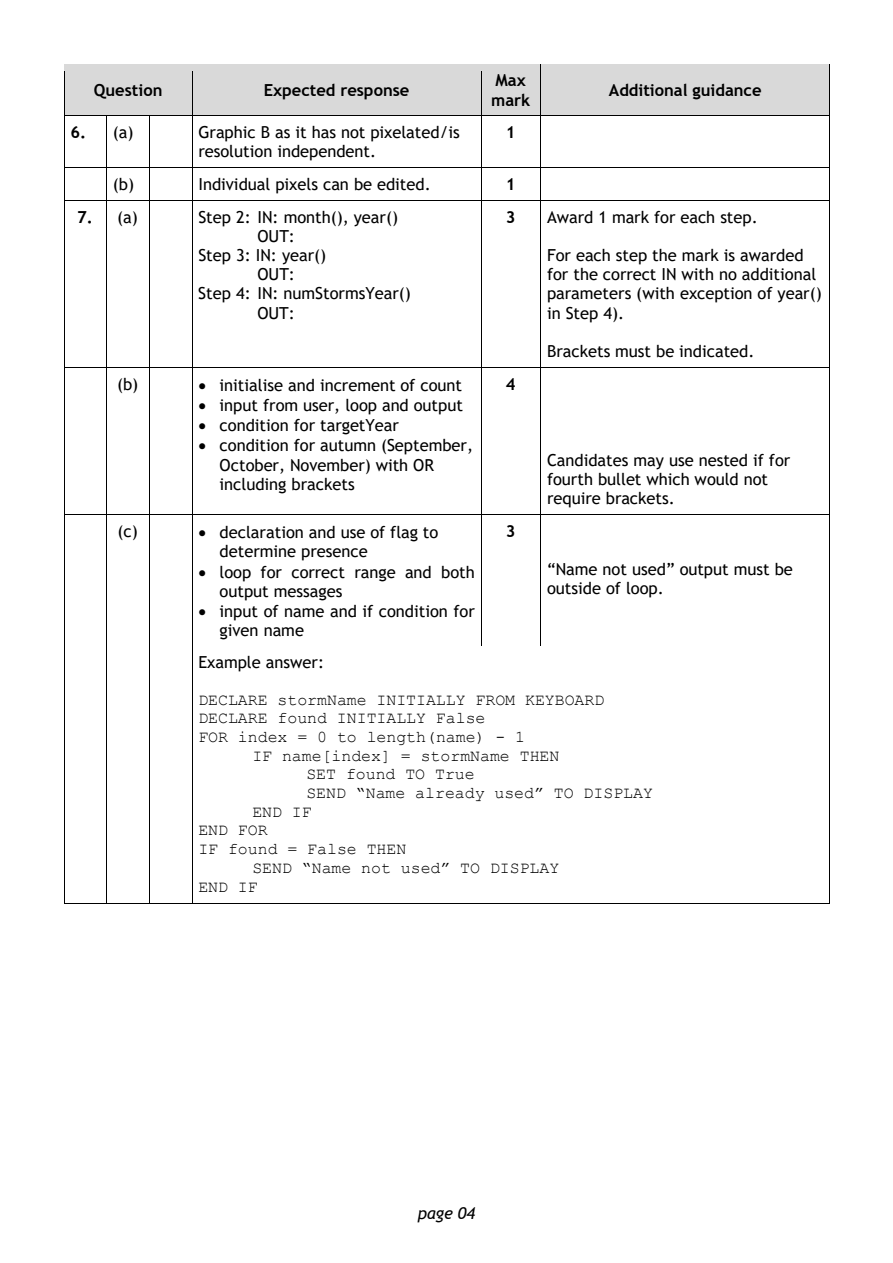
Selectable page text
Max
   Question       Expected response               Additional guidance
                                       mark
6.  (a)     Graphic B as it has not pixelated/is 1
            resolution independent.
    (b)     Individual pixels can be edited. 1

 7.  (a)    Step 2: IN: month(), year()  3  Award 1 mark for each step.
                  OUT:
            Step 3: IN: year()              For each step the mark is awarded
                  OUT:                      for the correct IN with no additional
            Step 4: IN: numStormsYear()     parameters (with exception of year()
                  OUT:                      in Step 4).

                                            Brackets must be indicated.
     (b)    • initialise and increment of count 4
            • input from user, loop and output
            • condition for targetYear
            • condition for autumn (September,

              October, November) with OR    Candidates may use nested if for
              including brackets            fourth bullet which would not
                                            require brackets.
     (c)    • declaration and use of flag to 3
              determine presence
            • loop for correct range and both “Name not used” output must be
              output messages               outside of loop.
            • input of name and if condition for
              given name

            Example answer:

            DECLARE stormName INITIALLY FROM KEYBOARD
            DECLARE found INITIALLY False
            FOR index = 0 to length(name) - 1
                 IF name[index] = stormName THEN
                      SET found TO True
                      SEND “Name already used” TO DISPLAY
                 END IF
            END FOR
            IF found = False THEN
                 SEND “Name not used” TO DISPLAY
            END IF

                                page 04
PDF page 5
Question 8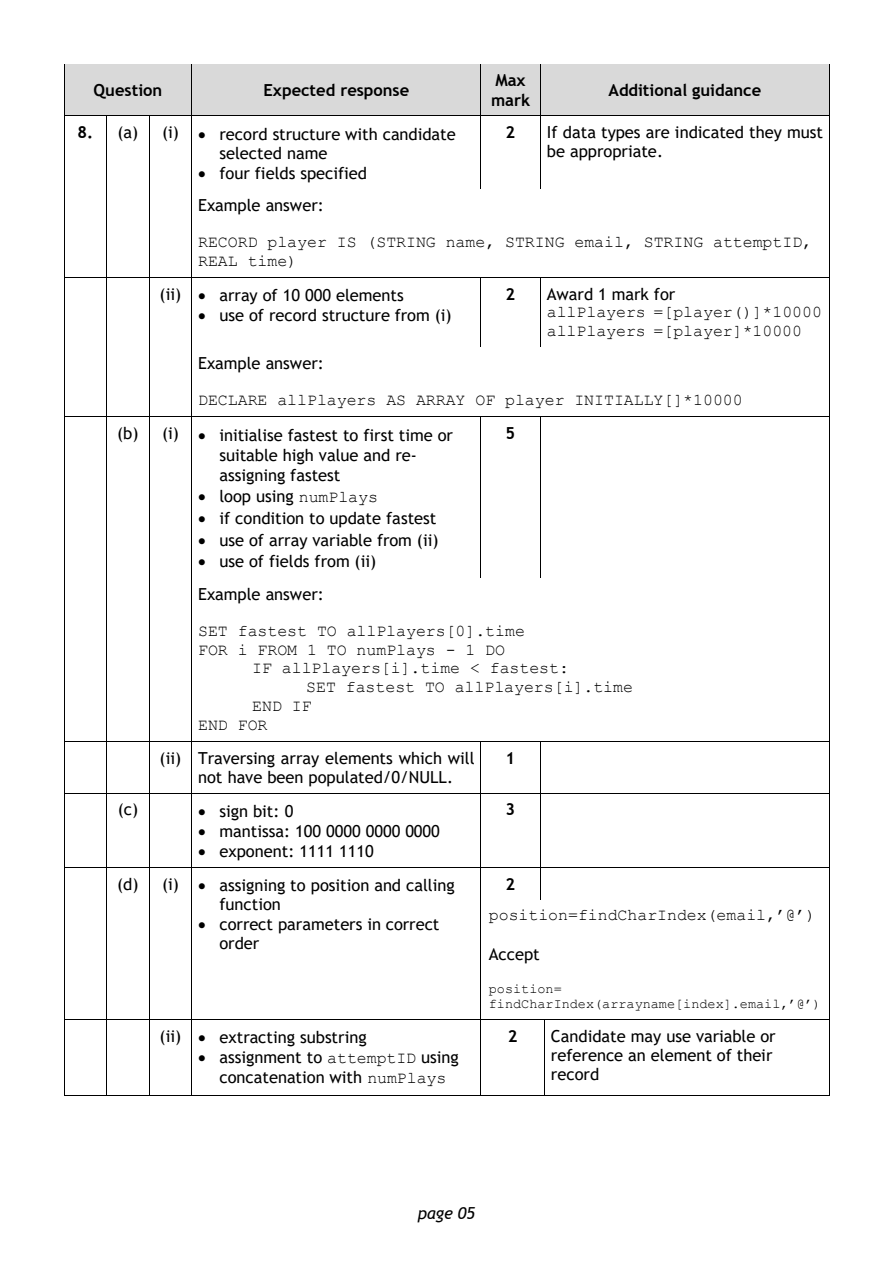
Selectable page text
Max
  Question       Expected response               Additional guidance
                                      mark
8.  (a) (i) • record structure with candidate 2 If data types are indicated they must
             selected name                 be appropriate.
           • four fields specified
           Example answer:

           RECORD player IS (STRING name, STRING email, STRING attemptID,
           REAL time)

        (ii) • array of 10 000 elements 2  Award 1 mark for
           • use of record structure from (i) allPlayers =[player()]*10000
                                           allPlayers =[player]*10000
           Example answer:

           DECLARE allPlayers AS ARRAY OF player INITIALLY[]*10000
    (b) (i) • initialise fastest to first time or 5
             suitable high value and re-
             assigning fastest
           • loop using
                    numPlays
           • if condition to update fastest
           • use of array variable from (ii)
           • use of fields from (ii)
           Example answer:

           SET fastest TO allPlayers[0].time
           FOR i FROM 1 TO numPlays - 1 DO
                IF allPlayers[i].time < fastest:
                     SET fastest TO allPlayers[i].time
                END IF
           END FOR

        (ii) Traversing array elements which will 1
           not have been populated/0/NULL.
    (c)    • sign bit: 0               3
           • mantissa: 100 0000 0000 0000
           • exponent: 1111 1110

    (d) (i) • assigning to position and calling 2
             function
           • correct parameters in correct position=findCharIndex(email,’@’)
             order
                                      Accept

                                      position=
                                      findCharIndex(arrayname[index].email,’@’)
        (ii) • extracting substring     2   Candidate may use variable or
           • assignment to      using       reference an element of their
                       attemptID
             concatenation with
                           numPlays
                                            record

                               page 05
PDF page 6
Question 9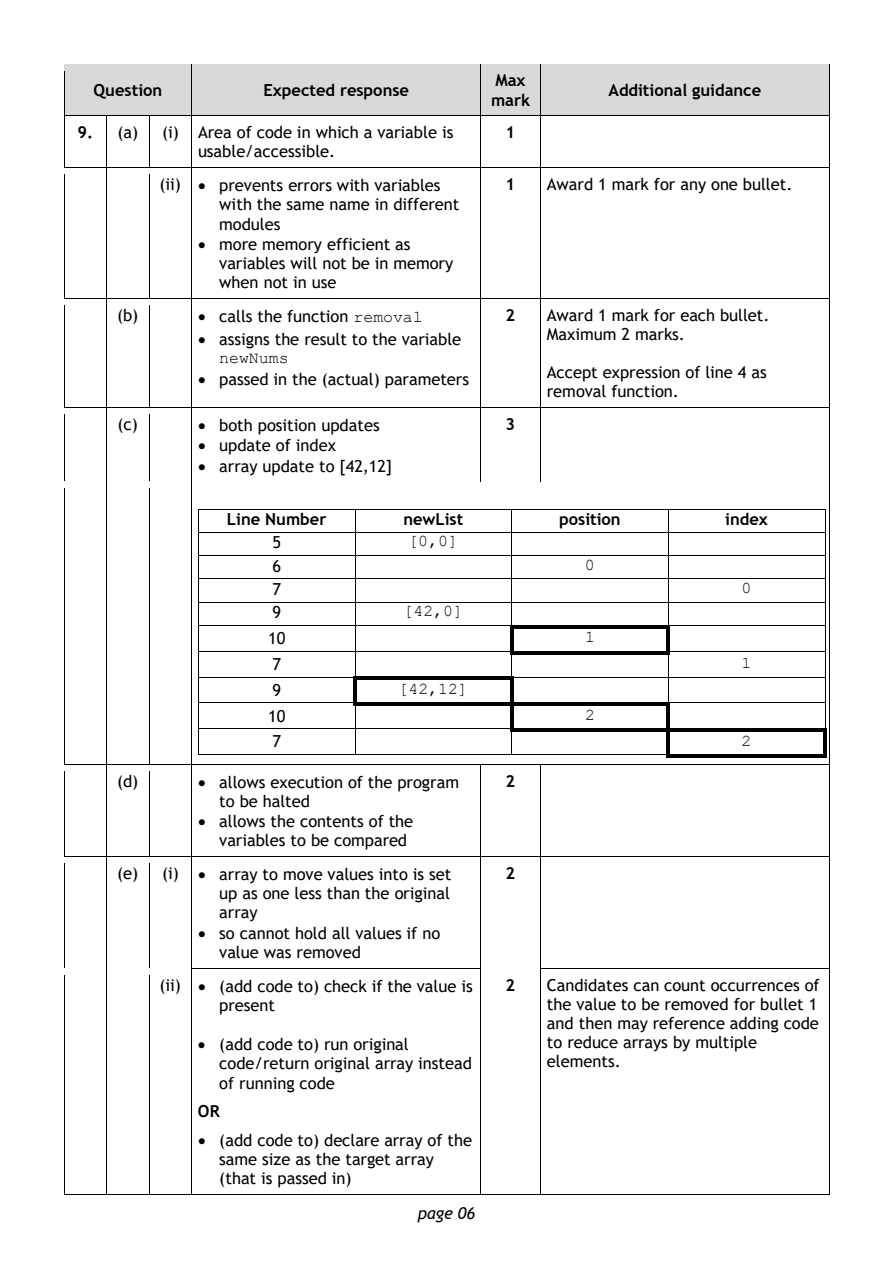
Selectable page text
Max
  Question       Expected response               Additional guidance
                                      mark
9.  (a) (i) Area of code in which a variable is 1
           usable/accessible.
        (ii) • prevents errors with variables 1 Award 1 mark for any one bullet.
             with the same name in different
             modules
           • more memory efficient as
             variables will not be in memory
             when not in use

    (b)    • calls the function        2   Award 1 mark for each bullet.
                          removal
           • assigns the result to the variable Maximum 2 marks.
             newNums
                                           Accept expression of line 4 as
           • passed in the (actual) parameters
                                           removal function.
    (c)    • both position updates     3
           • update of index
           • array update to [42,12]
              Line Number     newList       position        index
                  5
                               [0,0]
                  6
                                               0
                  7
                                                             0
                  9
                              [42,0]
                  10
                                               1
                  7
                                                             1
                  9
                              [42,12]
                  10
                                               2
                  7
                                                             2
    (d)    • allows execution of the program 2
             to be halted
           • allows the contents of the
             variables to be compared
    (e) (i) • array to move values into is set 2
             up as one less than the original
             array
           • so cannot hold all values if no
             value was removed
        (ii) • (add code to) check if the value is 2 Candidates can count occurrences of
             present                       the value to be removed for bullet 1
                                           and then may reference adding code
           • (add code to) run original    to reduce arrays by multiple
             code/return original array instead elements.
             of running code
           OR
           • (add code to) declare array of the
             same size as the target array
             (that is passed in)
                               page 06
PDF page 7
Selectable page text
Max
  Question       Expected response               Additional guidance
                                      mark
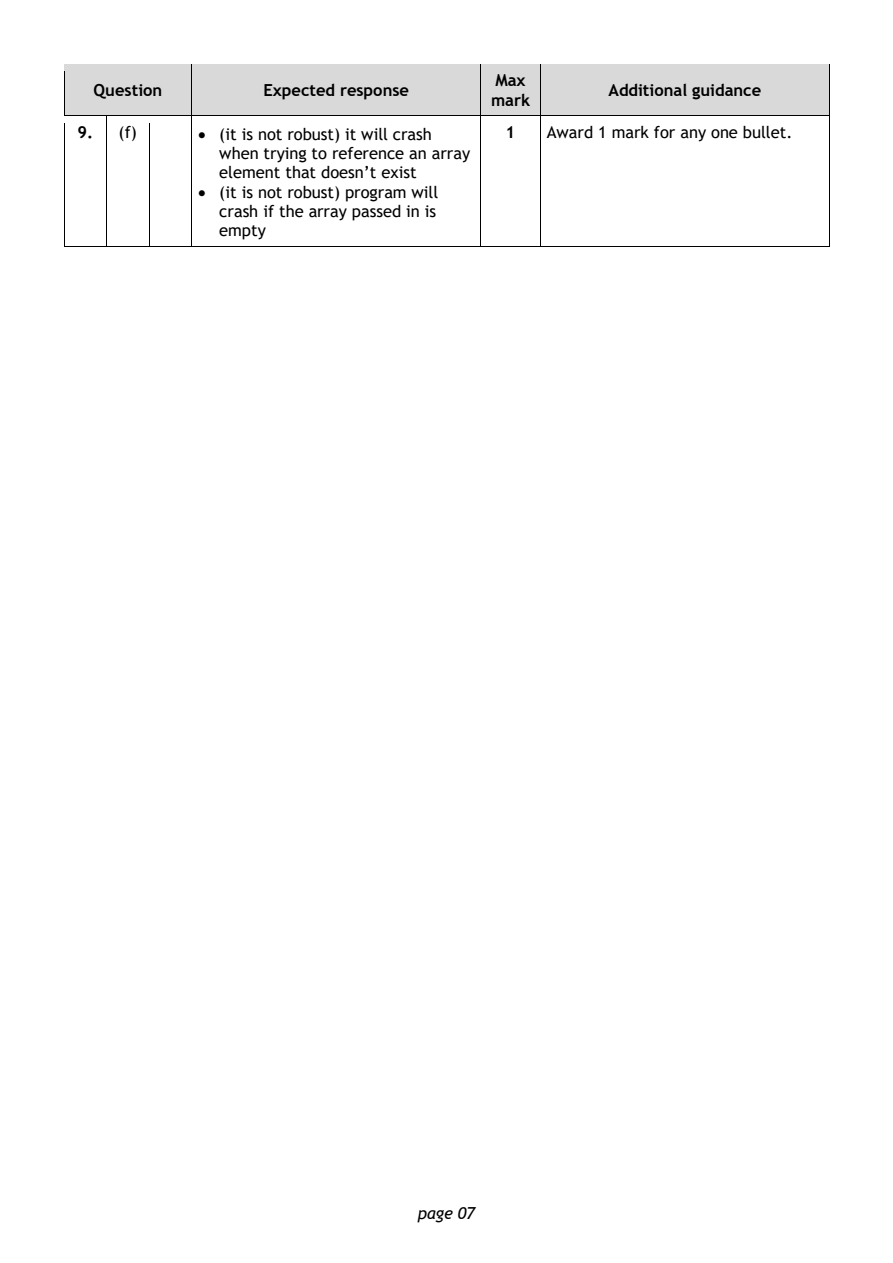
9.  (f)    • (it is not robust) it will crash 1 Award 1 mark for any one bullet.
             when trying to reference an array
             element that doesn’t exist
           • (it is not robust) program will
             crash if the array passed in is
             empty

                               page 07
PDF page 8
Question 10Question 11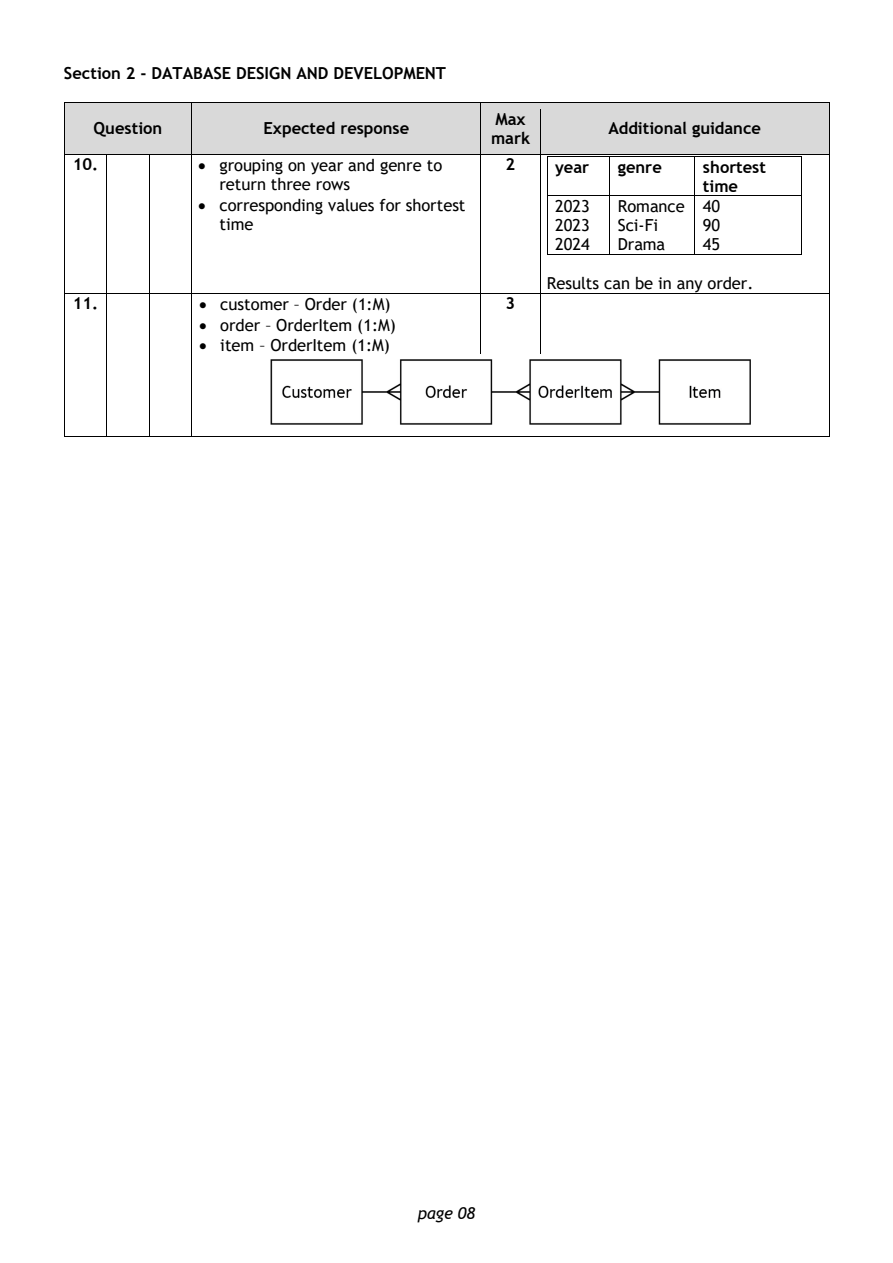
Selectable page text
Section 2 - DATABASE DESIGN AND DEVELOPMENT

                                        Max
   Question       Expected response               Additional guidance
                                       mark
 10.        • grouping on year and genre to 2 year genre   shortest
              return three rows                            time
            • corresponding values for shortest 2023 Romance 40
              time                           2023  Sci-Fi  90
                                             2024  Drama   45
                                            Results can be in any order.
 11.        • customer – Order (1:M)    3
            • order – OrderItem (1:M)
            • item – OrderItem (1:M)

                                page 08
PDF page 9
Question 12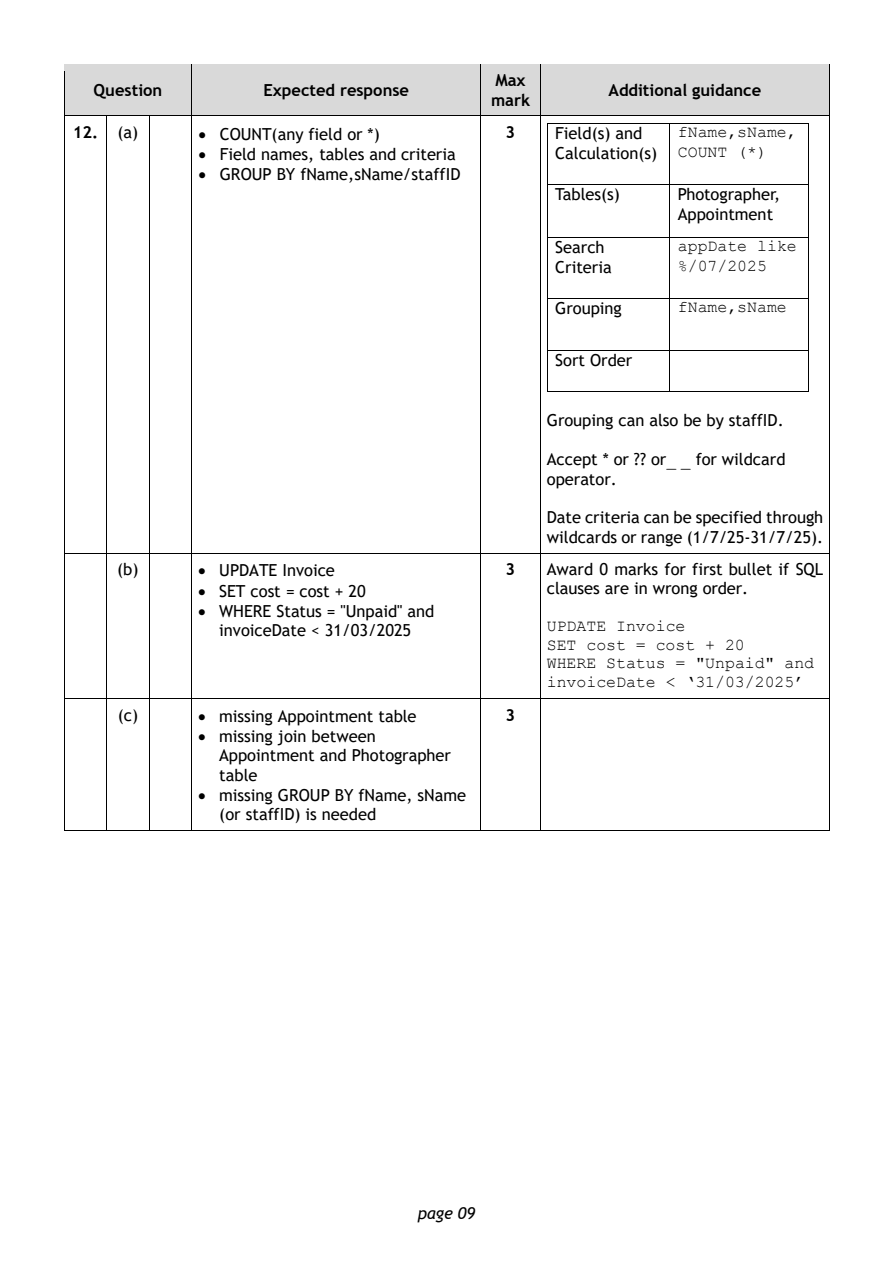
Selectable page text
Max
  Question       Expected response               Additional guidance
                                      mark
12. (a)    • COUNT(any field or *)     3    Field(s) and
                                                       fName,sName,
           • Field names, tables and criteria Calculation(s) COUNT (*)
           • GROUP BY fName,sName/staffID
                                            Tables(s)  Photographer,
                                                       Appointment
                                            Search
                                                       appDate like
                                            Criteria   %/07/2025
                                            Grouping
                                                       fName,sName
                                            Sort Order

                                           Grouping can also be by staffID.

                                           Accept * or ?? or for wildcard
                                                      _ _
                                           operator.
                                           Date criteria can be specified through
                                           wildcards or range (1/7/25-31/7/25).

    (b)    • UPDATE Invoice            3   Award 0 marks for first bullet if SQL
           • SET cost = cost + 20          clauses are in wrong order.
           • WHERE Status = "Unpaid" and
             invoiceDate < 31/03/2025      UPDATE Invoice
                                           SET cost = cost + 20
                                           WHERE Status = "Unpaid" and
                                           invoiceDate < ‘31/03/2025’
    (c)    • missing Appointment table 3
           • missing join between
             Appointment and Photographer
             table
           • missing GROUP BY fName, sName
             (or staffID) is needed

                               page 09
PDF page 10
Question 13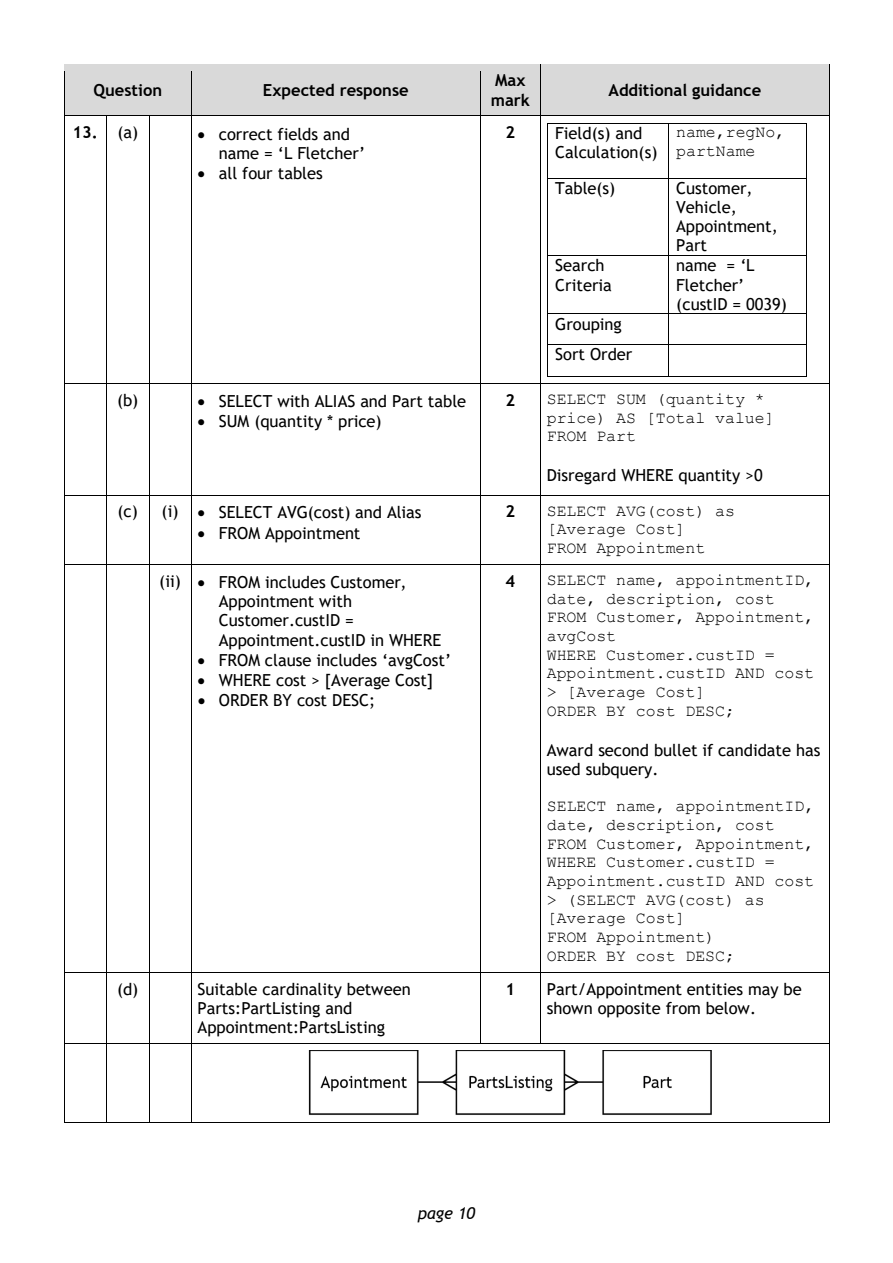
Selectable page text
Max
  Question       Expected response               Additional guidance
                                      mark
13. (a)    • correct fields and        2    Field(s) and
                                                       name,regNo,
             name = ‘L Fletcher’            Calculation(s) partName
           • all four tables
                                            Table(s)   Customer,
                                                       Vehicle,
                                                       Appointment,
                                                       Part
                                            Search     name = ‘L
                                            Criteria   Fletcher’
                                                       (custID = 0039)
                                            Grouping
                                            Sort Order
    (b)    • SELECT with ALIAS and Part table 2 SELECT SUM (quantity *
           • SUM (quantity * price)        price) AS [Total value]
                                           FROM Part

                                           Disregard WHERE quantity >0

    (c) (i) • SELECT AVG(cost) and Alias 2 SELECT AVG(cost) as
           • FROM Appointment              [Average Cost]
                                           FROM Appointment
        (ii) • FROM includes Customer, 4   SELECT name, appointmentID,

             Appointment with              date, description, cost
             Customer.custID =             FROM Customer, Appointment,
             Appointment.custID in WHERE   avgCost
           • FROM clause includes ‘avgCost’ WHERE Customer.custID =
           • WHERE cost > [Average Cost]   Appointment.custID AND cost
           • ORDER BY cost DESC;           > [Average Cost]
                                           ORDER BY cost DESC;
                                           Award second bullet if candidate has
                                           used subquery.

                                           SELECT name, appointmentID,
                                           date, description, cost
                                           FROM Customer, Appointment,
                                           WHERE Customer.custID =
                                           Appointment.custID AND cost
                                           > (SELECT AVG(cost) as
                                           [Average Cost]
                                           FROM Appointment)
                                           ORDER BY cost DESC;
    (d)    Suitable cardinality between 1  Part/Appointment entities may be
           Parts:PartListing and           shown opposite from below.
           Appointment:PartsListing

                               page 10
PDF page 11
Question 14Question 15Question 16Question 17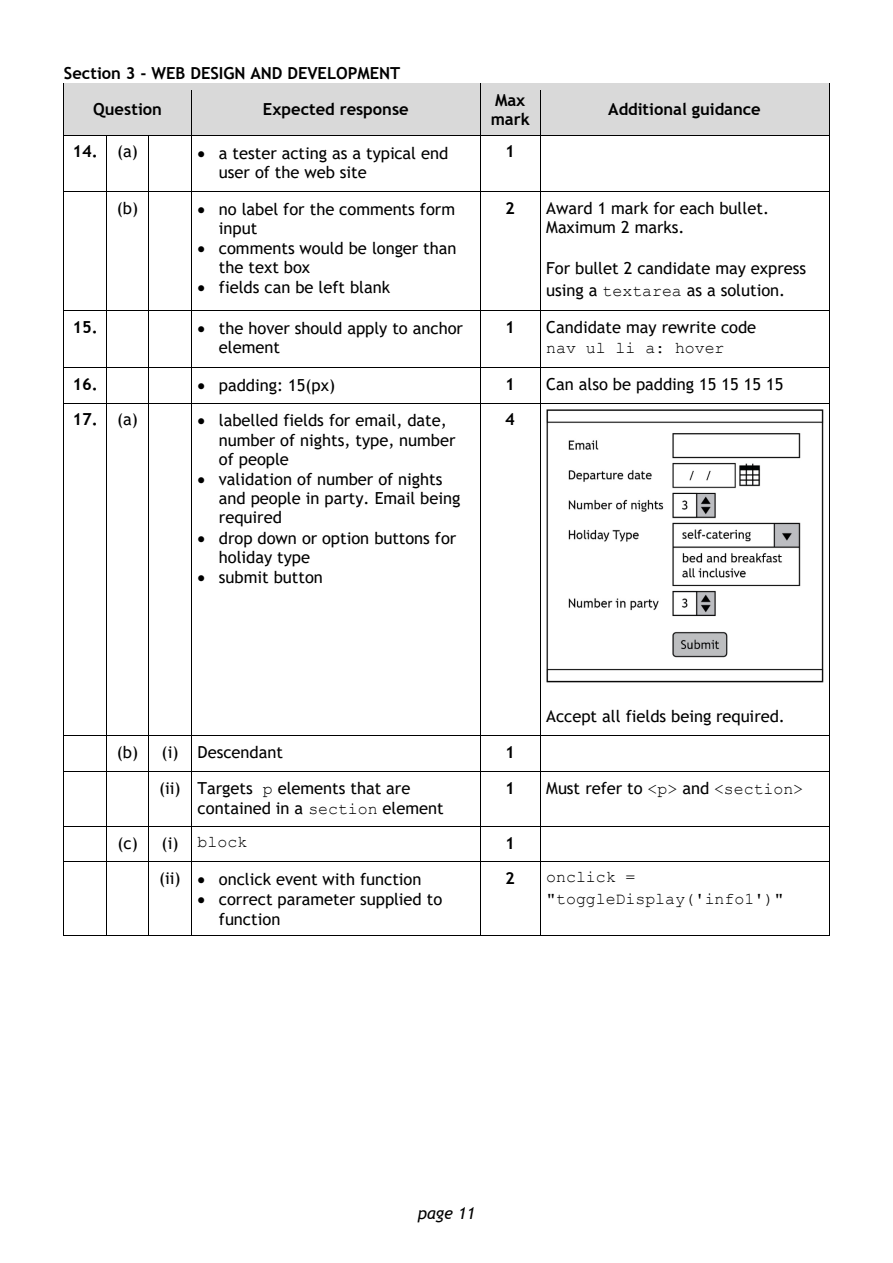
Selectable page text
Section 3 - WEB DESIGN AND DEVELOPMENT

                                        Max
   Question       Expected response               Additional guidance
                                       mark
 14. (a)    • a tester acting as a typical end 1
              user of the web site
     (b)    • no label for the comments form 2 Award 1 mark for each bullet.
              input                         Maximum 2 marks.
            • comments would be longer than
              the text box                  For bullet 2 candidate may express
            • fields can be left blank      using a      as a solution.
                                                 textarea
 15.        • the hover should apply to anchor 1 Candidate may rewrite code
              element
                                            nav ul li a: hover
 16.        • padding: 15(px)           1   Can also be padding 15 15 15 15

 17. (a)    • labelled fields for email, date, 4
              number of nights, type, number
              of people
            • validation of number of nights
              and people in party. Email being
              required
            • drop down or option buttons for
              holiday type
            • submit button

                                            Accept all fields being required.

     (b) (i) Descendant                 1

         (ii) Targets elements that are 1   Must refer to and
                  p                                   <p>   <section>
            contained in a   element
                      section
     (c) (i)                            1
            block
         (ii) • onclick event with function 2 onclick =
            • correct parameter supplied to
                                            "toggleDisplay('info1')"
              function

                                page 11
PDF page 12
Question 18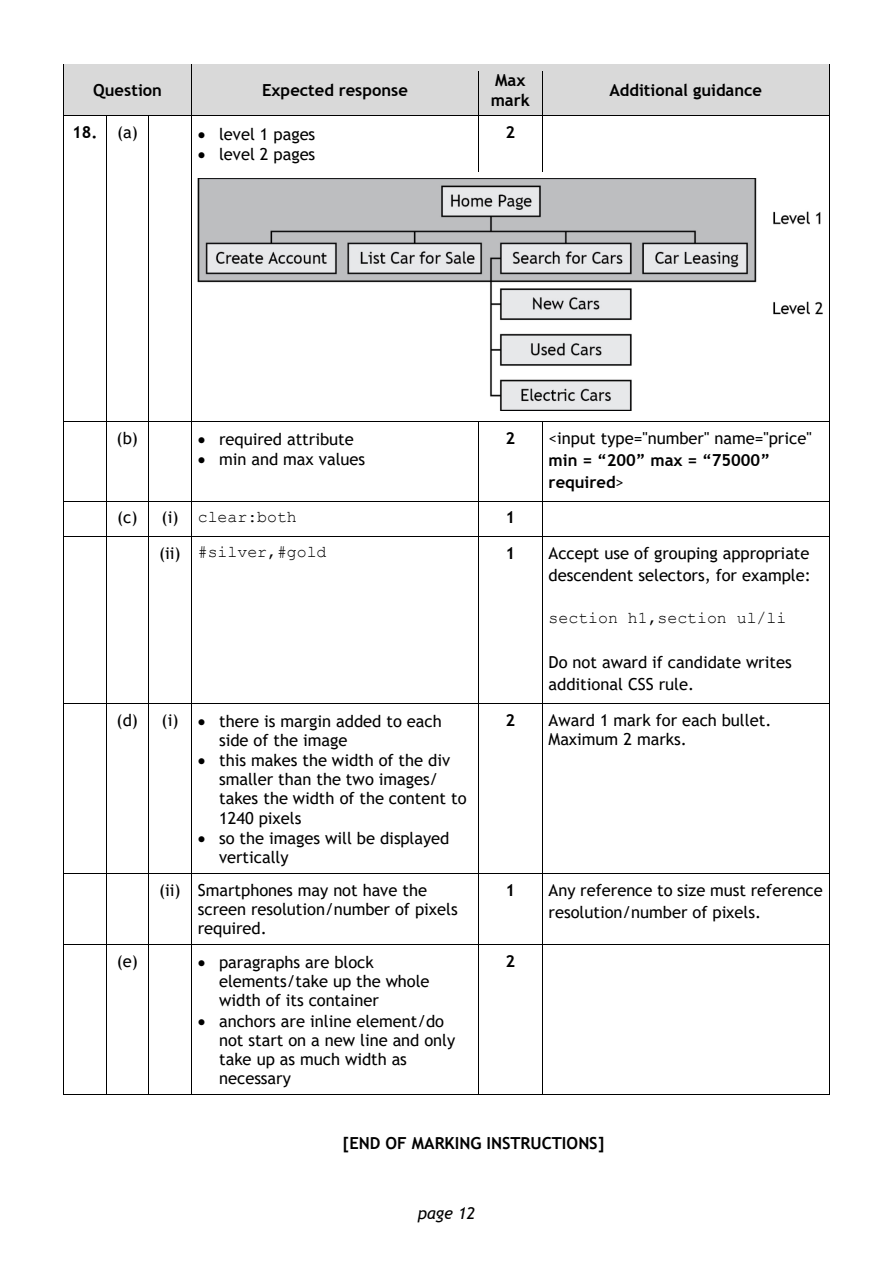
Selectable page text
Max
  Question       Expected response               Additional guidance
                                      mark
18. (a)    • level 1 pages             2
           • level 2 pages

    (b)    • required attribute        2   <input type="number" name="price"
           • min and max values            min = “200” max = “75000”
                                           required>

    (c) (i)                            1
           clear:both
        (ii)                           1   Accept use of grouping appropriate
           #silver,#gold
                                           descendent selectors, for example:

                                           section h1,section ul/li

                                           Do not award if candidate writes
                                           additional CSS rule.

    (d) (i) • there is margin added to each 2 Award 1 mark for each bullet.
             side of the image             Maximum 2 marks.
           • this makes the width of the div
             smaller than the two images/
             takes the width of the content to
             1240 pixels
           • so the images will be displayed
             vertically
        (ii) Smartphones may not have the 1 Any reference to size must reference
           screen resolution/number of pixels resolution/number of pixels.
           required.

    (e)    • paragraphs are block      2
             elements/take up the whole
             width of its container
           • anchors are inline element/do
             not start on a new line and only
             take up as much width as
             necessary

                         [END OF MARKING INSTRUCTIONS]

                               page 12