2024 Higher Computing Science marking instructions
Source: Scottish Qualifications Authority (SQA) / Qualifications Scotland. This is a StemInteract HTML companion, not an official HTML edition. Selectable text is supplied alongside original page images. Use the images or original PDF for equations, powers, fractions, vector notation, tables and diagrams; text extraction cannot fully preserve mathematical layout.
Jump to a question
PDF page 1
Selectable page text
National

                  Qualifications
                  2024

                     2024  Computing     Science

                               Higher

         Question   Paper  Finalised  Marking   Instructions

© Scottish Qualifications Authority 2024

These marking instructions have been prepared by examination teams for use by SQA appointed
markers when marking external course assessments.

The information in this document may be reproduced in support of SQA qualifications only on a non-
commercial basis. If it is reproduced, SQA must be clearly acknowledged as the source. If it is to be
reproduced for any other purpose, written permission must be obtained from permissions@sqa.org.uk.

                                                                     ©
PDF page 2
Selectable page text
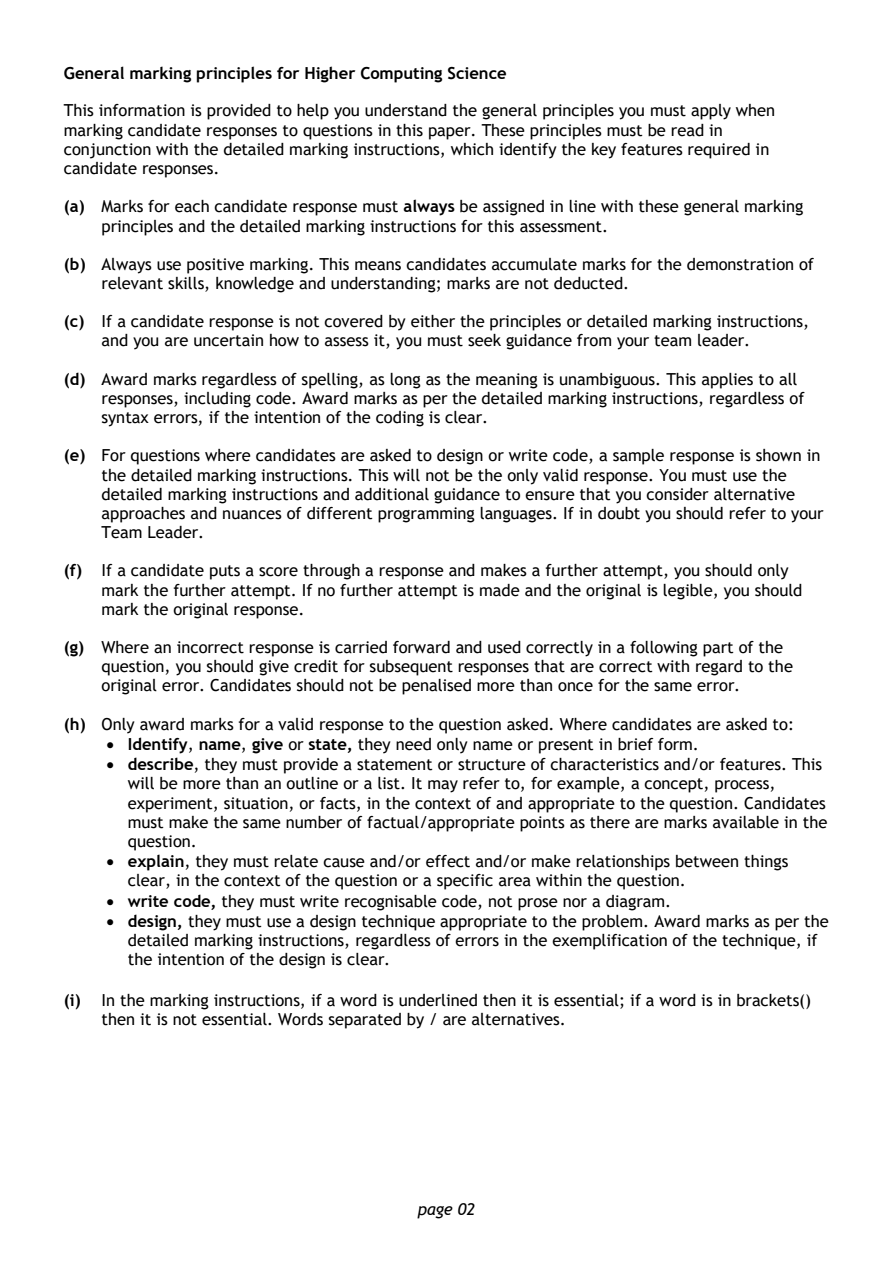
General marking principles for Higher Computing Science

This information is provided to help you understand the general principles you must apply when
marking candidate responses to questions in this paper. These principles must be read in
conjunction with the detailed marking instructions, which identify the key features required in
candidate responses.

(a) Marks for each candidate response must always be assigned in line with these general marking
   principles and the detailed marking instructions for this assessment.

(b) Always use positive marking. This means candidates accumulate marks for the demonstration of
   relevant skills, knowledge and understanding; marks are not deducted.

(c) If a candidate response is not covered by either the principles or detailed marking instructions,
   and you are uncertain how to assess it, you must seek guidance from your team leader.

(d) Award marks regardless of spelling, as long as the meaning is unambiguous. This applies to all
   responses, including code. Award marks as per the detailed marking instructions, regardless of
   syntax errors, if the intention of the coding is clear.

(e) For questions where candidates are asked to design or write code, a sample response is shown in
   the detailed marking instructions. This will not be the only valid response. You must use the
   detailed marking instructions and additional guidance to ensure that you consider alternative
   approaches and nuances of different programming languages. If in doubt you should refer to your
   Team Leader.

(f) If a candidate puts a score through a response and makes a further attempt, you should only
   mark the further attempt. If no further attempt is made and the original is legible, you should
   mark the original response.

(g) Where an incorrect response is carried forward and used correctly in a following part of the
   question, you should give credit for subsequent responses that are correct with regard to the
   original error. Candidates should not be penalised more than once for the same error.

(h) Only award marks for a valid response to the question asked. Where candidates are asked to:
    • Identify, name, give or state, they need only name or present in brief form.
    • describe, they must provide a statement or structure of characteristics and/or features. This
      will be more than an outline or a list. It may refer to, for example, a concept, process,
      experiment, situation, or facts, in the context of and appropriate to the question. Candidates
      must make the same number of factual/appropriate points as there are marks available in the
      question.
    • explain, they must relate cause and/or effect and/or make relationships between things
      clear, in the context of the question or a specific area within the question.
    • write code, they must write recognisable code, not prose nor a diagram.
    • design, they must use a design technique appropriate to the problem. Award marks as per the
      detailed marking instructions, regardless of errors in the exemplification of the technique, if
      the intention of the design is clear.

(i) In the marking instructions, if a word is underlined then it is essential; if a word is in brackets()
   then it is not essential. Words separated by / are alternatives.

                                page 02
PDF page 3
Question 1Question 2Question 3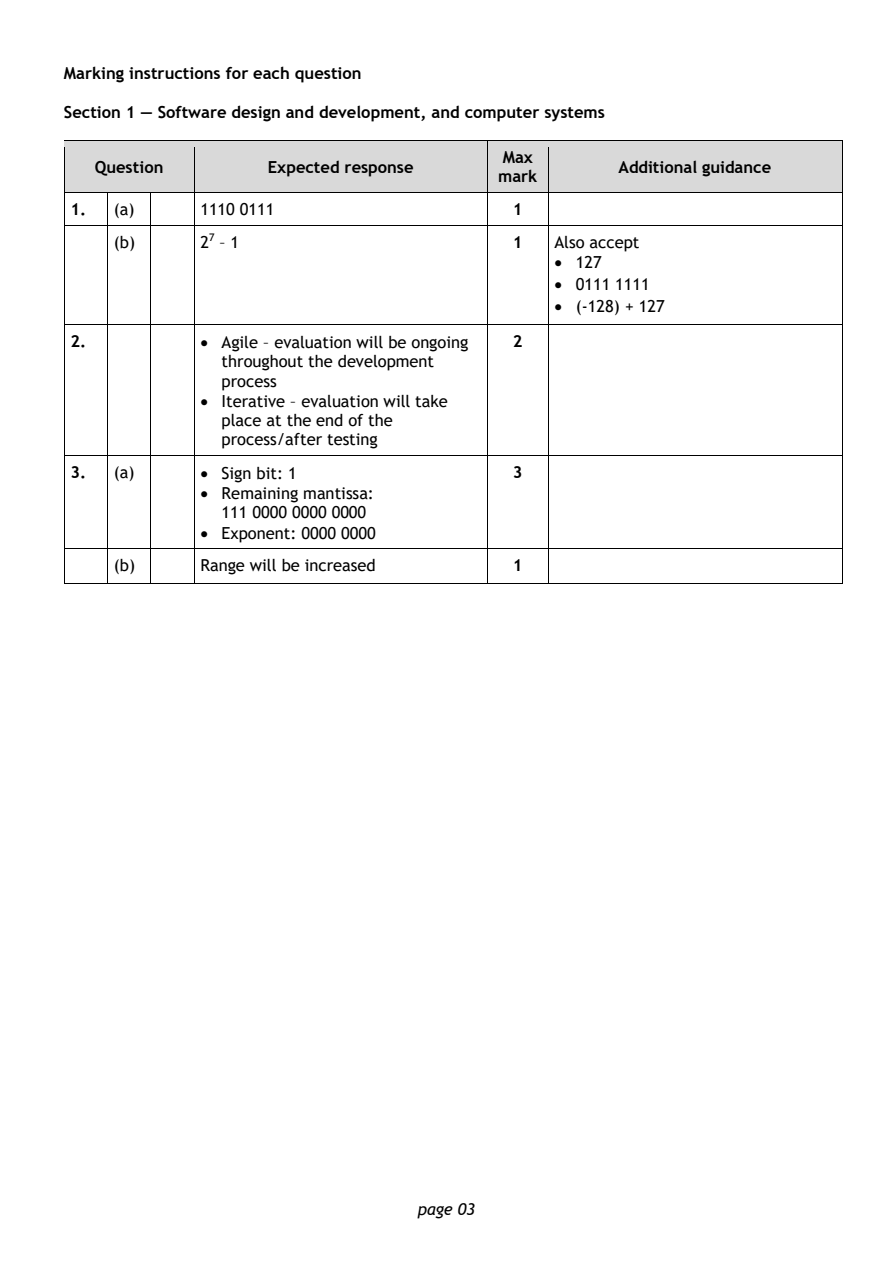
Selectable page text
Marking instructions for each question

Section 1 — Software design and development, and computer systems

                                        Max
   Question        Expected response               Additional guidance
                                        mark
1.  (a)     1110 0111                    1
    (b)     27 – 1                       1   Also accept
                                             • 127
                                             • 0111 1111
                                             • (-128) + 127

2.          • Agile – evaluation will be ongoing 2
              throughout the development
              process
            • Iterative – evaluation will take
              place at the end of the
              process/after testing

3.  (a)     • Sign bit: 1                3
            • Remaining mantissa:
              111 0000 0000 0000
            • Exponent: 0000 0000

    (b)     Range will be increased      1

                                page 03
PDF page 4
Question 4Question 5Question 6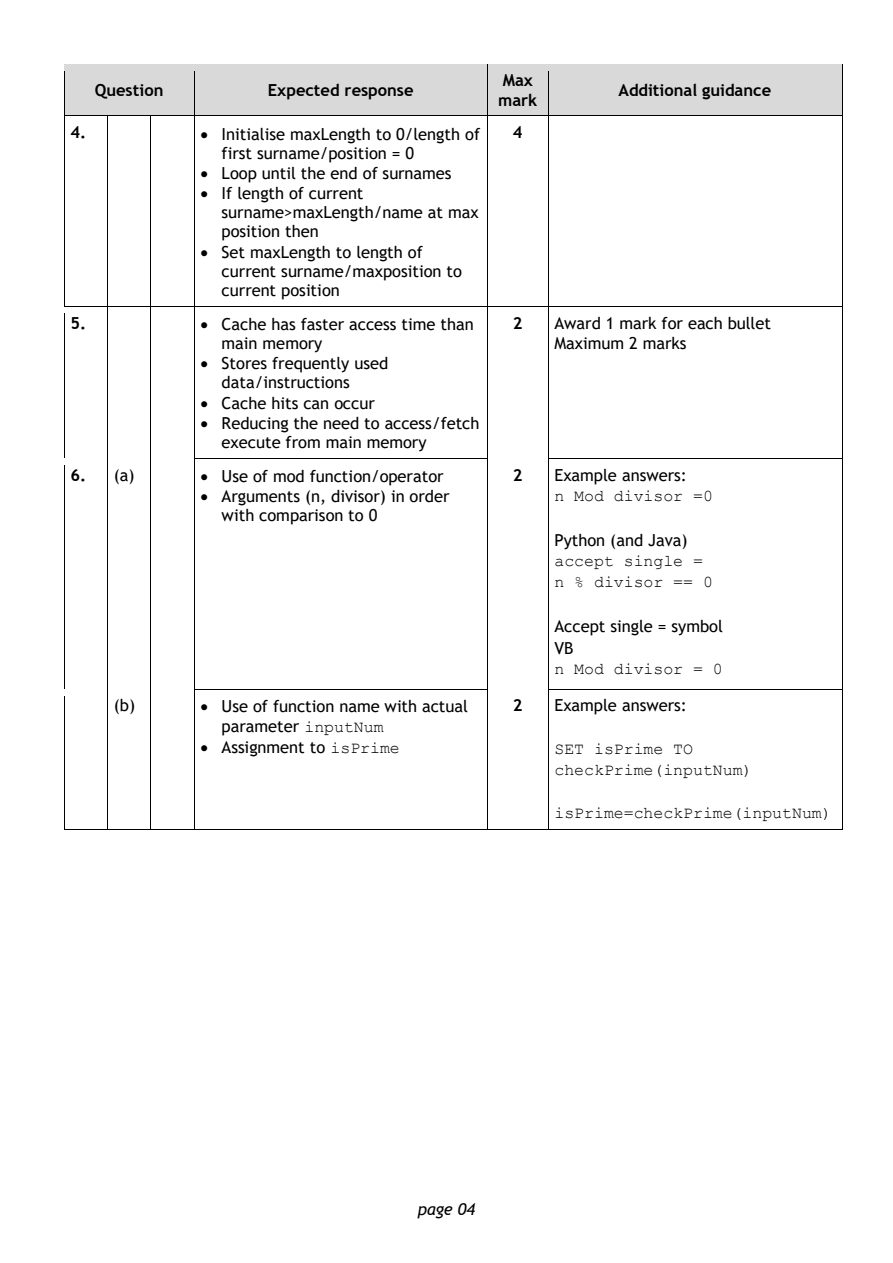
Selectable page text
Max
   Question        Expected response               Additional guidance
                                        mark
4.          • Initialise maxLength to 0/length of 4
              first surname/position = 0
            • Loop until the end of surnames
            • If length of current
              surname>maxLength/name at max
              position then
            • Set maxLength to length of
              current surname/maxposition to
              current position
5.          • Cache has faster access time than 2 Award 1 mark for each bullet
              main memory                    Maximum 2 marks
            • Stores frequently used
              data/instructions
            • Cache hits can occur
            • Reducing the need to access/fetch
              execute from main memory

6.  (a)     • Use of mod function/operator 2 Example answers:
            • Arguments (n, divisor) in order n Mod divisor =0
              with comparison to 0
                                             Python (and Java)
                                             accept single =
                                             n % divisor == 0

                                             Accept single = symbol
                                             VB
                                             n Mod divisor = 0

    (b)     • Use of function name with actual 2 Example answers:
              parameter inputNum
            • Assignment to isPrime          SET isPrime TO
                                             checkPrime(inputNum)

                                             isPrime=checkPrime(inputNum)

                                page 04
PDF page 5
Question 7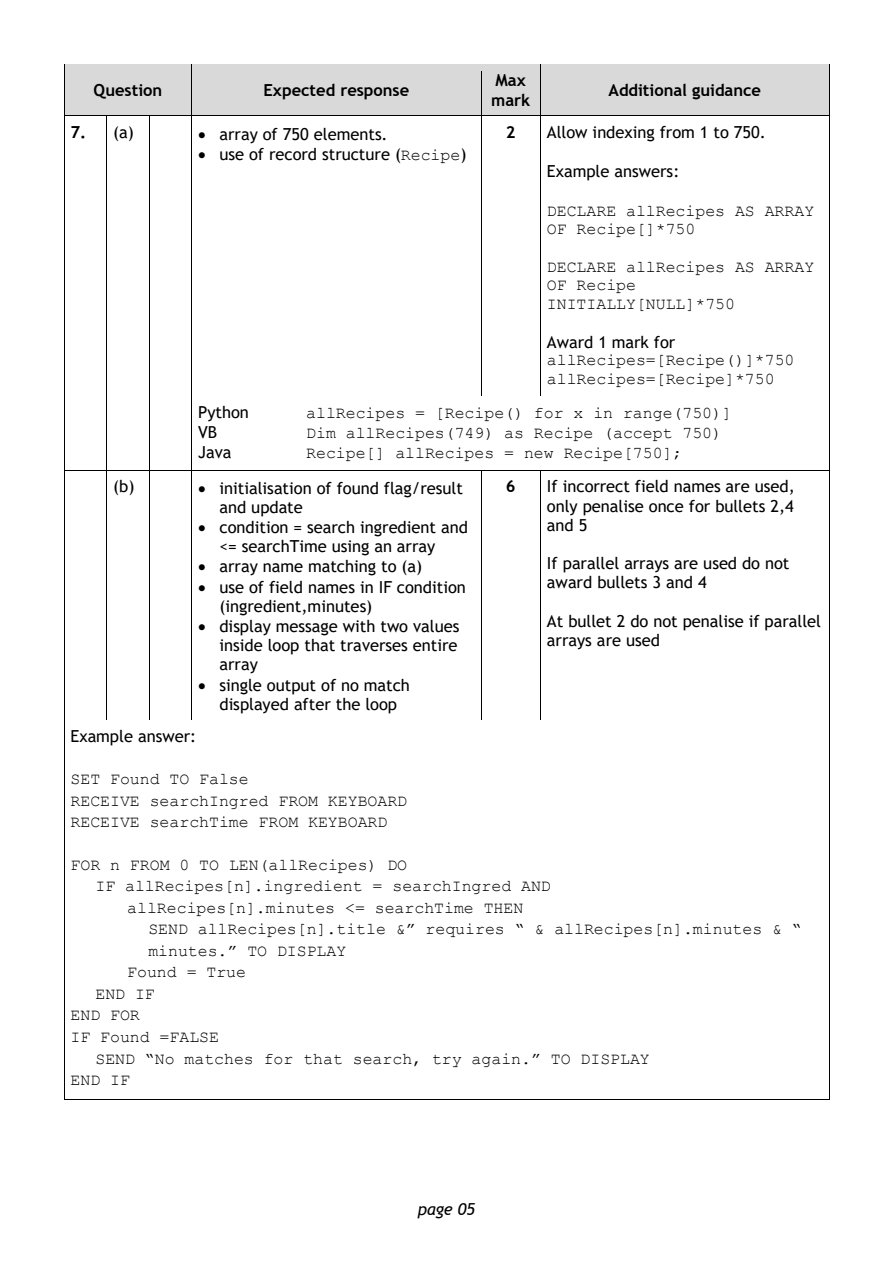
Selectable page text
Max
   Question       Expected response               Additional guidance
                                       mark
7.  (a)     • array of 750 elements.     2  Allow indexing from 1 to 750.
            • use of record structure (Recipe)
                                            Example answers:
                                            DECLARE allRecipes AS ARRAY
                                            OF Recipe[]*750

                                            DECLARE allRecipes AS ARRAY
                                            OF Recipe
                                            INITIALLY[NULL]*750

                                            Award 1 mark for
                                            allRecipes=[Recipe()]*750
                                            allRecipes=[Recipe]*750

            Python    allRecipes = [Recipe() for x in range(750)]
            VB        Dim allRecipes(749) as Recipe (accept 750)
            Java      Recipe[] allRecipes = new Recipe[750];

    (b)     • initialisation of found flag/result 6 If incorrect field names are used,
              and update                    only penalise once for bullets 2,4
            • condition = search ingredient and and 5
              <= searchTime using an array
            • array name matching to (a)    If parallel arrays are used do not
            • use of field names in IF condition award bullets 3 and 4
              (ingredient,minutes)
                                            At bullet 2 do not penalise if parallel
            • display message with two values
                                            arrays are used
              inside loop that traverses entire
              array
            • single output of no match
              displayed after the loop
Example answer:
SET Found TO False
RECEIVE searchIngred FROM KEYBOARD
RECEIVE searchTime FROM KEYBOARD

FOR n FROM 0 TO LEN(allRecipes) DO
   IF allRecipes[n].ingredient = searchIngred AND
      allRecipes[n].minutes <= searchTime THEN
        SEND allRecipes[n].title &” requires “ & allRecipes[n].minutes & “
        minutes.” TO DISPLAY
      Found = True

   END IF
END FOR
IF Found =FALSE
   SEND “No matches for that search, try again.” TO DISPLAY
END IF

                                page 05
PDF page 6
Question 8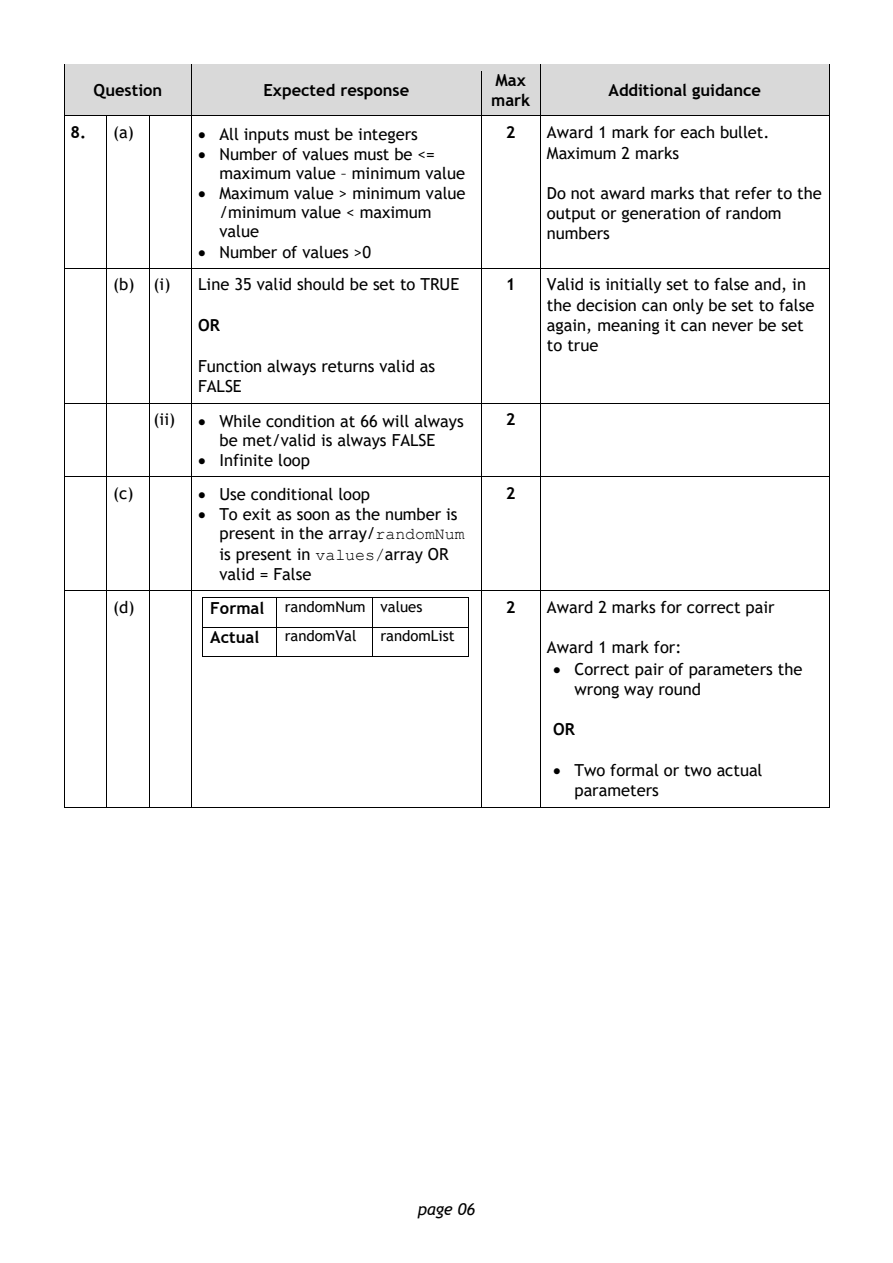
Selectable page text
Max
   Question       Expected response               Additional guidance
                                       mark
8.  (a)     • All inputs must be integers 2 Award 1 mark for each bullet.
            • Number of values must be <=   Maximum 2 marks
              maximum value – minimum value
            • Maximum value > minimum value Do not award marks that refer to the
              /minimum value < maximum      output or generation of random
              value                         numbers
            • Number of values >0
    (b) (i) Line 35 valid should be set to TRUE 1 Valid is initially set to false and, in
                                            the decision can only be set to false
            OR                              again, meaning it can never be set
                                            to true
            Function always returns valid as
            FALSE

        (ii) • While condition at 66 will always 2
              be met/valid is always FALSE
            • Infinite loop

    (c)     • Use conditional loop       2
            • To exit as soon as the number is
              present in the array/randomNum
              is present in values/array OR
              valid = False

    (d)      Formal randomNum values     2  Award 2 marks for correct pair
             Actual randomVal randomList
                                            Award 1 mark for:
                                             • Correct pair of parameters the
                                               wrong way round

                                             OR

                                             • Two formal or two actual
                                               parameters

                                page 06
PDF page 7
Question 9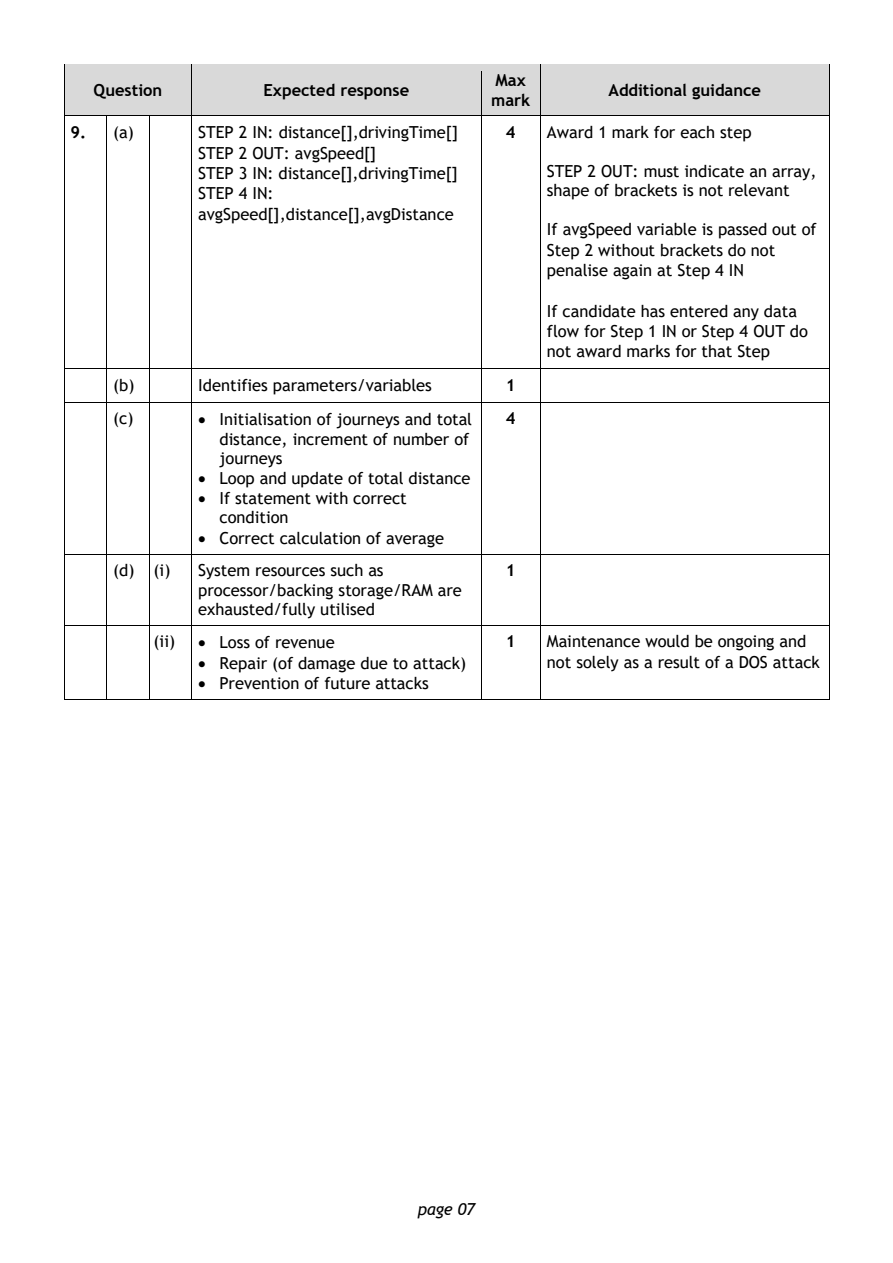
Selectable page text
Max
   Question       Expected response               Additional guidance
                                       mark
9.  (a)     STEP 2 IN: distance[],drivingTime[] 4 Award 1 mark for each step
            STEP 2 OUT: avgSpeed[]
            STEP 3 IN: distance[],drivingTime[] STEP 2 OUT: must indicate an array,
            STEP 4 IN:                      shape of brackets is not relevant
            avgSpeed[],distance[],avgDistance
                                            If avgSpeed variable is passed out of
                                            Step 2 without brackets do not
                                            penalise again at Step 4 IN

                                            If candidate has entered any data
                                            flow for Step 1 IN or Step 4 OUT do
                                            not award marks for that Step
    (b)     Identifies parameters/variables 1

    (c)     • Initialisation of journeys and total 4
              distance, increment of number of
              journeys
            • Loop and update of total distance
            • If statement with correct
              condition
            • Correct calculation of average

    (d) (i) System resources such as     1
            processor/backing storage/RAM are
            exhausted/fully utilised

        (ii) • Loss of revenue           1  Maintenance would be ongoing and
            • Repair (of damage due to attack) not solely as a result of a DOS attack
            • Prevention of future attacks

                                page 07
PDF page 8
Question 10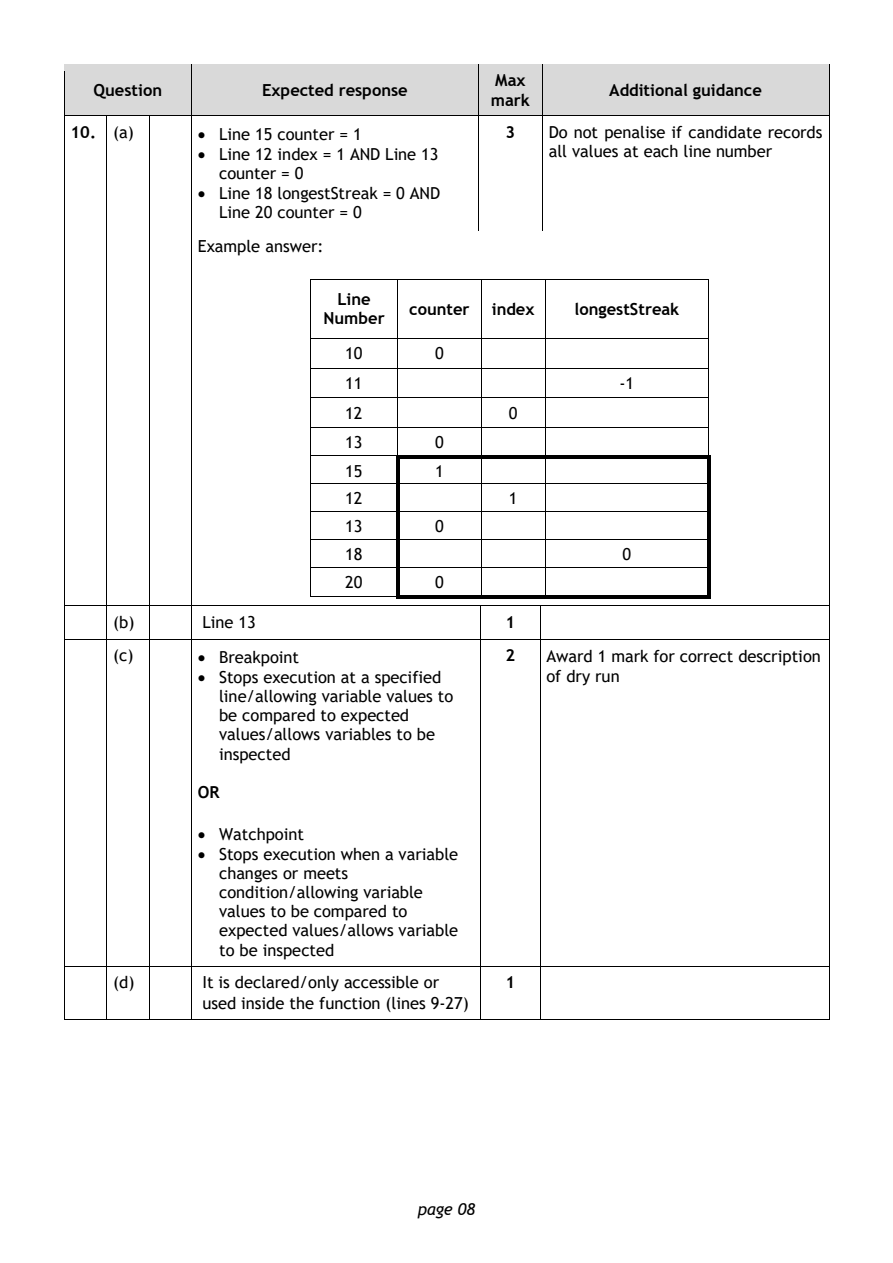
Selectable page text
Max
   Question       Expected response               Additional guidance
                                       mark
10. (a)     • Line 15 counter = 1       3   Do not penalise if candidate records
            • Line 12 index = 1 AND Line 13 all values at each line number
              counter = 0
            • Line 18 longestStreak = 0 AND
              Line 20 counter = 0
            Example answer:

                         Line
                                counter index  longestStreak
                        Number
                          10      0
                          11                       -1

                          12             0
                          13      0

                          15      1
                          12             1

                          13      0
                          18                       0
                          20      0

    (b)      Line 13                    1
    (c)     • Breakpoint                2   Award 1 mark for correct description
            • Stops execution at a specified of dry run
              line/allowing variable values to
              be compared to expected
              values/allows variables to be
              inspected

            OR

            • Watchpoint
            • Stops execution when a variable
              changes or meets
              condition/allowing variable
              values to be compared to
              expected values/allows variable
              to be inspected

    (d)      It is declared/only accessible or 1
             used inside the function (lines 9-27)

                                page 08
PDF page 9
Selectable page text
Max
   Question       Expected response               Additional guidance
                                       mark
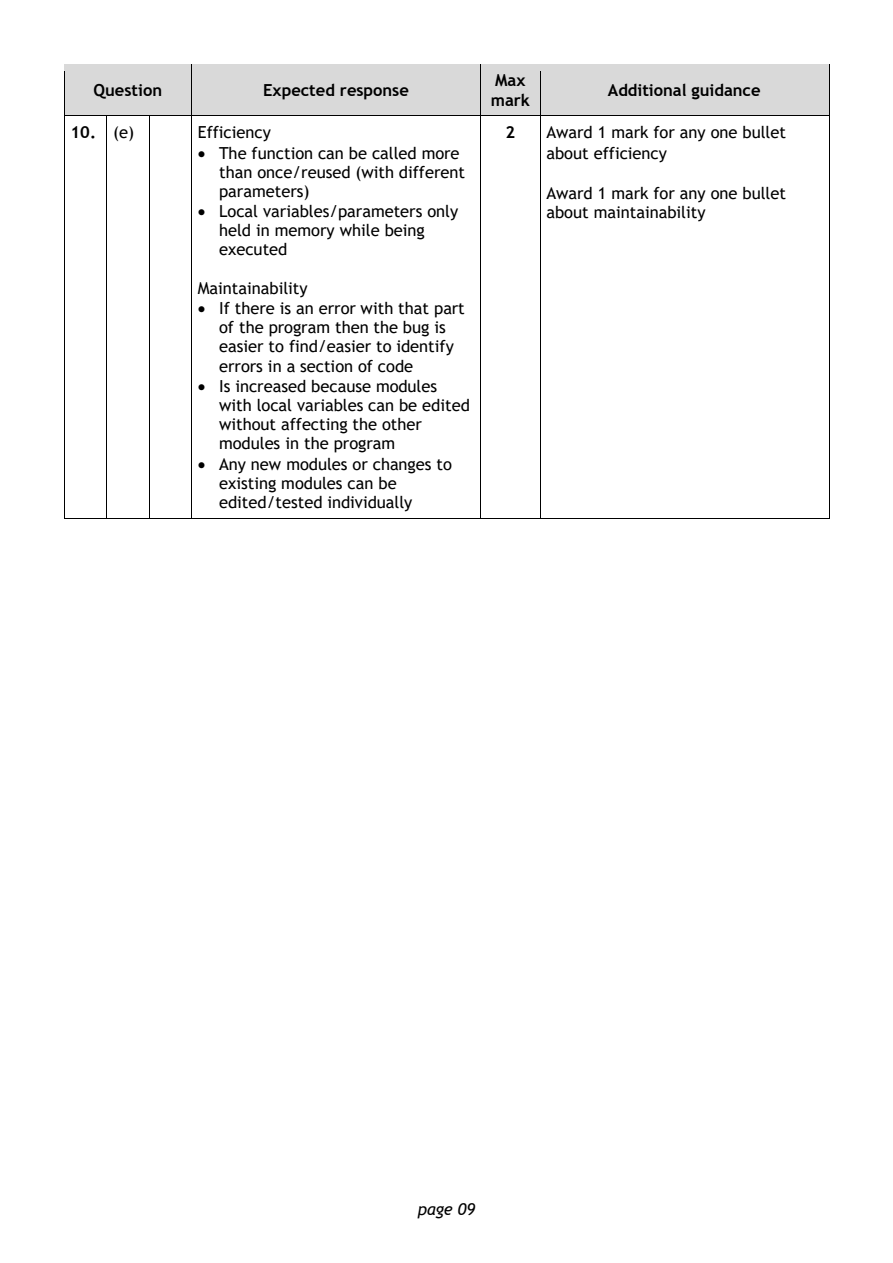
10. (e)     Efficiency                  2   Award 1 mark for any one bullet
            • The function can be called more about efficiency
              than once/reused (with different
              parameters)                   Award 1 mark for any one bullet
            • Local variables/parameters only about maintainability
              held in memory while being
              executed
            Maintainability
            • If there is an error with that part
              of the program then the bug is
              easier to find/easier to identify
              errors in a section of code
            • Is increased because modules
              with local variables can be edited
              without affecting the other
              modules in the program
            • Any new modules or changes to
              existing modules can be
              edited/tested individually

                                page 09
PDF page 10
Question 11Question 12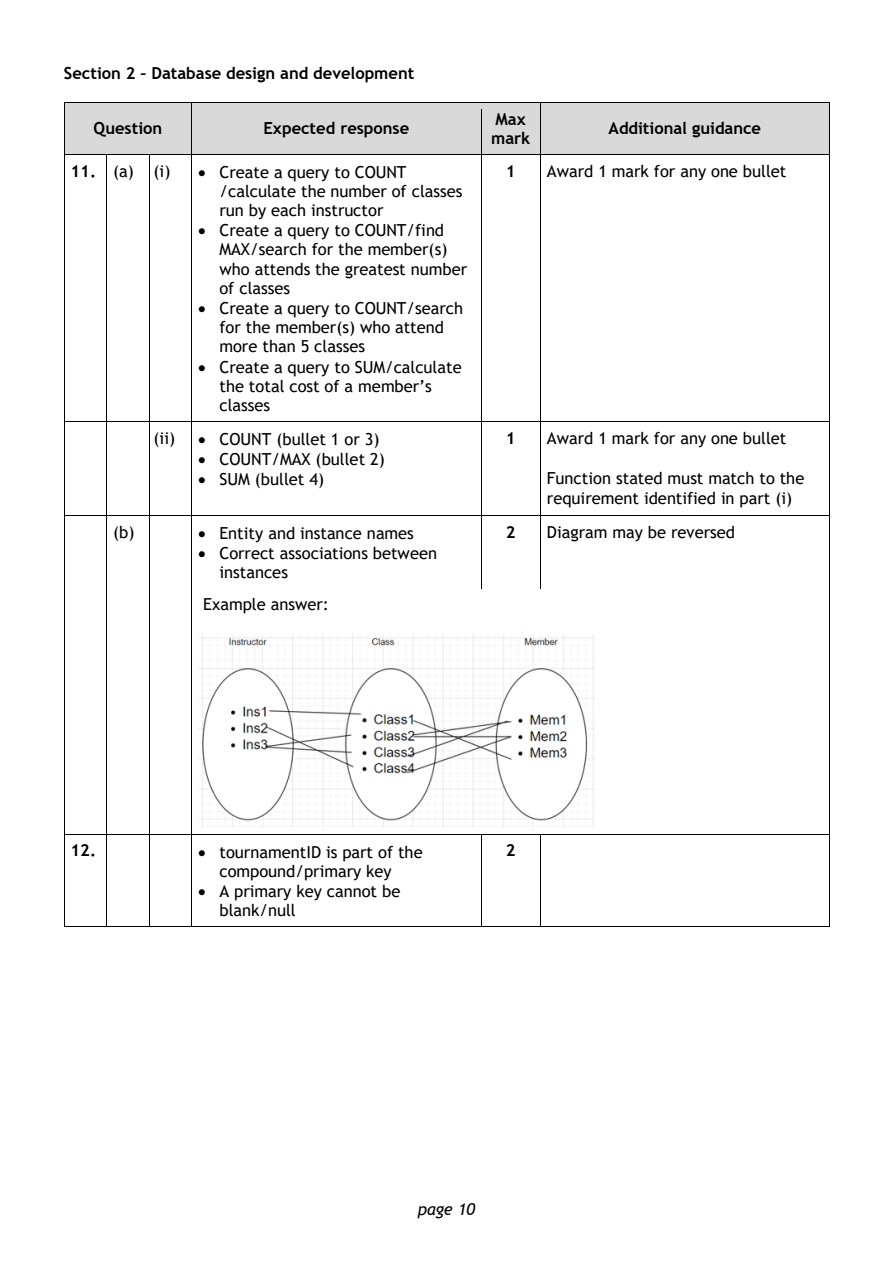
Selectable page text
Section 2 – Database design and development

                                        Max
   Question       Expected response               Additional guidance
                                       mark
11. (a) (i) • Create a query to COUNT    1  Award 1 mark for any one bullet
              /calculate the number of classes
              run by each instructor
            • Create a query to COUNT/find
              MAX/search for the member(s)
              who attends the greatest number
              of classes
            • Create a query to COUNT/search
              for the member(s) who attend
              more than 5 classes
            • Create a query to SUM/calculate
              the total cost of a member’s
              classes
        (ii) • COUNT (bullet 1 or 3)     1  Award 1 mark for any one bullet
            • COUNT/MAX (bullet 2)
            • SUM (bullet 4)                Function stated must match to the
                                            requirement identified in part (i)

    (b)     • Entity and instance names  2  Diagram may be reversed
            • Correct associations between
              instances

             Example answer:

12.         • tournamentID is part of the 2
              compound/primary key
            • A primary key cannot be
              blank/null

                                page 10
PDF page 11
Question 13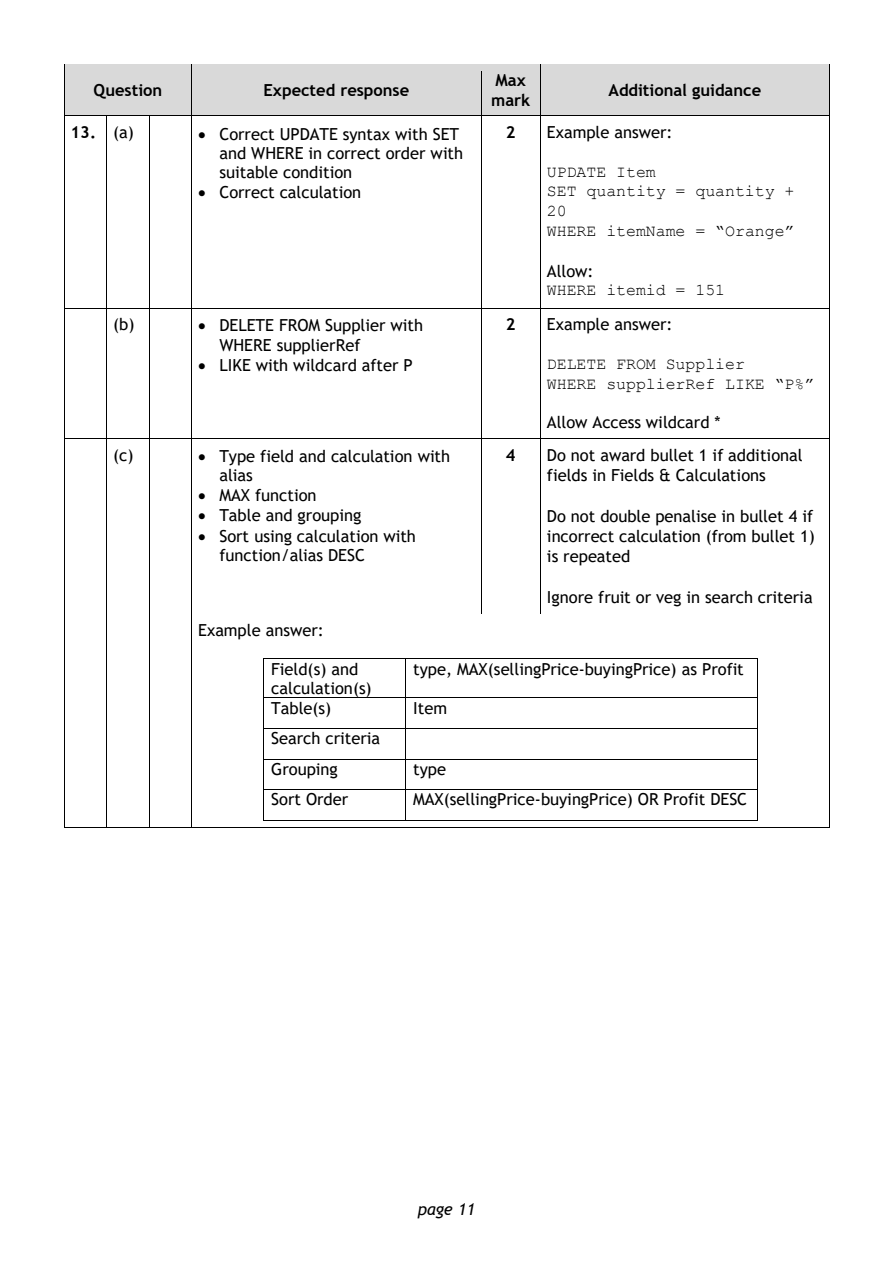
Selectable page text
Max
   Question       Expected response               Additional guidance
                                       mark
13. (a)     • Correct UPDATE syntax with SET 2 Example answer:
              and WHERE in correct order with
              suitable condition            UPDATE Item
            • Correct calculation           SET quantity = quantity +
                                            20
                                            WHERE itemName = “Orange”

                                            Allow:
                                            WHERE itemid = 151
    (b)     • DELETE FROM Supplier with  2  Example answer:
              WHERE supplierRef
            • LIKE with wildcard after P    DELETE FROM Supplier
                                            WHERE supplierRef LIKE “P%”

                                            Allow Access wildcard *

    (c)     • Type field and calculation with 4 Do not award bullet 1 if additional
              alias                         fields in Fields & Calculations
            • MAX function
            • Table and grouping            Do not double penalise in bullet 4 if
            • Sort using calculation with   incorrect calculation (from bullet 1)
              function/alias DESC           is repeated

                                            Ignore fruit or veg in search criteria

            Example answer:

                   Field(s) and type, MAX(sellingPrice-buyingPrice) as Profit
                   calculation(s)
                   Table(s)     Item
                   Search criteria

                   Grouping     type

                   Sort Order   MAX(sellingPrice-buyingPrice) OR Profit DESC

                                page 11
PDF page 12
Question 14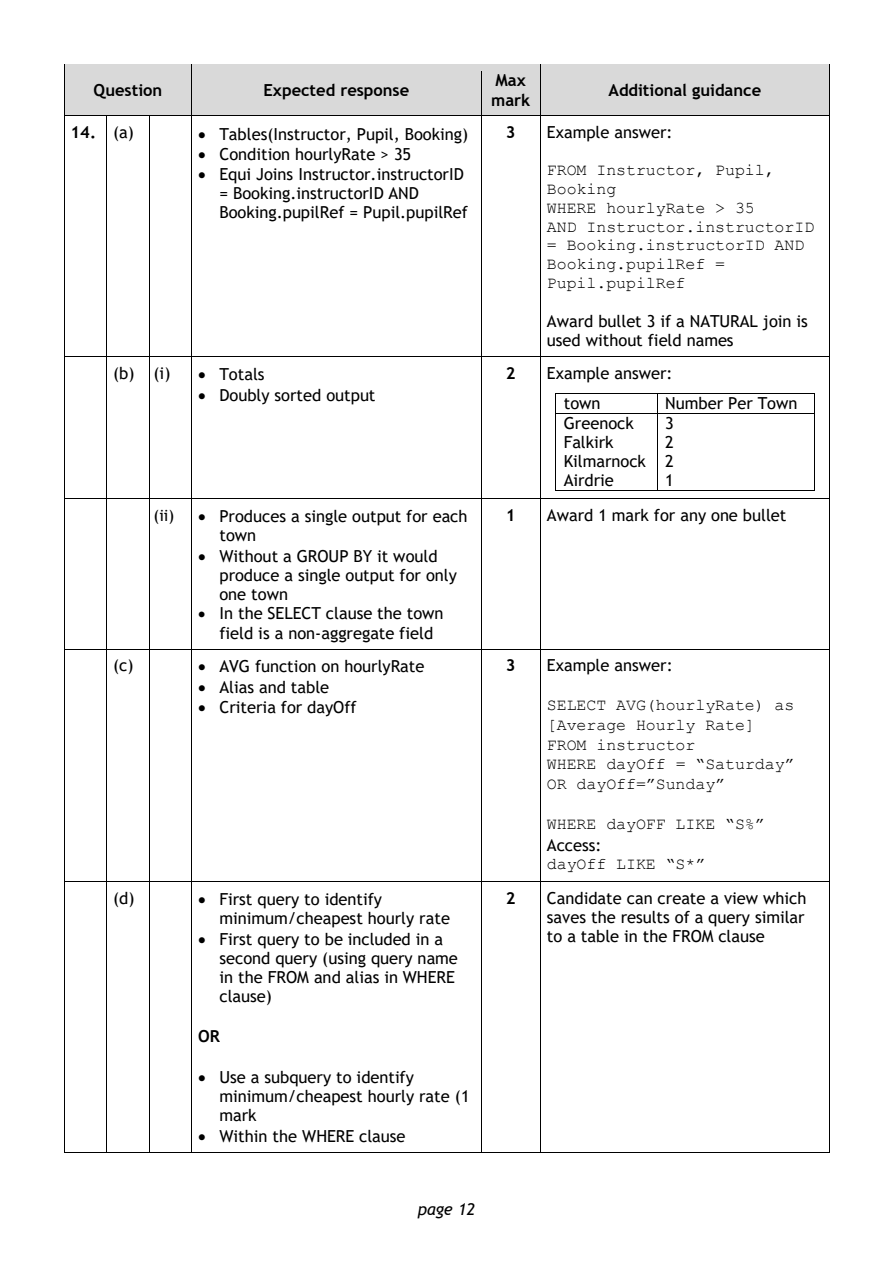
Selectable page text
Max
   Question       Expected response               Additional guidance
                                       mark
14. (a)     • Tables(Instructor, Pupil, Booking) 3 Example answer:
            • Condition hourlyRate > 35
                                            FROM Instructor, Pupil,
            • Equi Joins Instructor.instructorID
                                            Booking
              = Booking.instructorID AND
                                            WHERE hourlyRate > 35
              Booking.pupilRef = Pupil.pupilRef
                                            AND Instructor.instructorID
                                            = Booking.instructorID AND
                                            Booking.pupilRef =
                                            Pupil.pupilRef
                                            Award bullet 3 if a NATURAL join is
                                            used without field names
    (b) (i) • Totals                     2  Example answer:
            • Doubly sorted output
                                              town     Number Per Town
                                              Greenock 3
                                              Falkirk  2
                                              Kilmarnock 2
                                              Airdrie  1
        (ii) • Produces a single output for each 1 Award 1 mark for any one bullet
              town
            • Without a GROUP BY it would
              produce a single output for only
              one town
            • In the SELECT clause the town
              field is a non-aggregate field
    (c)     • AVG function on hourlyRate 3  Example answer:
            • Alias and table
            • Criteria for dayOff           SELECT AVG(hourlyRate) as
                                            [Average Hourly Rate]
                                            FROM instructor
                                            WHERE dayOff = “Saturday”
                                            OR dayOff=”Sunday”
                                            WHERE dayOFF LIKE “S%”
                                            Access:
                                            dayOff LIKE “S*”

    (d)     • First query to identify    2  Candidate can create a view which
              minimum/cheapest hourly rate  saves the results of a query similar
            • First query to be included in a to a table in the FROM clause
              second query (using query name
              in the FROM and alias in WHERE
              clause)

            OR

            • Use a subquery to identify
              minimum/cheapest hourly rate (1
              mark
            • Within the WHERE clause

                                page 12
PDF page 13
Question 15Question 16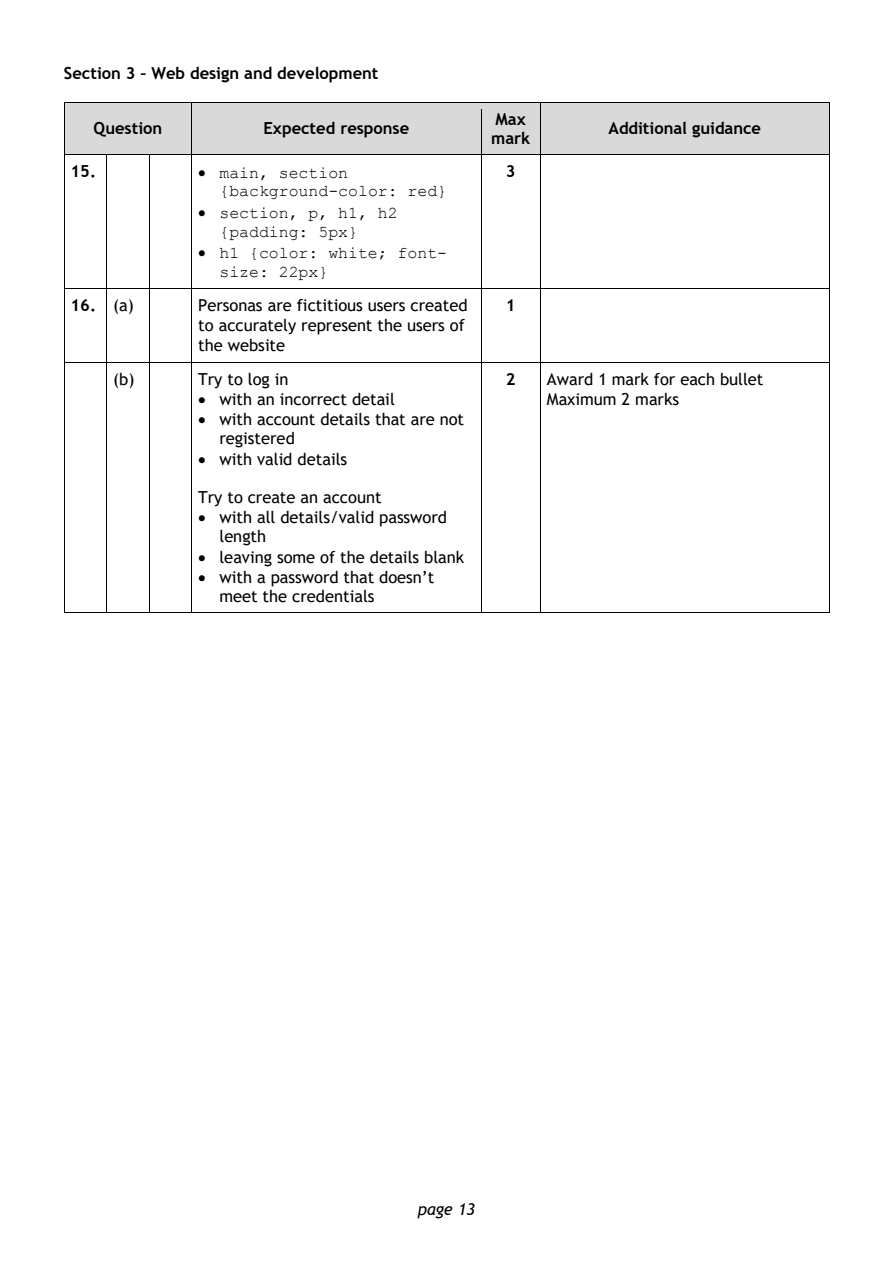
Selectable page text
Section 3 – Web design and development

                                        Max
   Question       Expected response               Additional guidance
                                       mark
15.         • main, section              3
              {background-color: red}
            • section, p, h1, h2
              {padding: 5px}
            • h1 {color: white; font-
              size: 22px}
16. (a)     Personas are fictitious users created 1
            to accurately represent the users of
            the website

    (b)     Try to log in                2  Award 1 mark for each bullet
            • with an incorrect detail      Maximum 2 marks
            • with account details that are not
              registered
            • with valid details

            Try to create an account
            • with all details/valid password
              length
            • leaving some of the details blank
            • with a password that doesn’t
              meet the credentials

                                page 13
PDF page 14
Question 17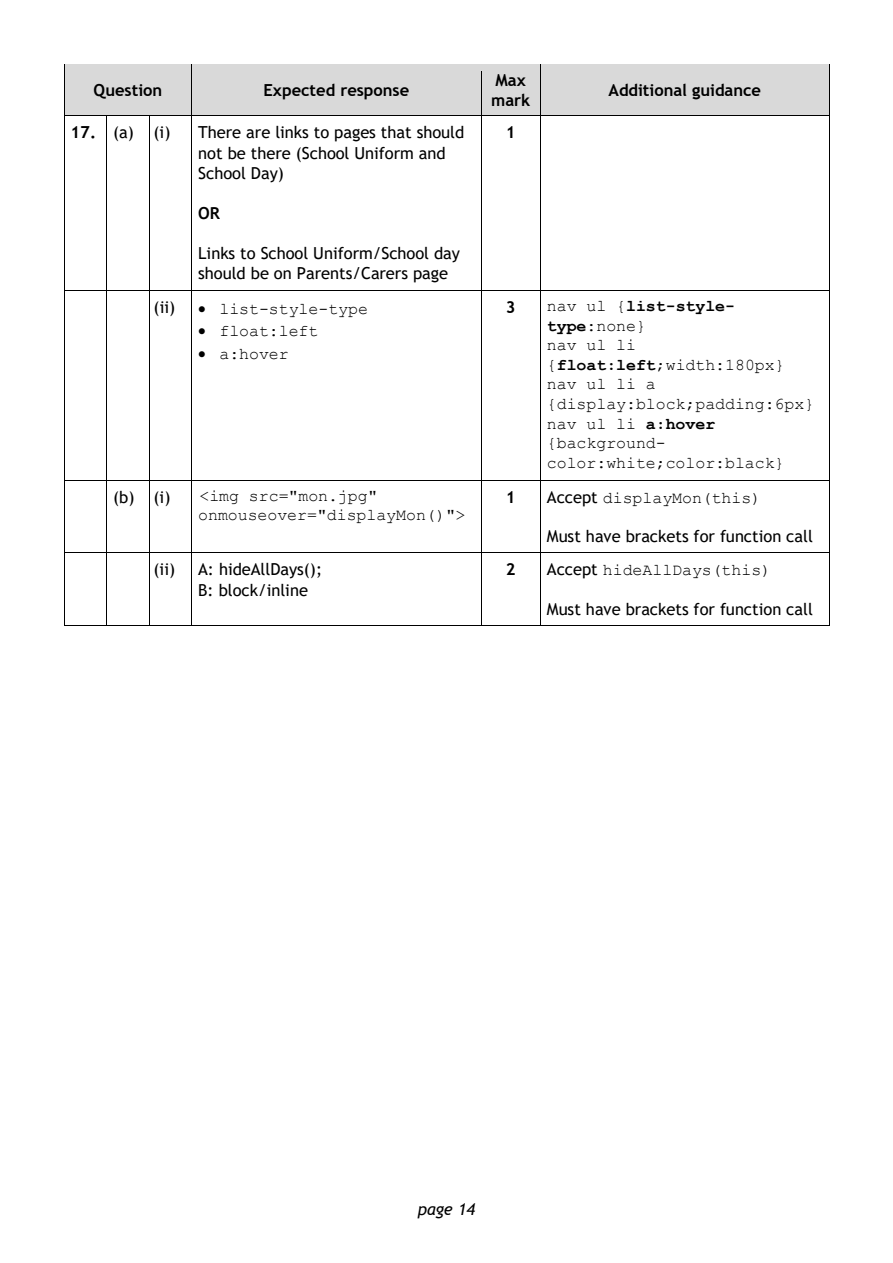
Selectable page text
Max
   Question       Expected response               Additional guidance
                                       mark
17. (a) (i) There are links to pages that should 1
            not be there (School Uniform and
            School Day)

            OR

            Links to School Uniform/School day
            should be on Parents/Carers page
        (ii) • list-style-type           3  nav ul {list-style-
                                            type:none}
            • float:left
                                            nav ul li
            • a:hover
                                            {float:left;width:180px}
                                            nav ul li a
                                            {display:block;padding:6px}
                                            nav ul li a:hover
                                            {background-
                                            color:white;color:black}
    (b) (i) <img src="mon.jpg"           1  Accept displayMon(this)
            onmouseover="displayMon()">
                                            Must have brackets for function call
        (ii) A: hideAllDays();           2  Accept hideAllDays(this)
            B: block/inline
                                            Must have brackets for function call

                                page 14
PDF page 15
Question 18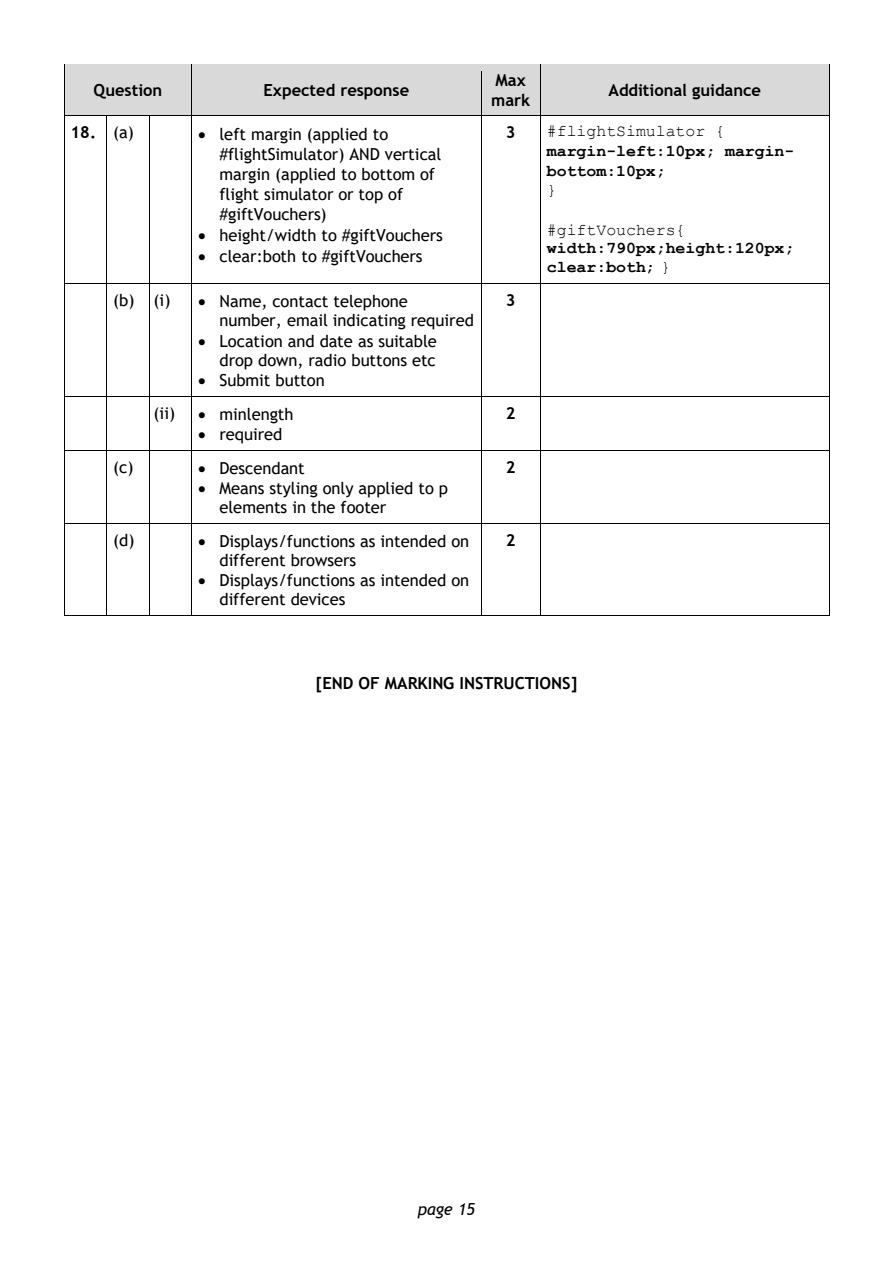
Selectable page text
Max
   Question       Expected response               Additional guidance
                                       mark
18. (a)     • left margin (applied to    3  #flightSimulator {
              #flightSimulator) AND vertical margin-left:10px; margin-
              margin (applied to bottom of  bottom:10px;
                                            }
              flight simulator or top of
              #giftVouchers)
                                            #giftVouchers{
            • height/width to #giftVouchers
                                            width:790px;height:120px;
            • clear:both to #giftVouchers
                                            clear:both; }
    (b) (i) • Name, contact telephone    3
              number, email indicating required
            • Location and date as suitable
              drop down, radio buttons etc
            • Submit button
        (ii) • minlength                 2
            • required
    (c)     • Descendant                 2
            • Means styling only applied to p
              elements in the footer
    (d)     • Displays/functions as intended on 2
              different browsers
            • Displays/functions as intended on
              different devices

                       [END OF MARKING INSTRUCTIONS]

                                page 15