2023 Higher Computing Science marking instructions
Source: Scottish Qualifications Authority (SQA) / Qualifications Scotland. This is a StemInteract HTML companion, not an official HTML edition. Selectable text is supplied alongside original page images. Use the images or original PDF for equations, powers, fractions, vector notation, tables and diagrams; text extraction cannot fully preserve mathematical layout.
Jump to a question
PDF page 1
Selectable page text
National

                  Qualifications
                  2023

                   2023   Computing      Science

                               Higher

                Finalised   Marking    Instructions

© Scottish Qualifications Authority 2023

These marking instructions have been prepared by examination teams for use by SQA appointed markers
when marking external course assessments. The information in this document may be reproduced in
support of SQA qualifications only on a noncommercial basis. If it is reproduced, SQA must be clearly
acknowledged as the source. If it is to be reproduced for any other purpose, written permission must
be obtained from permissions@sqa.org.uk.

                                                                    ©
PDF page 2
Selectable page text
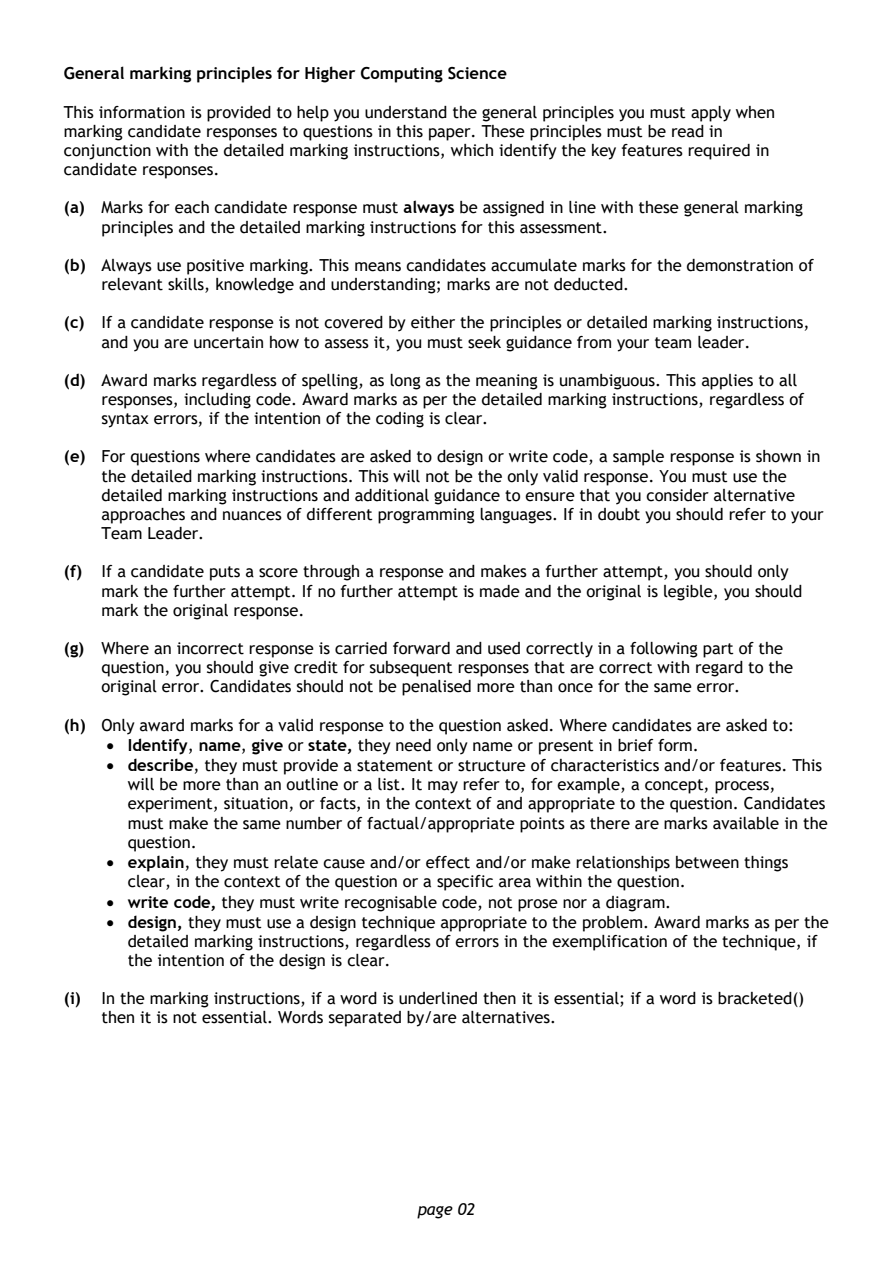
General marking principles for Higher Computing Science

This information is provided to help you understand the general principles you must apply when
marking candidate responses to questions in this paper. These principles must be read in
conjunction with the detailed marking instructions, which identify the key features required in
candidate responses.

(a) Marks for each candidate response must always be assigned in line with these general marking
   principles and the detailed marking instructions for this assessment.

(b) Always use positive marking. This means candidates accumulate marks for the demonstration of
   relevant skills, knowledge and understanding; marks are not deducted.

(c) If a candidate response is not covered by either the principles or detailed marking instructions,
   and you are uncertain how to assess it, you must seek guidance from your team leader.

(d) Award marks regardless of spelling, as long as the meaning is unambiguous. This applies to all
   responses, including code. Award marks as per the detailed marking instructions, regardless of
   syntax errors, if the intention of the coding is clear.

(e) For questions where candidates are asked to design or write code, a sample response is shown in
   the detailed marking instructions. This will not be the only valid response. You must use the
   detailed marking instructions and additional guidance to ensure that you consider alternative
   approaches and nuances of different programming languages. If in doubt you should refer to your
   Team Leader.

(f) If a candidate puts a score through a response and makes a further attempt, you should only
   mark the further attempt. If no further attempt is made and the original is legible, you should
   mark the original response.

(g) Where an incorrect response is carried forward and used correctly in a following part of the
   question, you should give credit for subsequent responses that are correct with regard to the
   original error. Candidates should not be penalised more than once for the same error.

(h) Only award marks for a valid response to the question asked. Where candidates are asked to:
    • Identify, name, give or state, they need only name or present in brief form.
    • describe, they must provide a statement or structure of characteristics and/or features. This
      will be more than an outline or a list. It may refer to, for example, a concept, process,
      experiment, situation, or facts, in the context of and appropriate to the question. Candidates
      must make the same number of factual/appropriate points as there are marks available in the
      question.
    • explain, they must relate cause and/or effect and/or make relationships between things
      clear, in the context of the question or a specific area within the question.
    • write code, they must write recognisable code, not prose nor a diagram.
    • design, they must use a design technique appropriate to the problem. Award marks as per the
      detailed marking instructions, regardless of errors in the exemplification of the technique, if
      the intention of the design is clear.

(i) In the marking instructions, if a word is underlined then it is essential; if a word is bracketed()
   then it is not essential. Words separated by/are alternatives.

                                page 02
PDF page 3
Question 1Question 2Question 3Question 4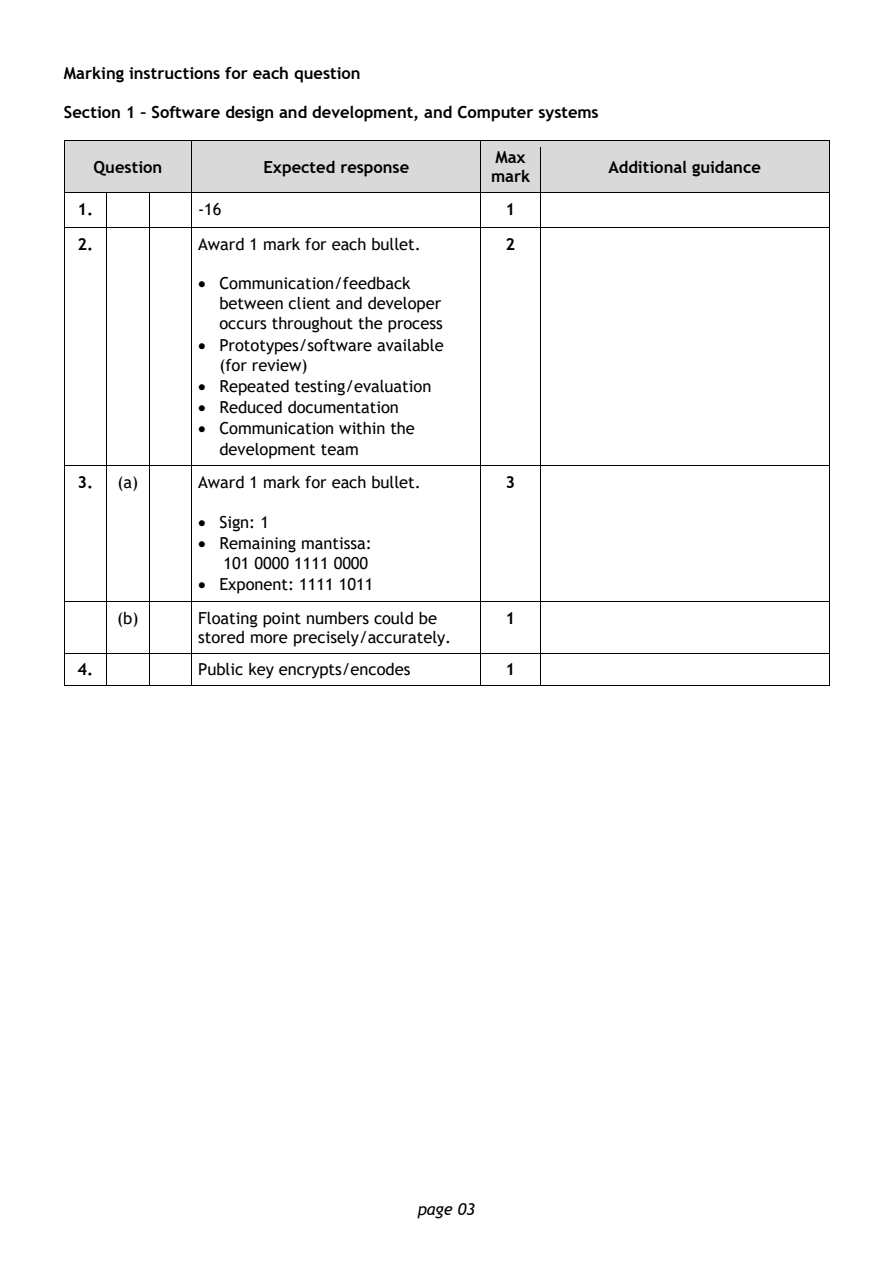
Selectable page text
Marking instructions for each question

Section 1 – Software design and development, and Computer systems

                                        Max
   Question       Expected response               Additional guidance
                                       mark
 1.         -16                         1
 2.         Award 1 mark for each bullet. 2

            • Communication/feedback
              between client and developer
              occurs throughout the process
            • Prototypes/software available
              (for review)
            • Repeated testing/evaluation

            • Reduced documentation
            • Communication within the
              development team
 3.  (a)    Award 1 mark for each bullet. 3

            • Sign: 1
            • Remaining mantissa:

               101 0000 1111 0000
            • Exponent: 1111 1011
     (b)    Floating point numbers could be 1
            stored more precisely/accurately.

 4.         Public key encrypts/encodes 1

                                page 03
PDF page 4
Question 5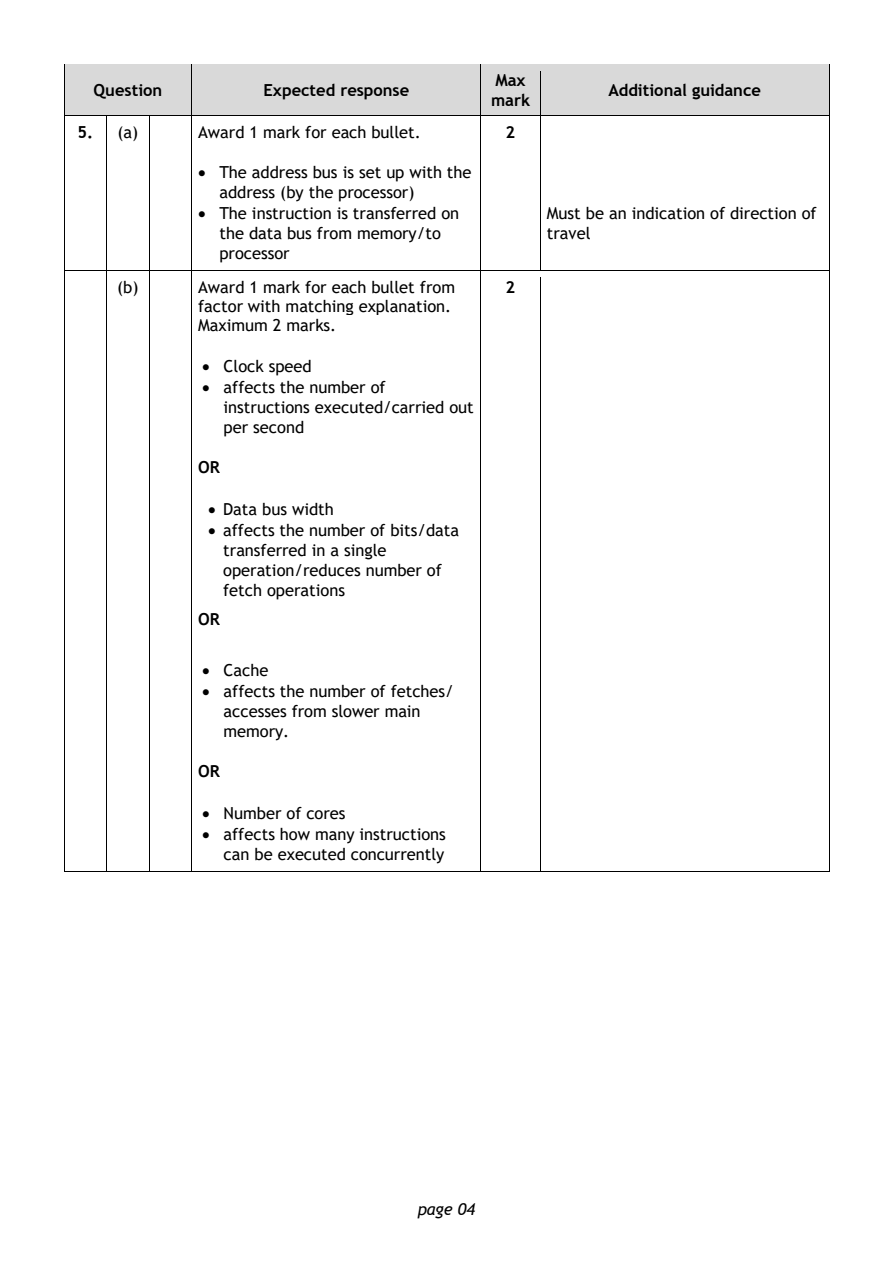
Selectable page text
Max
  Question       Expected response               Additional guidance
                                      mark
5.  (a)    Award 1 mark for each bullet. 2
           • The address bus is set up with the

             address (by the processor)
           • The instruction is transferred on Must be an indication of direction of
             the data bus from memory/to   travel
             processor
    (b)    Award 1 mark for each bullet from 2
           factor with matching explanation.
           Maximum 2 marks.

            • Clock speed
            • affects the number of

              instructions executed/carried out
              per second

           OR

            • Data bus width
            • affects the number of bits/data
              transferred in a single
              operation/reduces number of
              fetch operations
           OR

            • Cache
            • affects the number of fetches/
              accesses from slower main
              memory.

           OR

            • Number of cores
            • affects how many instructions
              can be executed concurrently

                               page 04
PDF page 5
Question 6Question 7Question 8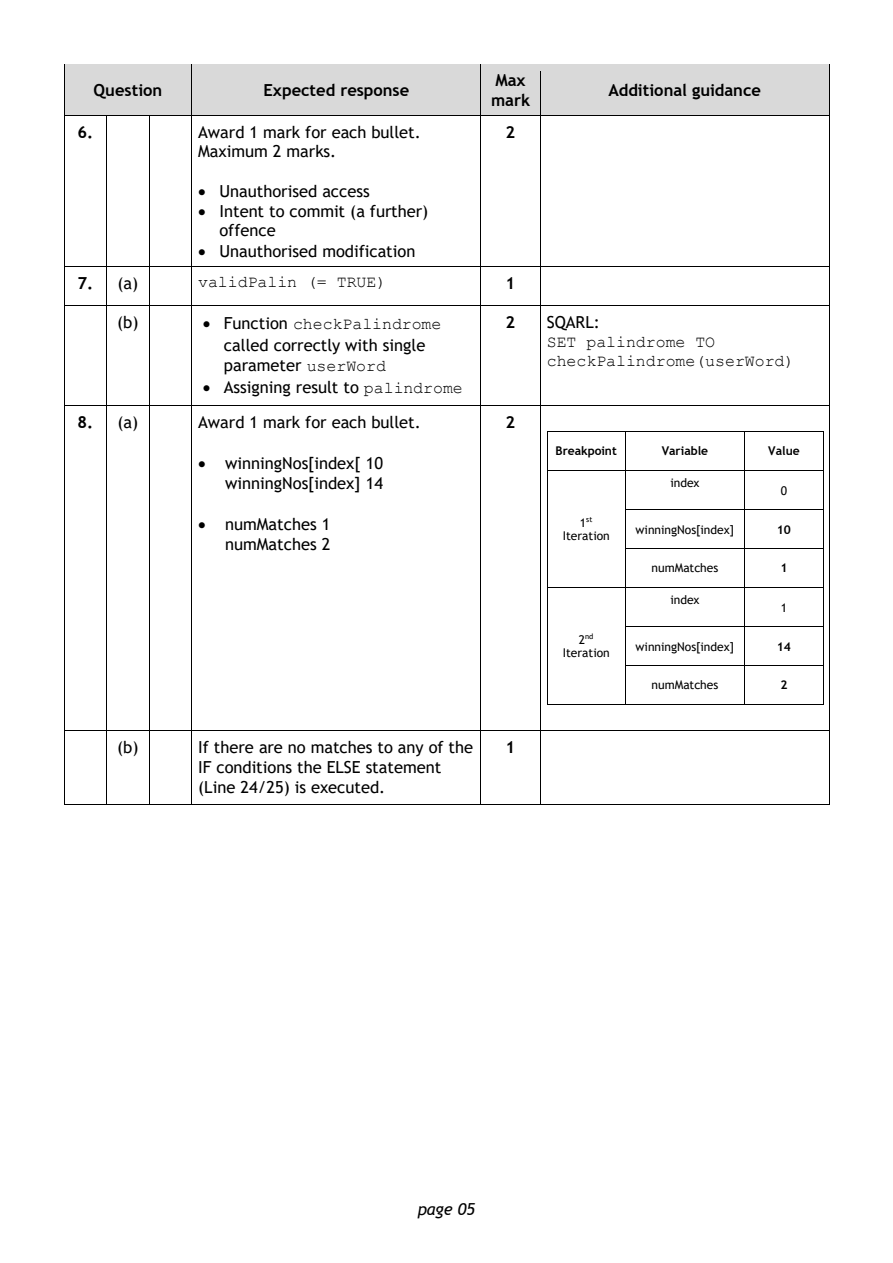
Selectable page text
Max
  Question       Expected response               Additional guidance
                                      mark
6.         Award 1 mark for each bullet. 2
           Maximum 2 marks.
           • Unauthorised access
           • Intent to commit (a further)
             offence
           • Unauthorised modification

7.  (a)                                1
           validPalin (= TRUE)
    (b)     • Function                 2   SQARL:
                    checkPalindrome
              called correctly with single SET palindrome TO
              parameter                    checkPalindrome(userWord)
                     userWord
            • Assigning result to
                          palindrome
8.  (a)    Award 1 mark for each bullet. 2
                                            Breakpoint Variable Value
           •  winningNos[index[ 10
              winningNos[index] 14                     index
                                                                 0
           •  numMatches 1                    1st
                                                   winningNos[index] 10
                                             Iteration
              numMatches 2
                                                     numMatches  1
                                                       index
                                                                 1
                                              2nd
                                                   winningNos[index] 14
                                             Iteration
                                                     numMatches  2
    (b)    If there are no matches to any of the 1
           IF conditions the ELSE statement
           (Line 24/25) is executed.

                               page 05
PDF page 6
Question 9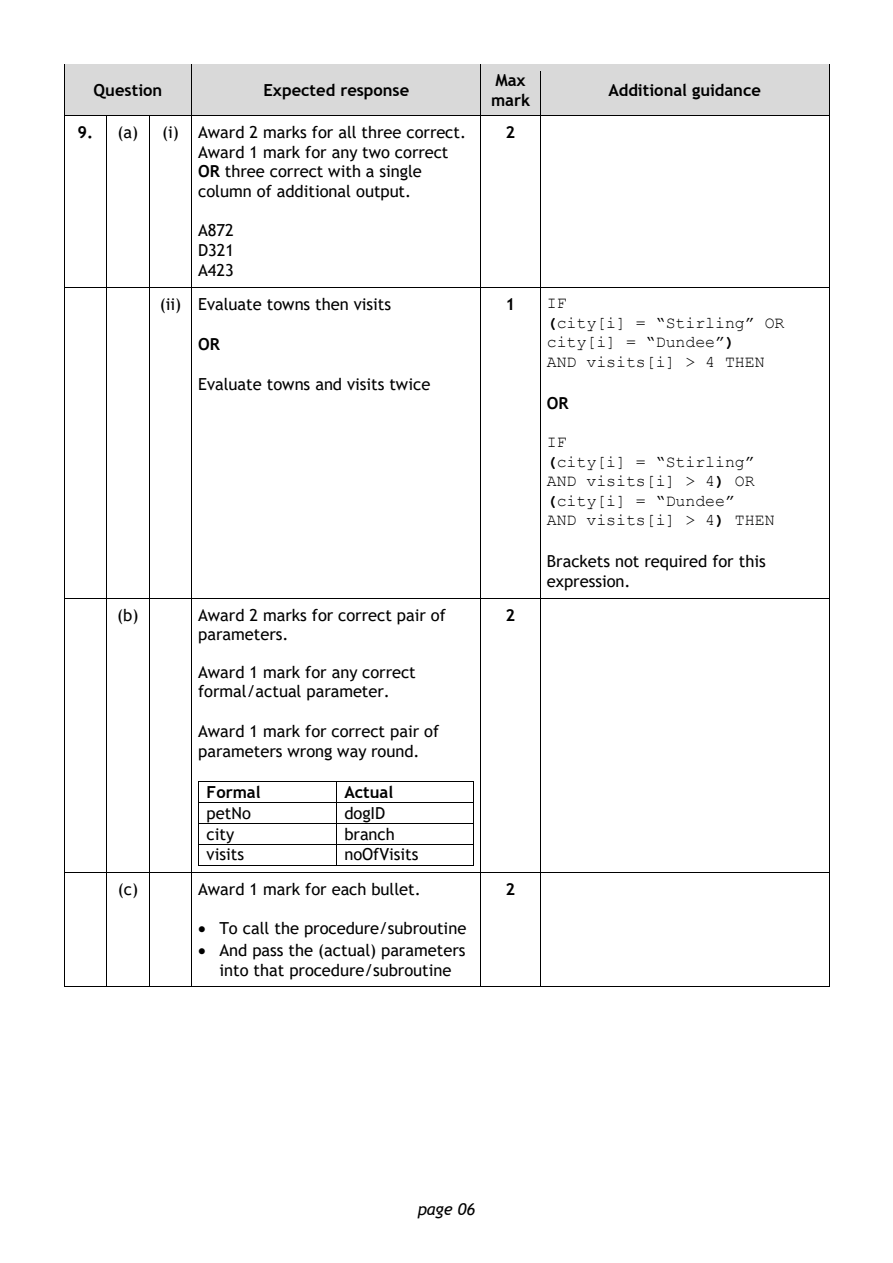
Selectable page text
Max
  Question       Expected response               Additional guidance
                                      mark
9.  (a) (i) Award 2 marks for all three correct. 2
           Award 1 mark for any two correct
           OR three correct with a single
           column of additional output.
           A872

           D321
           A423
        (ii) Evaluate towns then visits 1
                                           IF
                                           (city[i] = “Stirling” OR
           OR                              city[i] = “Dundee”)
                                           AND visits[i] > 4 THEN
           Evaluate towns and visits twice
                                           OR

                                           IF
                                           (city[i] = “Stirling”
                                           AND visits[i] > 4) OR
                                           (city[i] = “Dundee”
                                           AND visits[i] > 4) THEN
                                           Brackets not required for this
                                           expression.

    (b)    Award 2 marks for correct pair of 2
           parameters.

           Award 1 mark for any correct
           formal/actual parameter.

           Award 1 mark for correct pair of
           parameters wrong way round.

            Formal       Actual
            petNo        dogID
            city         branch
            visits       noOfVisits

    (c)    Award 1 mark for each bullet. 2

           • To call the procedure/subroutine
           • And pass the (actual) parameters
             into that procedure/subroutine

                               page 06
PDF page 7
Selectable page text
Max
  Question       Expected response               Additional guidance
                                      mark
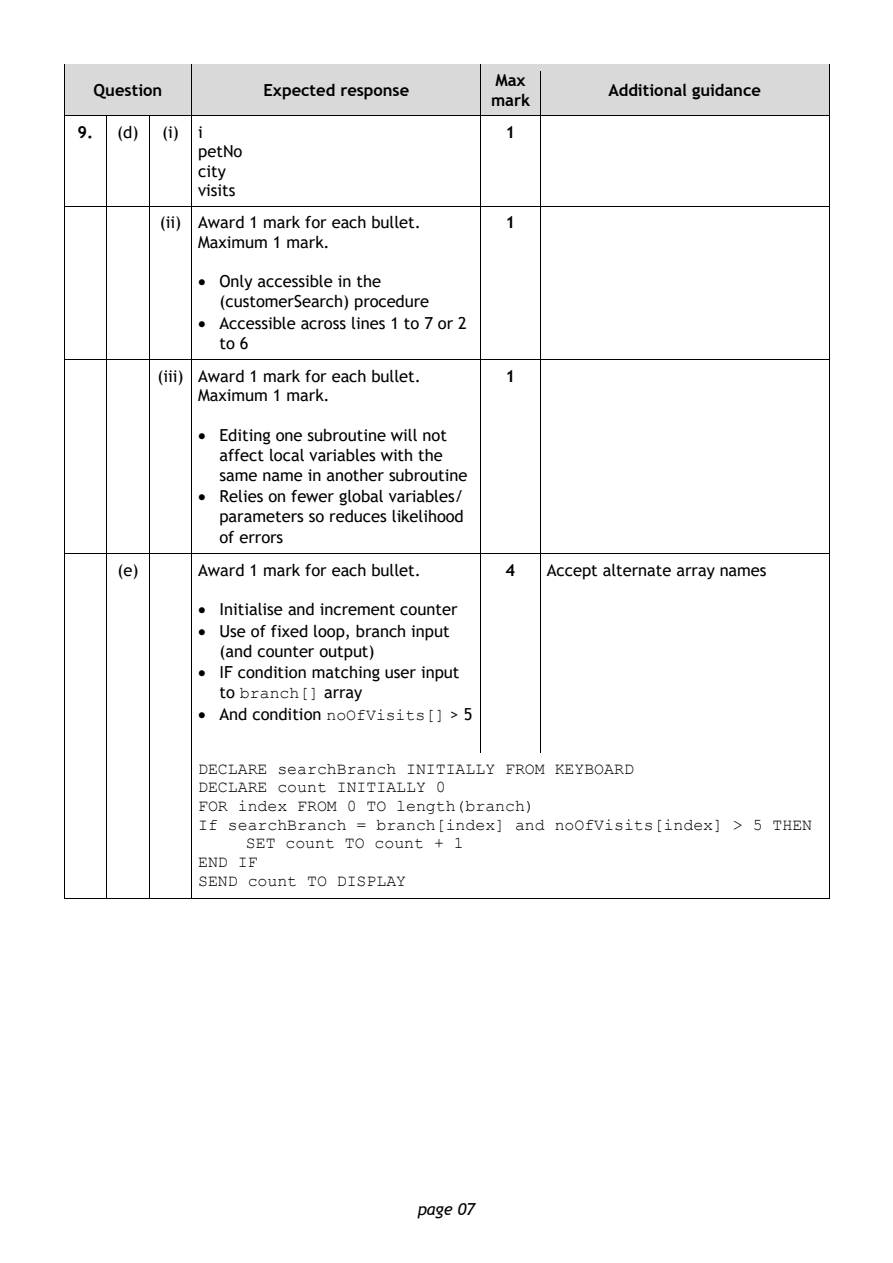
9.  (d) (i) i                          1
           petNo
           city
           visits
        (ii) Award 1 mark for each bullet. 1
           Maximum 1 mark.

           • Only accessible in the
             (customerSearch) procedure
           • Accessible across lines 1 to 7 or 2
             to 6

       (iii) Award 1 mark for each bullet. 1
           Maximum 1 mark.

           • Editing one subroutine will not
             affect local variables with the
             same name in another subroutine
           • Relies on fewer global variables/
             parameters so reduces likelihood
             of errors

    (e)    Award 1 mark for each bullet. 4 Accept alternate array names

           • Initialise and increment counter
           • Use of fixed loop, branch input
             (and counter output)
           • IF condition matching user input
             to        array
               branch[]
           • And condition        > 5
                       noOfVisits[]
           DECLARE searchBranch INITIALLY FROM KEYBOARD
           DECLARE count INITIALLY 0
           FOR index FROM 0 TO length(branch)
           If searchBranch = branch[index] and noOfVisits[index] > 5 THEN
                SET count TO count + 1
           END IF
           SEND count TO DISPLAY

                               page 07
PDF page 8
Question 10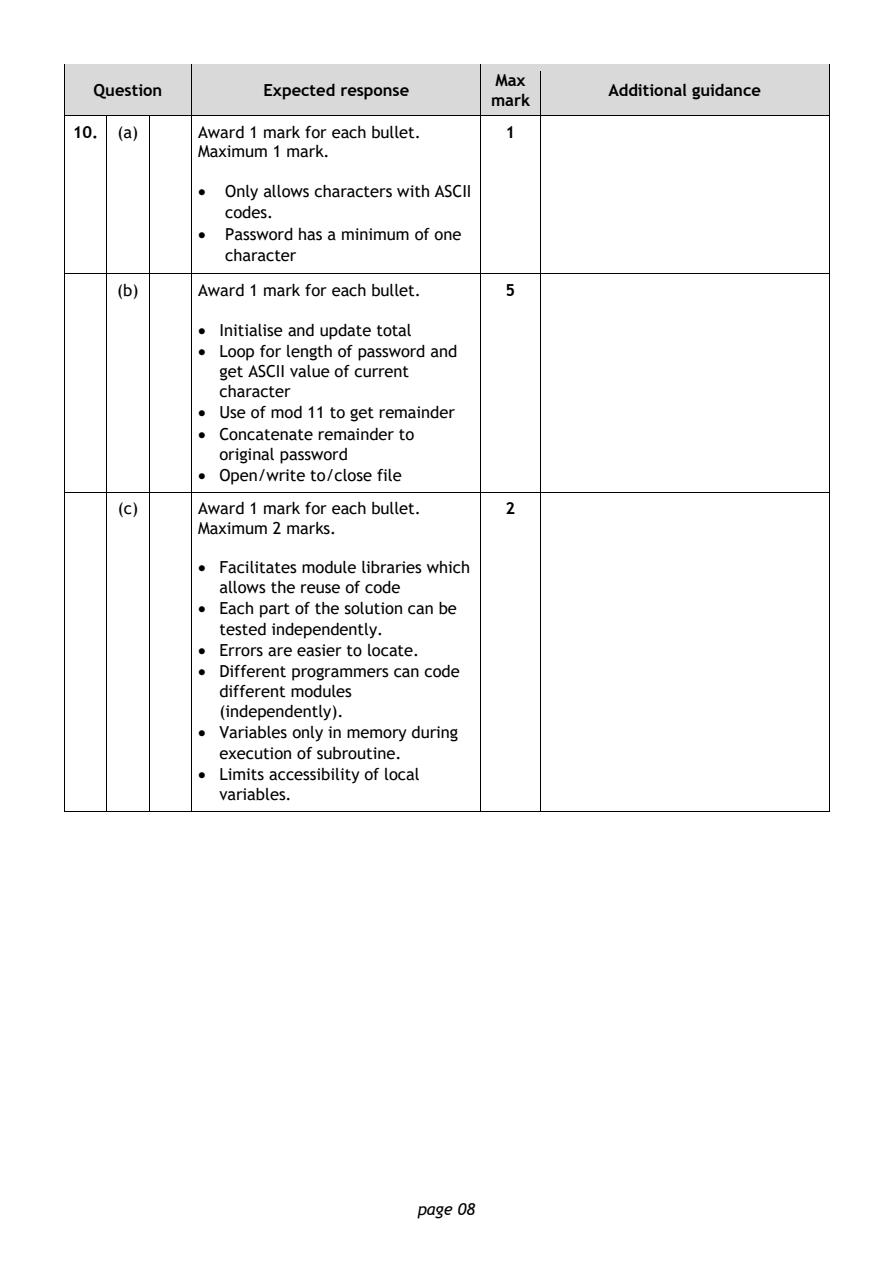
Selectable page text
Max
  Question       Expected response               Additional guidance
                                      mark
10. (a)    Award 1 mark for each bullet. 1
           Maximum 1 mark.
           •  Only allows characters with ASCII

              codes.
           •  Password has a minimum of one
              character

    (b)    Award 1 mark for each bullet. 5

           • Initialise and update total
           • Loop for length of password and
             get ASCII value of current
             character
           • Use of mod 11 to get remainder
           • Concatenate remainder to
             original password
           • Open/write to/close file

    (c)    Award 1 mark for each bullet. 2
           Maximum 2 marks.

           • Facilitates module libraries which
             allows the reuse of code
           • Each part of the solution can be
             tested independently.
           • Errors are easier to locate.
           • Different programmers can code
             different modules
             (independently).
           • Variables only in memory during
             execution of subroutine.
           • Limits accessibility of local
             variables.

                               page 08
PDF page 9
Question 11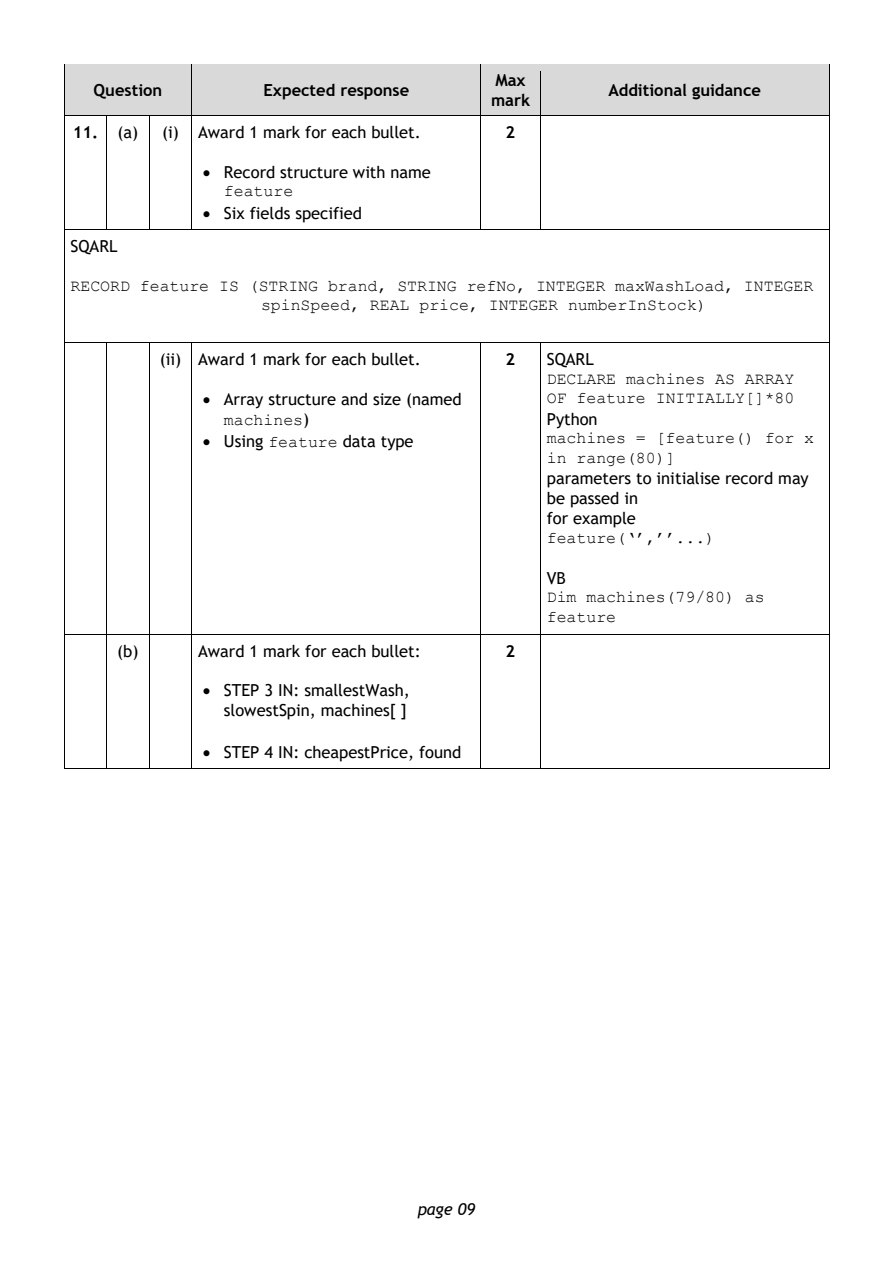
Selectable page text
Max
   Question       Expected response               Additional guidance
                                       mark
 11. (a) (i) Award 1 mark for each bullet. 2
             • Record structure with name

               feature
             • Six fields specified
SQARL

RECORD feature IS (STRING brand, STRING refNo, INTEGER maxWashLoad, INTEGER
                  spinSpeed, REAL price, INTEGER numberInStock)

         (ii) Award 1 mark for each bullet. 2 SQARL
                                            DECLARE machines AS ARRAY
             • Array structure and size (named
                                            OF feature INITIALLY[]*80
                      )                     Python
               machines
             • Using feature data type      machines = [feature() for x
                                            in range(80)]
                                            parameters to initialise record may
                                            be passed in
                                            for example
                                            feature(‘’,’’...)
                                            VB
                                            Dim machines(79/80) as
                                            feature
     (b)    Award 1 mark for each bullet: 2

             • STEP 3 IN: smallestWash,
               slowestSpin, machines[ ]

             • STEP 4 IN: cheapestPrice, found

                                page 09
PDF page 10
Selectable page text
Max
   Question       Expected response               Additional guidance
                                       mark
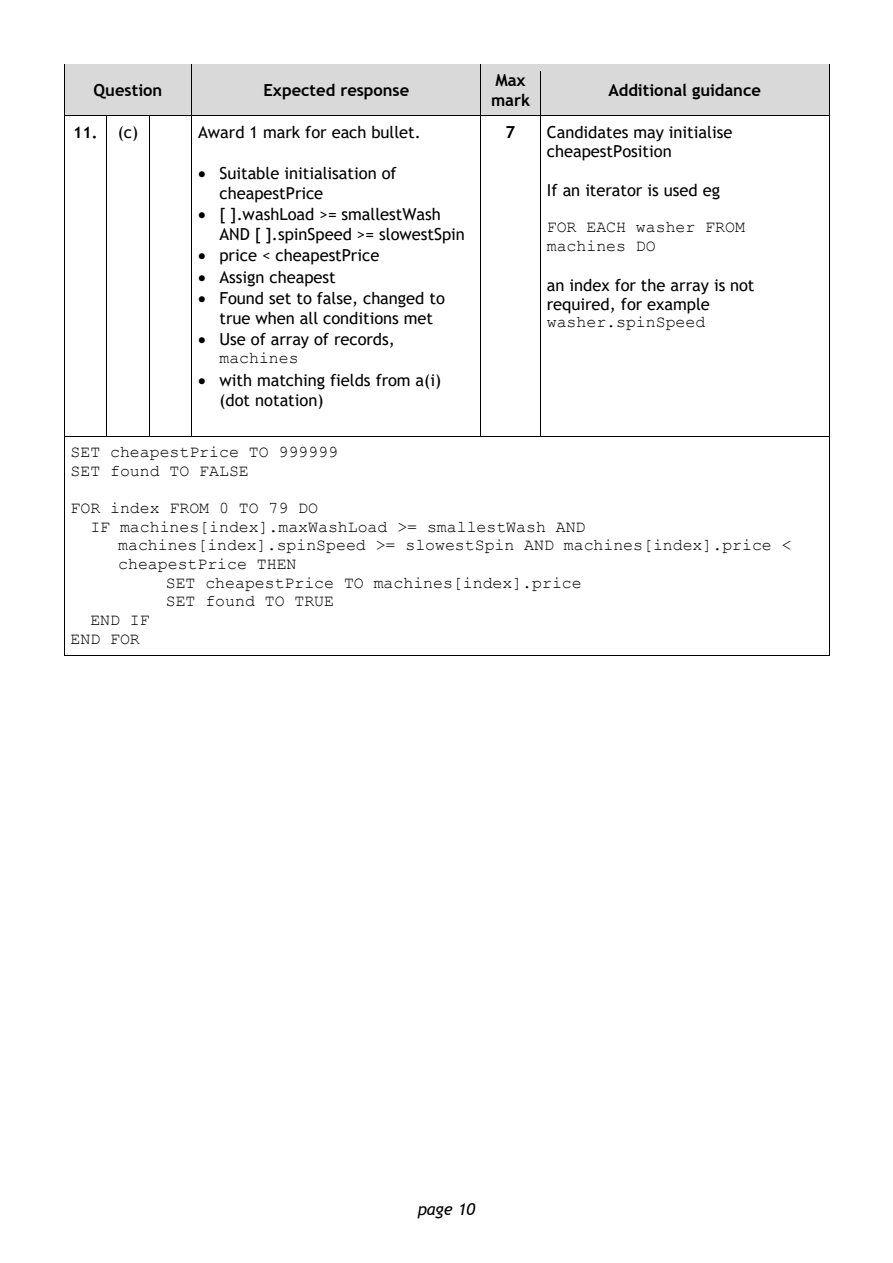
 11. (c)    Award 1 mark for each bullet. 7 Candidates may initialise
                                            cheapestPosition
            • Suitable initialisation of
              cheapestPrice                 If an iterator is used eg
            • [ ].washLoad >= smallestWash
              AND [ ].spinSpeed >= slowestSpin FOR EACH washer FROM
            • price < cheapestPrice         machines DO
            • Assign cheapest
                                            an index for the array is not
            • Found set to false, changed to
                                            required, for example
              true when all conditions met
                                            washer.spinSpeed
            • Use of array of records,
              machines
            • with matching fields from a(i)
              (dot notation)
SET cheapestPrice TO 999999
SET found TO FALSE
FOR index FROM 0 TO 79 DO
  IF machines[index].maxWashLoad >= smallestWash AND
     machines[index].spinSpeed >= slowestSpin AND machines[index].price <
     cheapestPrice THEN
         SET cheapestPrice TO machines[index].price
         SET found TO TRUE
  END IF
END FOR

                                page 10
PDF page 11
Question 12Question 13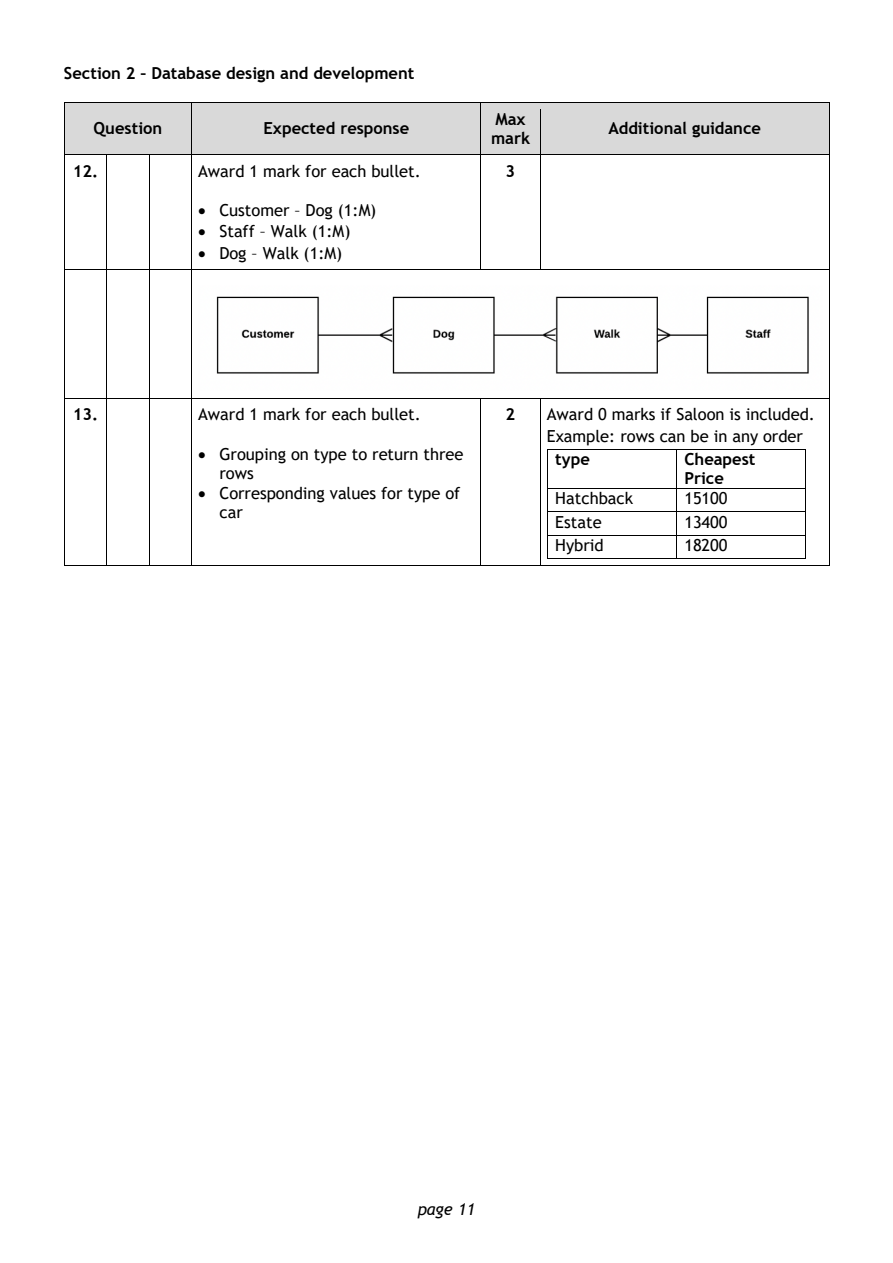
Selectable page text
Section 2 – Database design and development

                                        Max
   Question       Expected response               Additional guidance
                                       mark
 12.        Award 1 mark for each bullet. 3
            • Customer – Dog (1:M)

            • Staff – Walk (1:M)
            • Dog – Walk (1:M)

 13.        Award 1 mark for each bullet. 2 Award 0 marks if Saloon is included.
                                            Example: rows can be in any order
            • Grouping on type to return three
                                             type        Cheapest
              rows
                                                         Price
            • Corresponding values for type of
                                             Hatchback   15100
              car
                                             Estate      13400
                                             Hybrid      18200

                                page 11
PDF page 12
Question 14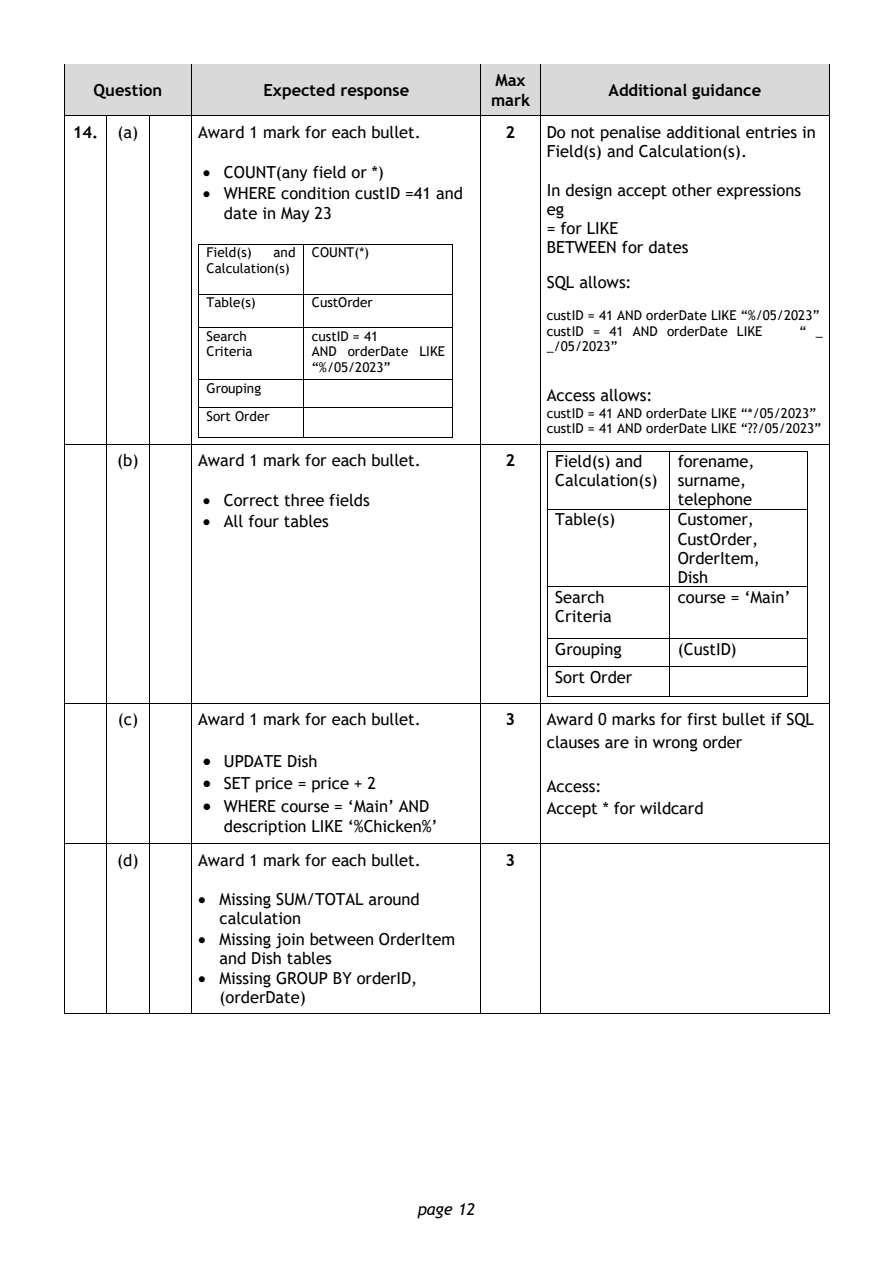
Selectable page text
Max
  Question       Expected response               Additional guidance
                                      mark
14. (a)    Award 1 mark for each bullet. 2 Do not penalise additional entries in
                                           Field(s) and Calculation(s).
            • COUNT(any field or *)
            • WHERE condition custID =41 and In design accept other expressions
              date in May 23               eg
                                           = for LIKE
                                           BETWEEN for dates
            Field(s) and COUNT(*)
            Calculation(s)
                                           SQL allows:
            Table(s)  CustOrder
                                           custID = 41 AND orderDate LIKE “%/05/2023”
                                           custID = 41 AND orderDate LIKE “ _
            Search    custID = 41
                                           _/05/2023”
            Criteria  AND orderDate LIKE
                      “ %/05/2023”
            Grouping
                                           Access allows:
            Sort Order                     custID = 41 AND orderDate LIKE “*/05/2023”
                                           c ustID = 41 AND orderDate LIKE “??/05/2023”
    (b)    Award 1 mark for each bullet. 2  Field(s) and forename,
                                            Calculation(s) surname,
            • Correct three fields                     telephone
            • All four tables               Table(s)   Customer,
                                                       CustOrder,
                                                       OrderItem,
                                                       Dish
                                            Search     course = ‘Main’
                                            Criteria
                                            Grouping   (CustID)
                                            Sort Order
    (c)    Award 1 mark for each bullet. 3 Award 0 marks for first bullet if SQL
                                           clauses are in wrong order
            • UPDATE Dish
            • SET price = price + 2        Access:
            • WHERE course = ‘Main’ AND    Accept * for wildcard
              description LIKE ‘%Chicken%’
    (d)    Award 1 mark for each bullet. 3
           • Missing SUM/TOTAL around
             calculation
           • Missing join between OrderItem
             and Dish tables
           • Missing GROUP BY orderID,
             (orderDate)

                               page 12
PDF page 13
Question 15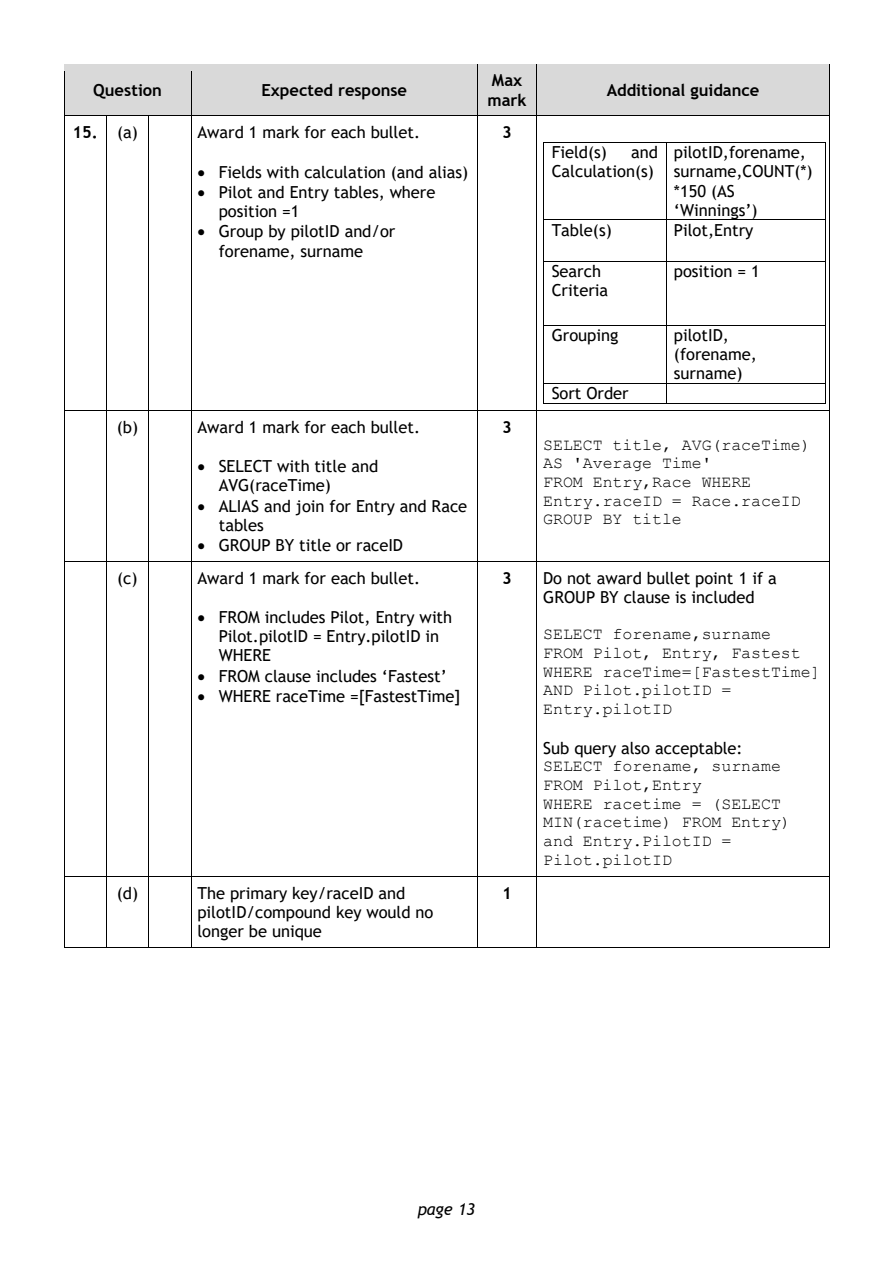
Selectable page text
Max
  Question       Expected response               Additional guidance
                                      mark
15. (a)    Award 1 mark for each bullet. 3
                                            Field(s) and pilotID,forename,
           • Fields with calculation (and alias) Calculation(s) surname,COUNT(*)
           • Pilot and Entry tables, where             *150 (AS
             position =1                               ‘Winnings’)
           • Group by pilotID and/or        Table(s)   Pilot,Entry
             forename, surname
                                            Search     position = 1
                                            Criteria

                                            Grouping   pilotID,
                                                       (forename,
                                                       surname)
                                            Sort Order

    (b)    Award 1 mark for each bullet. 3
                                           SELECT title, AVG(raceTime)
           • SELECT with title and         AS 'Average Time'
             AVG(raceTime)                 FROM Entry,Race WHERE
           • ALIAS and join for Entry and Race Entry.raceID = Race.raceID
             tables                        G ROUP BY title
           • GROUP BY title or raceID
    (c)    Award 1 mark for each bullet. 3 Do not award bullet point 1 if a
                                           GROUP BY clause is included
           • FROM includes Pilot, Entry with
             Pilot.pilotID = Entry.pilotID in SELECT forename,surname
             WHERE                         FROM Pilot, Entry, Fastest
           • FROM clause includes ‘Fastest’ WHERE raceTime=[FastestTime]
           • WHERE raceTime =[FastestTime] AND Pilot.pilotID =
                                           Entry.pilotID

                                           Sub query also acceptable:
                                           SELECT forename, surname
                                           FROM Pilot,Entry
                                           WHERE racetime = (SELECT
                                           MIN(racetime) FROM Entry)
                                           and Entry.PilotID =
                                           Pilot.pilotID
    (d)    The primary key/raceID and  1
           pilotID/compound key would no
           longer be unique

                               page 13
PDF page 14
Question 16Question 17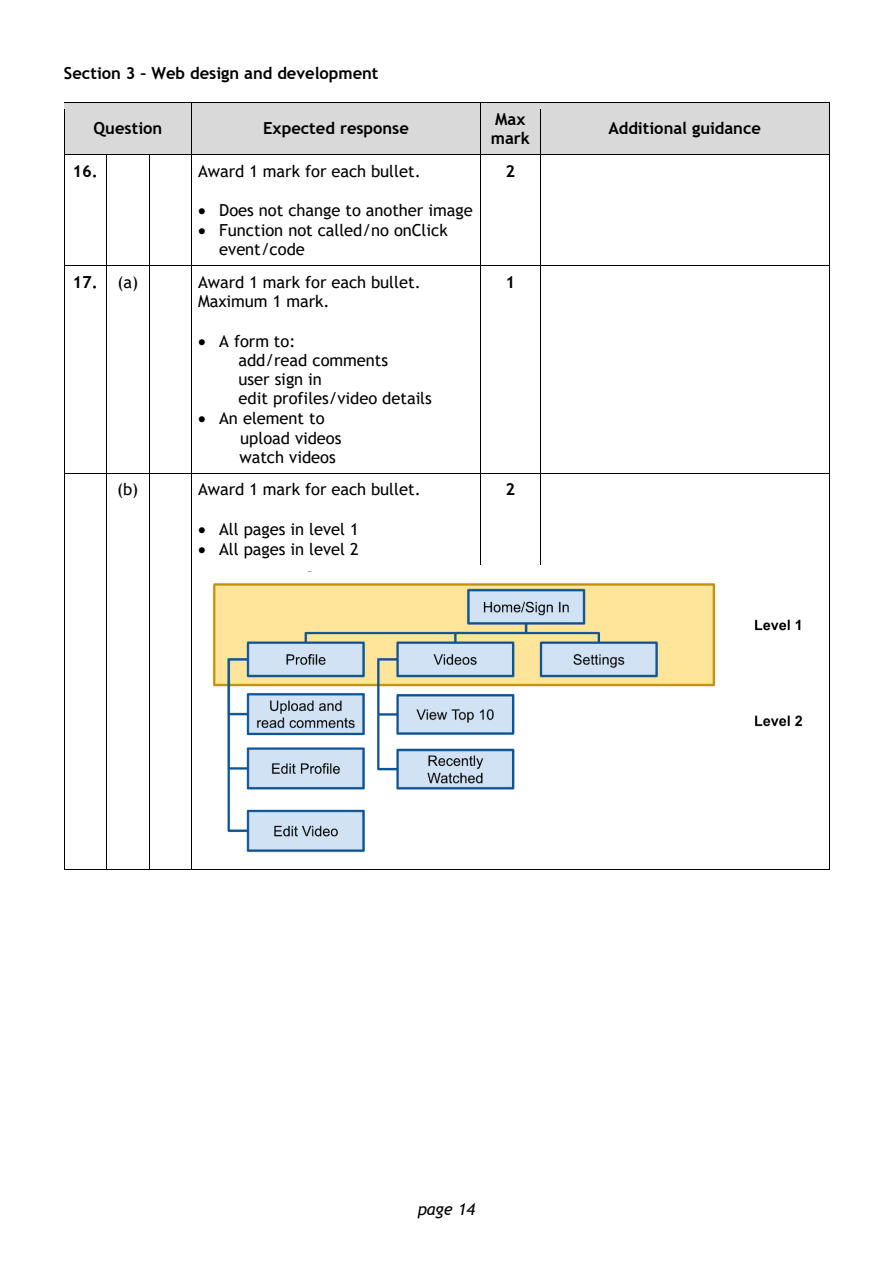
Selectable page text
Section 3 – Web design and development

                                        Max
   Question       Expected response               Additional guidance
                                       mark
 16.        Award 1 mark for each bullet. 2
            • Does not change to another image
            • Function not called/no onClick
              event/code

 17. (a)    Award 1 mark for each bullet. 1
            Maximum 1 mark.

            • A form to:
                add/read comments
                user sign in
                edit profiles/video details
            • An element to
                upload videos
                watch videos

     (b)    Award 1 mark for each bullet. 2

            • All pages in level 1
            • All pages in level 2

                                page 14
PDF page 15
Question 18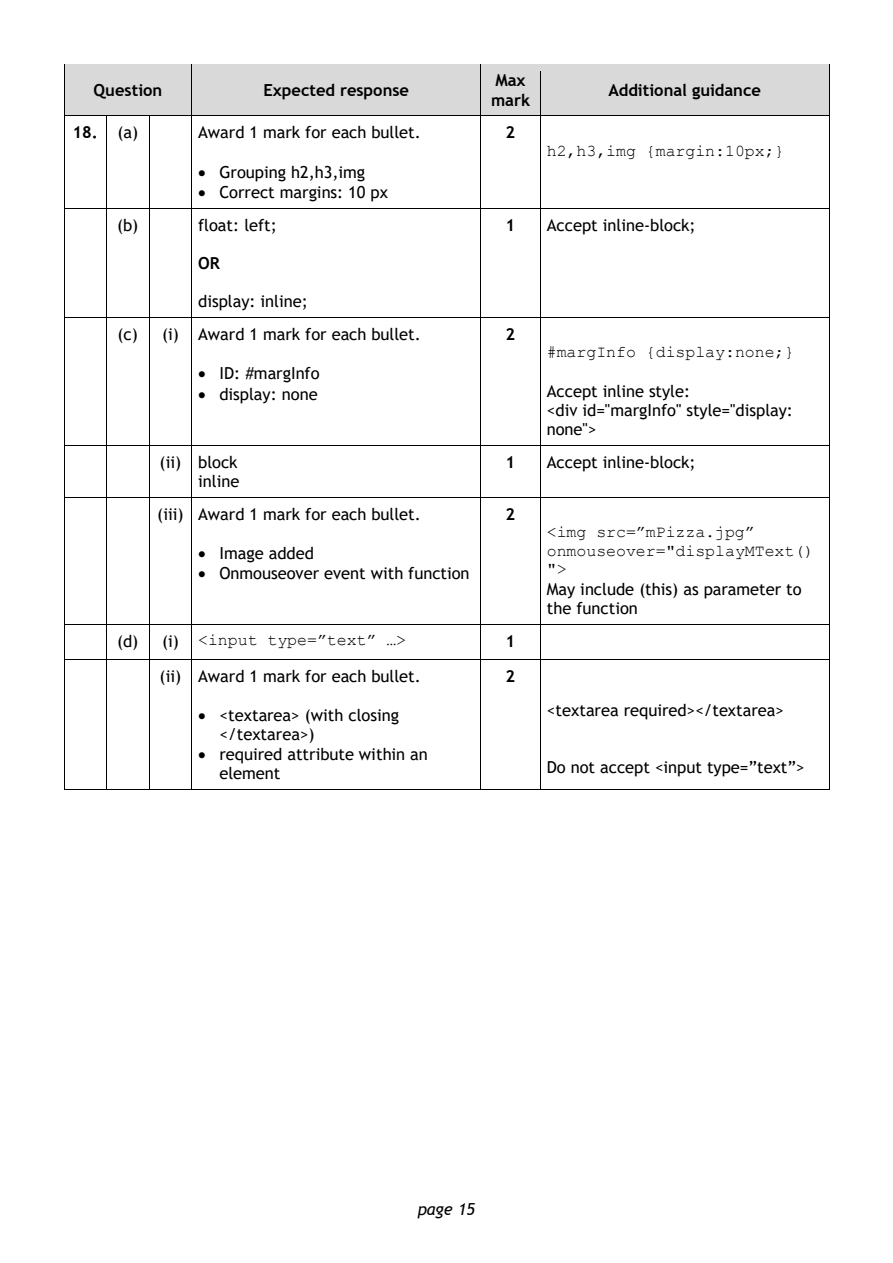
Selectable page text
Max
  Question       Expected response               Additional guidance
                                      mark
18. (a)    Award 1 mark for each bullet. 2
                                           h2,h3,img {margin:10px;}
           • Grouping h2,h3,img
           • Correct margins: 10 px
    (b)    float: left;                1   Accept inline-block;

           OR

           display: inline;

    (c) (i) Award 1 mark for each bullet. 2
                                           #margInfo {display:none;}
           • ID: #margInfo
           • display: none                 Accept inline style:
                                           <div id="margInfo" style="display:
                                           none">
        (ii) block                     1   Accept inline-block;
           inline

       (iii) Award 1 mark for each bullet. 2
                                           <img src=”mPizza.jpg”
           • Image added                   onmouseover="displayMText()
           • Onmouseover event with function ">
                                           May include (this) as parameter to
                                           the function

    (d) (i)                            1
           <input type=”text” …>
        (ii) Award 1 mark for each bullet. 2
                                           <textarea required></textarea>
           • <textarea> (with closing
             </textarea>)
           • required attribute within an
                                           Do not accept <input type=”text”>
             element

                               page 15
PDF page 16
Question 19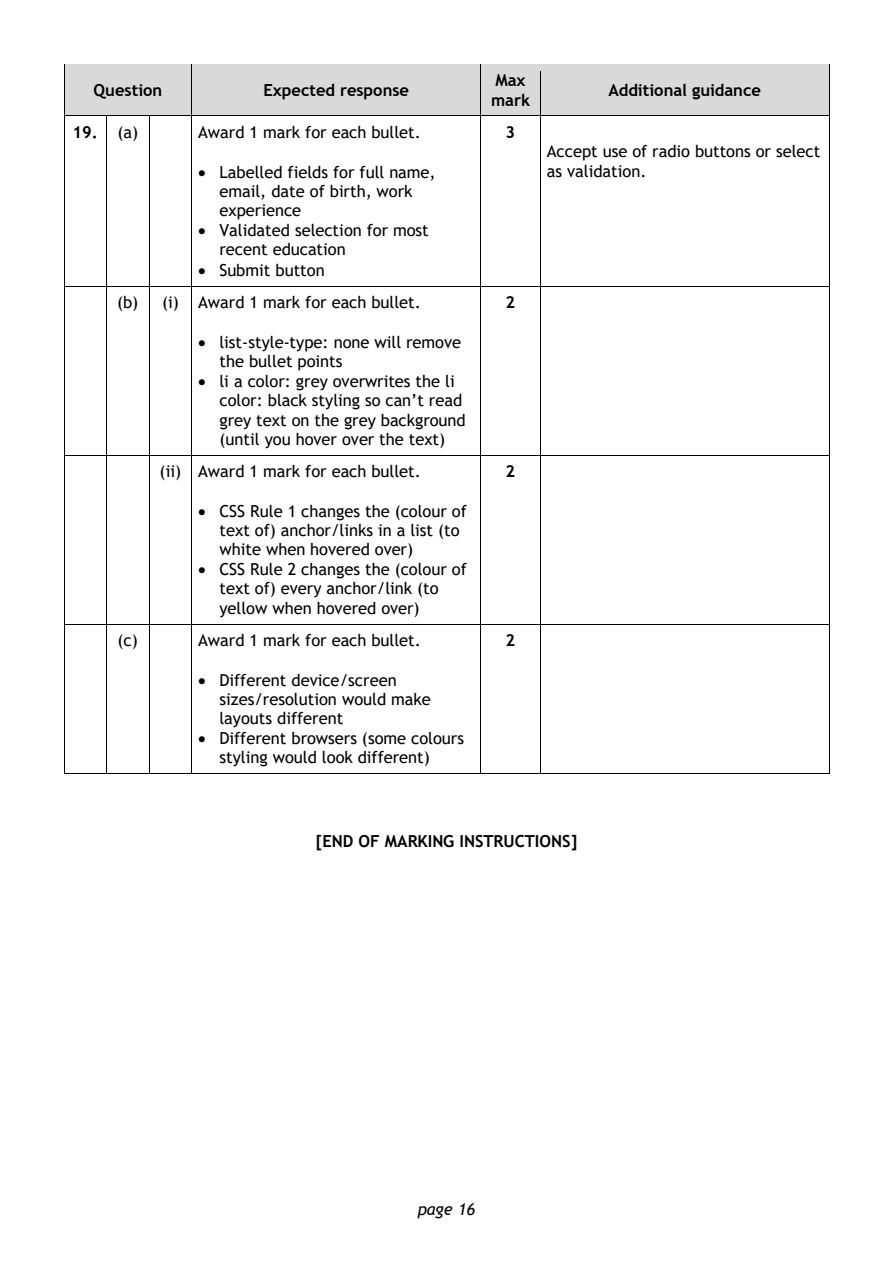
Selectable page text
Max
  Question       Expected response               Additional guidance
                                      mark
19. (a)    Award 1 mark for each bullet. 3
                                           Accept use of radio buttons or select
           • Labelled fields for full name, as validation.
             email, date of birth, work
             experience
           • Validated selection for most
             recent education
           • Submit button
    (b) (i) Award 1 mark for each bullet. 2

           • list-style-type: none will remove
             the bullet points
           • li a color: grey overwrites the li
             color: black styling so can’t read
             grey text on the grey background
             (until you hover over the text)

        (ii) Award 1 mark for each bullet. 2

           • CSS Rule 1 changes the (colour of
             text of) anchor/links in a list (to
             white when hovered over)
           • CSS Rule 2 changes the (colour of
             text of) every anchor/link (to
             yellow when hovered over)

    (c)    Award 1 mark for each bullet. 2

           • Different device/screen
             sizes/resolution would make
             layouts different
           • Different browsers (some colours
             styling would look different)

                      [END OF MARKING INSTRUCTIONS]

                               page 16