2022 Higher Computing Science marking instructions
Source: Scottish Qualifications Authority (SQA) / Qualifications Scotland. This is a StemInteract HTML companion, not an official HTML edition. Selectable text is supplied alongside original page images. Use the images or original PDF for equations, powers, fractions, vector notation, tables and diagrams; text extraction cannot fully preserve mathematical layout.
Jump to a question
PDF page 1

Selectable page text
National

                  Qualifications
                  2022

                2022   Computing      Science

                            Higher

             Finalised   Marking    Instructions

© Scottish Qualifications Authority 2022

These marking instructions have been prepared by examination teams for use by SQA appointed markers
when marking external course assessments.

The information in this document may be reproduced in support of SQA qualifications only on a non-
commercial basis. If it is reproduced, SQA must be clearly acknowledged as the source. If it is to be
reproduced for any other purpose, written permission must be obtained from permissions@sqa.org.uk.
PDF page 2
Selectable page text
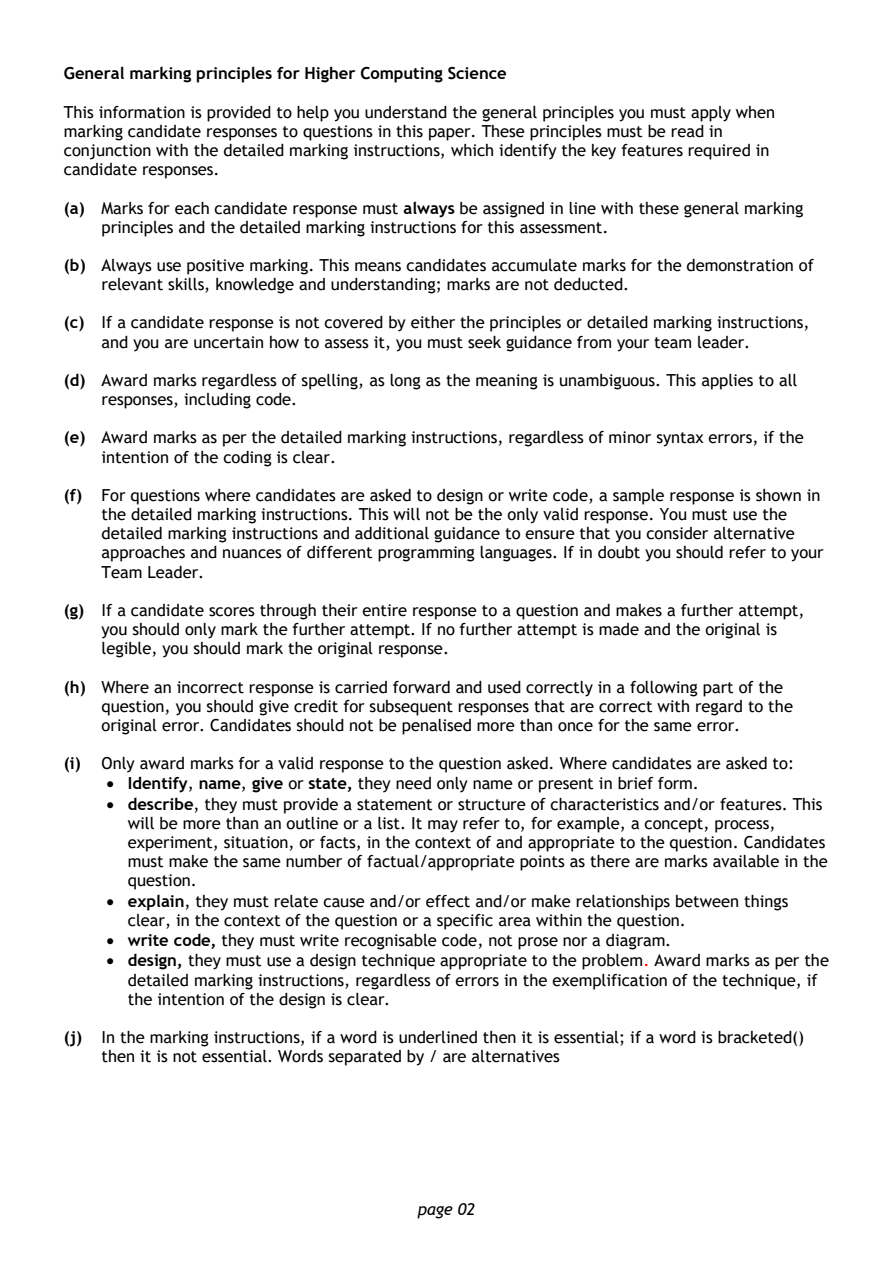
General marking principles for Higher Computing Science

This information is provided to help you understand the general principles you must apply when
marking candidate responses to questions in this paper. These principles must be read in
conjunction with the detailed marking instructions, which identify the key features required in
candidate responses.

(a) Marks for each candidate response must always be assigned in line with these general marking
   principles and the detailed marking instructions for this assessment.

(b) Always use positive marking. This means candidates accumulate marks for the demonstration of
   relevant skills, knowledge and understanding; marks are not deducted.

(c) If a candidate response is not covered by either the principles or detailed marking instructions,
   and you are uncertain how to assess it, you must seek guidance from your team leader.

(d) Award marks regardless of spelling, as long as the meaning is unambiguous. This applies to all
   responses, including code.

(e) Award marks as per the detailed marking instructions, regardless of minor syntax errors, if the
   intention of the coding is clear.

(f) For questions where candidates are asked to design or write code, a sample response is shown in
   the detailed marking instructions. This will not be the only valid response. You must use the
   detailed marking instructions and additional guidance to ensure that you consider alternative
   approaches and nuances of different programming languages. If in doubt you should refer to your
   Team Leader.

(g) If a candidate scores through their entire response to a question and makes a further attempt,
   you should only mark the further attempt. If no further attempt is made and the original is
   legible, you should mark the original response.

(h) Where an incorrect response is carried forward and used correctly in a following part of the
   question, you should give credit for subsequent responses that are correct with regard to the
   original error. Candidates should not be penalised more than once for the same error.

(i) Only award marks for a valid response to the question asked. Where candidates are asked to:
    • Identify, name, give or state, they need only name or present in brief form.
    • describe, they must provide a statement or structure of characteristics and/or features. This
      will be more than an outline or a list. It may refer to, for example, a concept, process,
      experiment, situation, or facts, in the context of and appropriate to the question. Candidates
      must make the same number of factual/appropriate points as there are marks available in the
      question.
    • explain, they must relate cause and/or effect and/or make relationships between things
      clear, in the context of the question or a specific area within the question.
    • write code, they must write recognisable code, not prose nor a diagram.
    • design, they must use a design technique appropriate to the problem. Award marks as per the
      detailed marking instructions, regardless of errors in the exemplification of the technique, if
      the intention of the design is clear.

(j) In the marking instructions, if a word is underlined then it is essential; if a word is bracketed()
   then it is not essential. Words separated by / are alternatives

                                page 02
PDF page 3
Question 1Question 2Question 3Question 4Question 5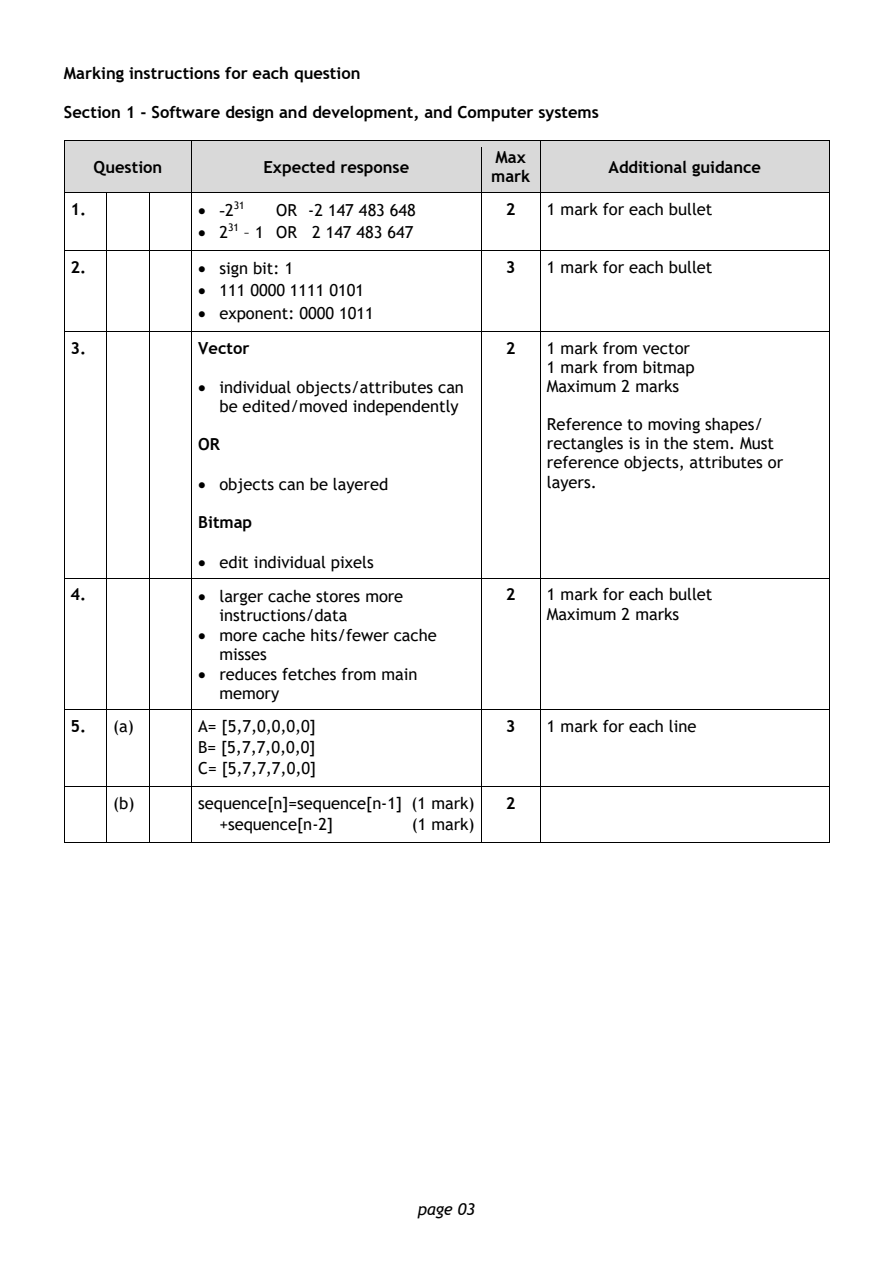
Selectable page text
Marking instructions for each question

Section 1 - Software design and development, and Computer systems

                                        Max
   Question       Expected response               Additional guidance
                                       mark
1.          • -231 OR -2 147 483 648     2  1 mark for each bullet
            • 231 – 1 OR 2 147 483 647
2.          • sign bit: 1                3  1 mark for each bullet

            • 111 0000 1111 0101
            • exponent: 0000 1011
3.          Vector                       2  1 mark from vector
                                            1 mark from bitmap
            • individual objects/attributes can Maximum 2 marks
              be edited/moved independently
                                            Reference to moving shapes/
            OR                              rectangles is in the stem. Must
                                            reference objects, attributes or
            • objects can be layered        layers.

            Bitmap

            • edit individual pixels

4.          • larger cache stores more   2  1 mark for each bullet
              instructions/data             Maximum 2 marks
            • more cache hits/fewer cache
              misses
            • reduces fetches from main
              memory

5.  (a)     A= [5,7,0,0,0,0]             3  1 mark for each line
            B= [5,7,7,0,0,0]
            C= [5,7,7,7,0,0]

    (b)     sequence[n]=sequence[n-1] (1 mark) 2
              +sequence[n-2]    (1 mark)

                                page 03
PDF page 4
Question 6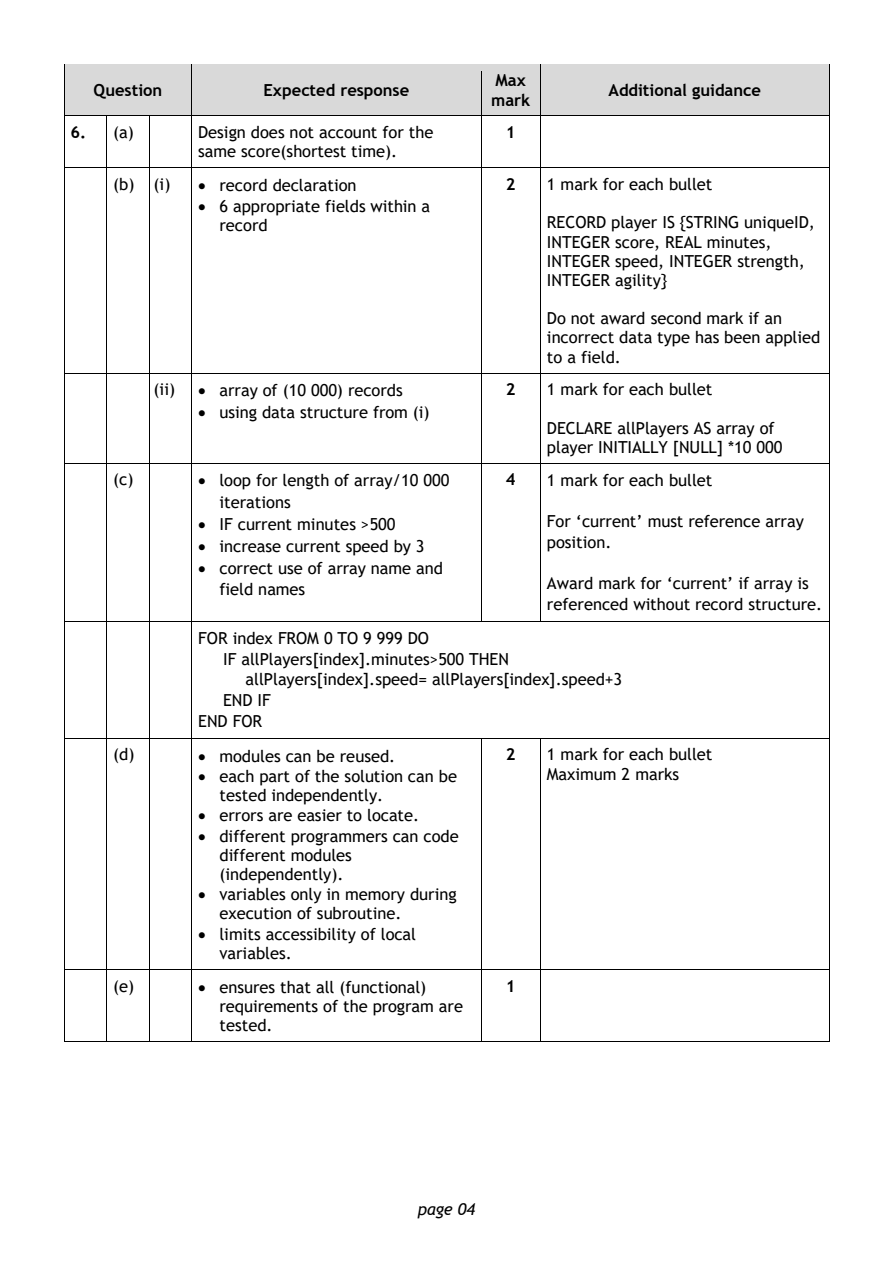
Selectable page text
Max
   Question       Expected response               Additional guidance
                                       mark
6.  (a)     Design does not account for the 1
            same score(shortest time).
    (b) (i) • record declaration         2  1 mark for each bullet
            • 6 appropriate fields within a
              record                        RECORD player IS {STRING uniqueID,
                                            INTEGER score, REAL minutes,
                                            INTEGER speed, INTEGER strength,
                                            INTEGER agility}

                                            Do not award second mark if an
                                            incorrect data type has been applied
                                            to a field.

        (ii) • array of (10 000) records 2  1 mark for each bullet
            • using data structure from (i)
                                            DECLARE allPlayers AS array of
                                            player INITIALLY [NULL] *10 000
    (c)     • loop for length of array/10 000 4 1 mark for each bullet
              iterations
            • IF current minutes >500       For ‘current’ must reference array

            • increase current speed by 3   position.
            • correct use of array name and
                                            Award mark for ‘current’ if array is
              field names
                                            referenced without record structure.
            FOR index FROM 0 TO 9 999 DO
               IF allPlayers[index].minutes>500 THEN
                 allPlayers[index].speed= allPlayers[index].speed+3
               END IF
            END FOR
    (d)     • modules can be reused.     2  1 mark for each bullet
            • each part of the solution can be Maximum 2 marks
              tested independently.
            • errors are easier to locate.
            • different programmers can code
              different modules
              (independently).
            • variables only in memory during
              execution of subroutine.

            • limits accessibility of local
              variables.
    (e)     • ensures that all (functional) 1
              requirements of the program are
              tested.

                                page 04
PDF page 5
Question 7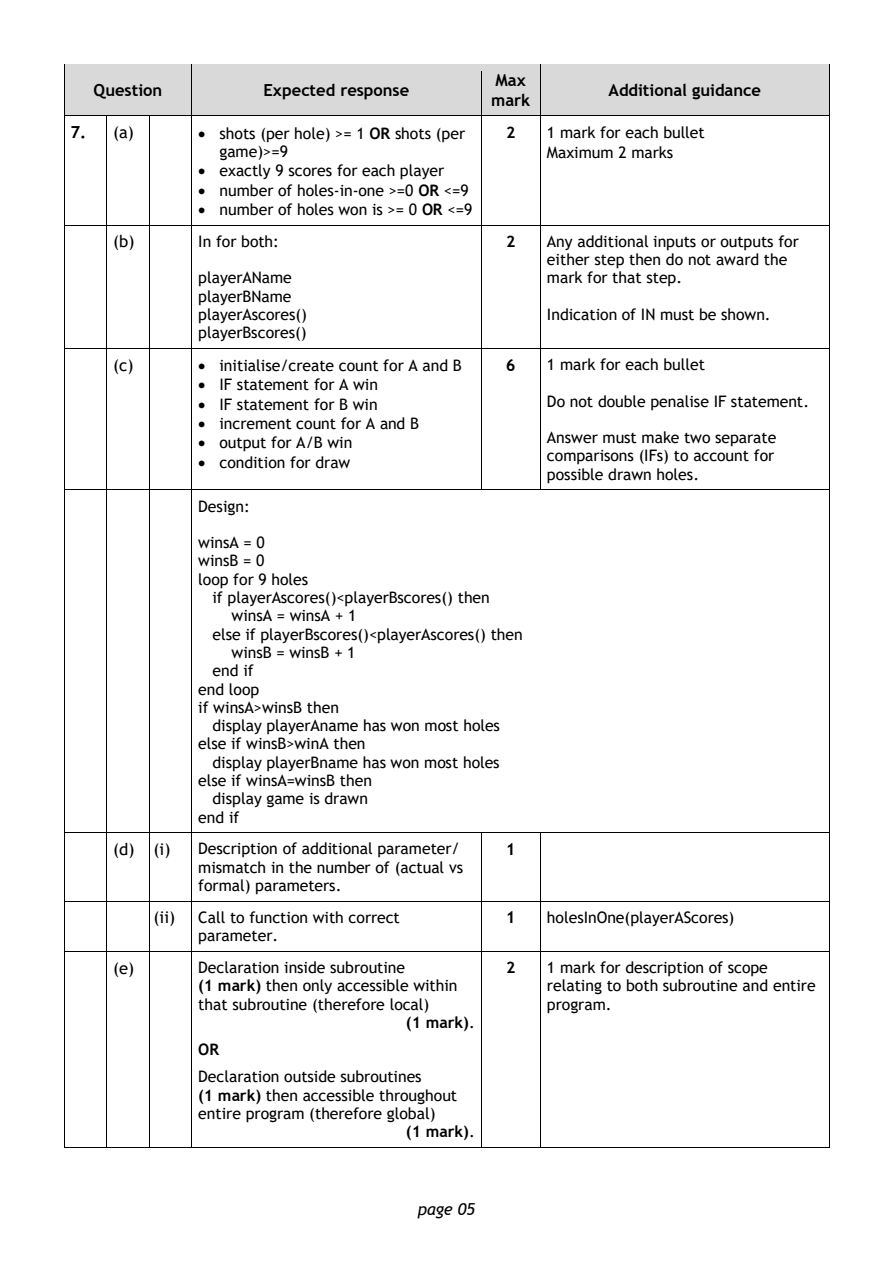
Selectable page text
Max
   Question       Expected response               Additional guidance
                                       mark
7.  (a)     • shots (per hole) >= 1 OR shots (per 2 1 mark for each bullet
              game)>=9                      Maximum 2 marks
            • exactly 9 scores for each player
            • number of holes-in-one >=0 OR <=9
            • number of holes won is >= 0 OR <=9
    (b)     In for both:                 2  Any additional inputs or outputs for
                                            either step then do not award the
            playerAName                     mark for that step.
            playerBName
            playerAscores()                 Indication of IN must be shown.
            playerBscores()
    (c)     • initialise/create count for A and B 6 1 mark for each bullet
            • IF statement for A win
            • IF statement for B win        Do not double penalise IF statement.
            • increment count for A and B
                                            Answer must make two separate
            • output for A/B win
                                            comparisons (IFs) to account for
            • condition for draw
                                            possible drawn holes.
            Design:
            winsA = 0
            winsB = 0
            loop for 9 holes
              if playerAscores()<playerBscores() then
               winsA = winsA + 1
              else if playerBscores()<playerAscores() then
               winsB = winsB + 1
              end if
            end loop
            if winsA>winsB then
              display playerAname has won most holes
            else if winsB>winA then
              display playerBname has won most holes
            else if winsA=winsB then
              display game is drawn
            end if
    (d) (i) Description of additional parameter/ 1
            mismatch in the number of (actual vs
            formal) parameters.
        (ii) Call to function with correct 1 holesInOne(playerAScores)
            parameter.
    (e)     Declaration inside subroutine 2 1 mark for description of scope
            (1 mark) then only accessible within relating to both subroutine and entire
            that subroutine (therefore local) program.
                               (1 mark).
            OR

            Declaration outside subroutines
            (1 mark) then accessible throughout
            entire program (therefore global)
                               (1 mark).

                                page 05
PDF page 6
Question 8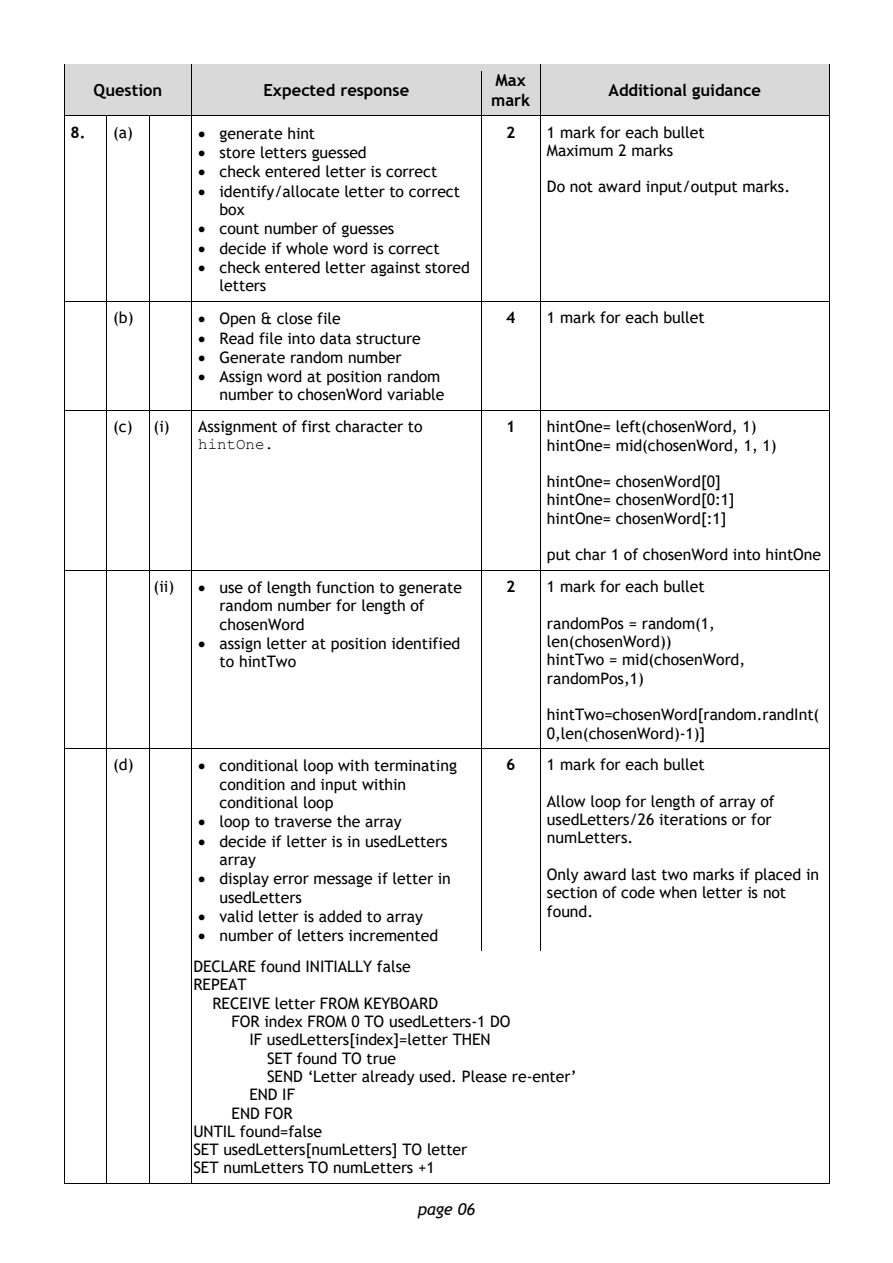
Selectable page text
Max
   Question       Expected response               Additional guidance
                                       mark
8.  (a)     • generate hint              2  1 mark for each bullet
            • store letters guessed         Maximum 2 marks
            • check entered letter is correct
            • identify/allocate letter to correct Do not award input/output marks.
              box
            • count number of guesses
            • decide if whole word is correct
            • check entered letter against stored
              letters
    (b)     • Open & close file          4  1 mark for each bullet
            • Read file into data structure
            • Generate random number
            • Assign word at position random
              number to chosenWord variable

    (c) (i) Assignment of first character to 1 hintOne= left(chosenWord, 1)
            hintOne.                        hintOne= mid(chosenWord, 1, 1)
                                            hintOne= chosenWord[0]
                                            hintOne= chosenWord[0:1]
                                            hintOne= chosenWord[:1]

                                            put char 1 of chosenWord into hintOne

        (ii) • use of length function to generate 2 1 mark for each bullet
              random number for length of
              chosenWord                    randomPos = random(1,
            • assign letter at position identified len(chosenWord))
              to hintTwo                    hintTwo = mid(chosenWord,
                                            randomPos,1)
                                            hintTwo=chosenWord[random.randInt(
                                            0,len(chosenWord)-1)]

    (d)     • conditional loop with terminating 6 1 mark for each bullet
              condition and input within
              conditional loop              Allow loop for length of array of
            • loop to traverse the array    usedLetters/26 iterations or for
            • decide if letter is in usedLetters numLetters.
              array
            • display error message if letter in Only award last two marks if placed in
              usedLetters                   section of code when letter is not
            • valid letter is added to array
                                            f ound.
            • number of letters incremented
            DECLARE found INITIALLY false
            REPEAT
              RECEIVE letter FROM KEYBOARD
               FOR index FROM 0 TO usedLetters-1 DO
                 IF usedLetters[index]=letter THEN
                   SET found TO true
                   SEND ‘Letter already used. Please re-enter’
                 END IF
               END FOR
            UNTIL found=false
            SET usedLetters[numLetters] TO letter
            SET numLetters TO numLetters +1
                                page 06
PDF page 7
Question 9Question 10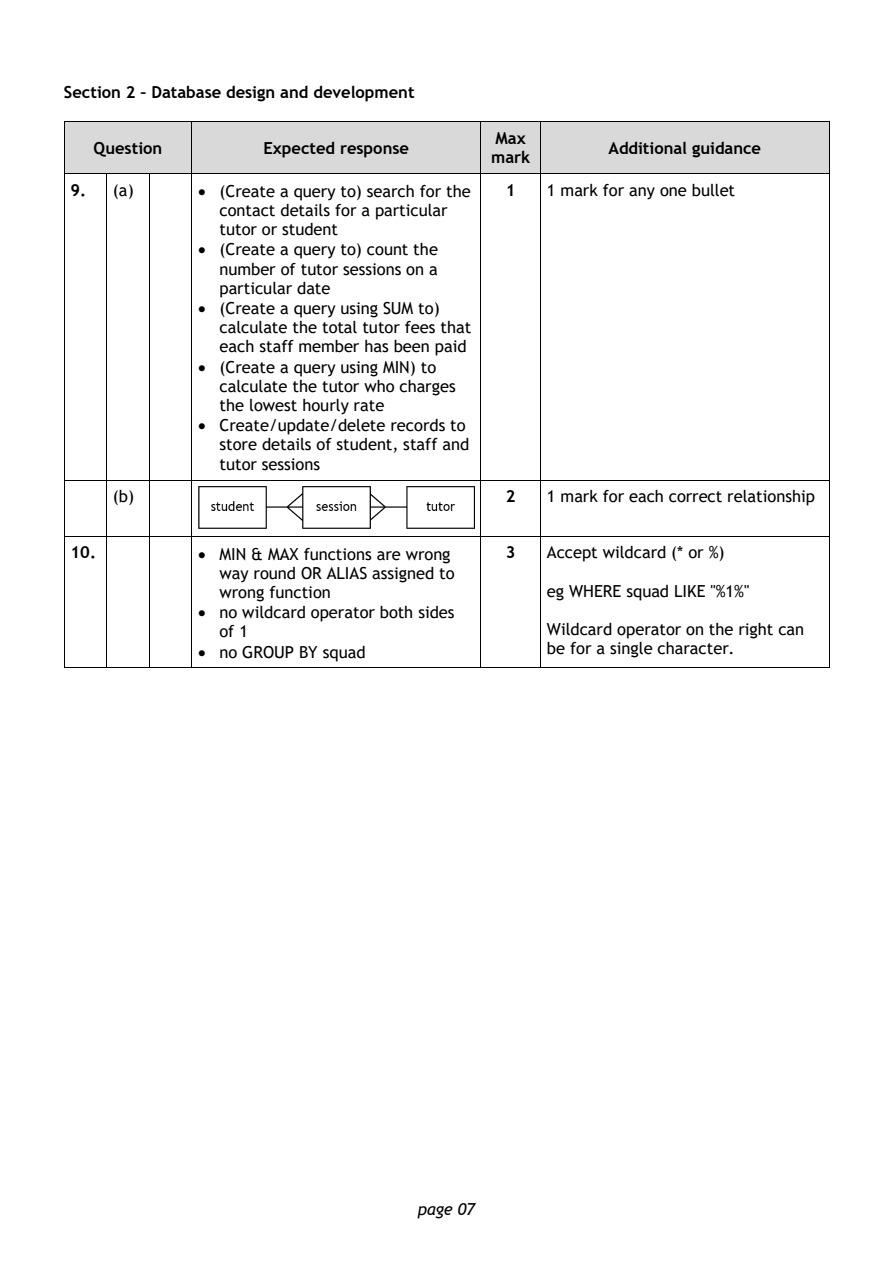
Selectable page text
Section 2 – Database design and development

                                        Max
   Question       Expected response               Additional guidance
                                       mark
9.  (a)     • (Create a query to) search for the 1 1 mark for any one bullet
              contact details for a particular
              tutor or student
            • (Create a query to) count the
              number of tutor sessions on a
              particular date
            • (Create a query using SUM to)
              calculate the total tutor fees that
              each staff member has been paid
            • (Create a query using MIN) to
              calculate the tutor who charges
              the lowest hourly rate
            • Create/update/delete records to
              store details of student, staff and
              tutor sessions
    (b)                                  2  1 mark for each correct relationship

10.         • MIN & MAX functions are wrong 3 Accept wildcard (* or %)
              way round OR ALIAS assigned to
              wrong function                eg WHERE squad LIKE "%1%"
            • no wildcard operator both sides
              of 1                          Wildcard operator on the right can
            • no GROUP BY squad             be for a single character.

                                page 07
PDF page 8
Question 11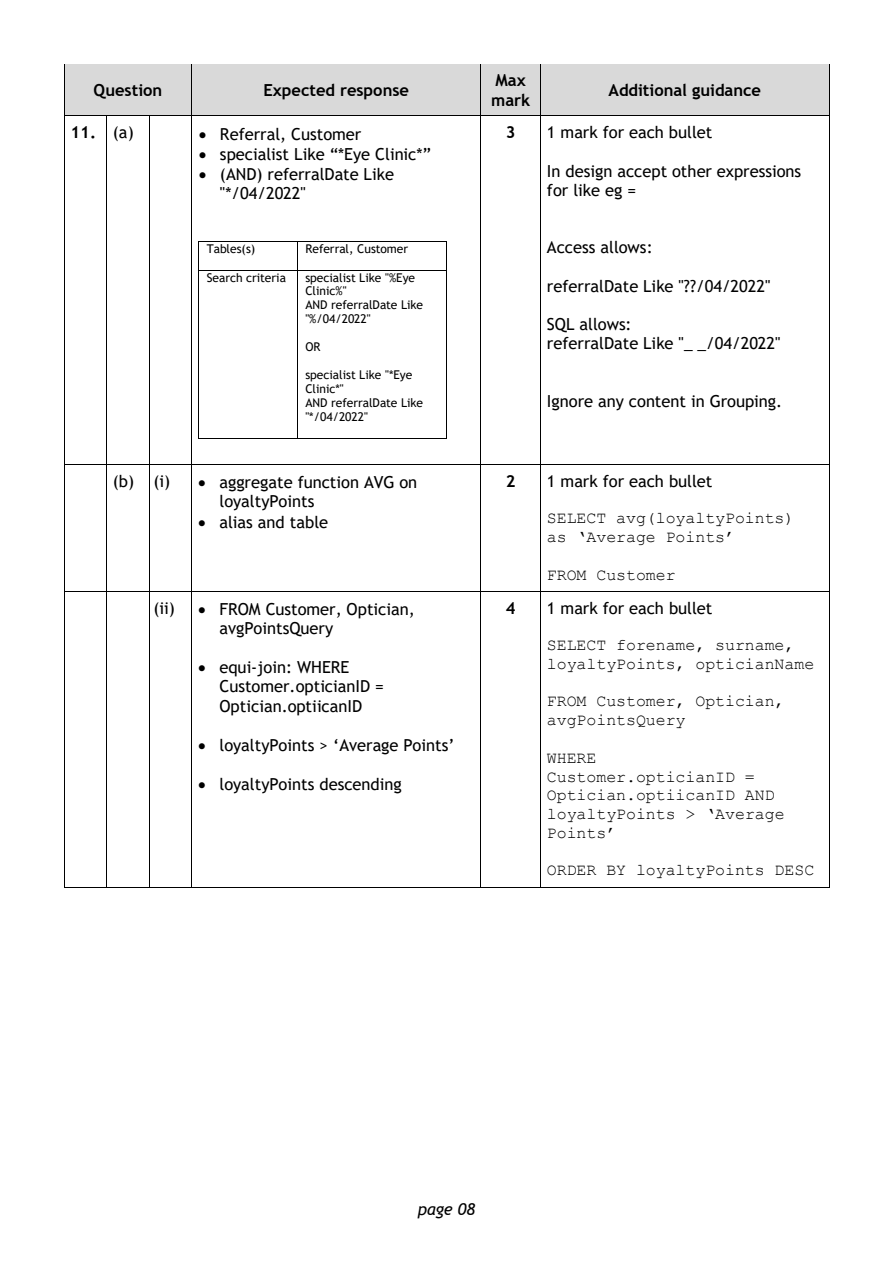
Selectable page text
Max
   Question       Expected response               Additional guidance
                                       mark
11. (a)     • Referral, Customer         3  1 mark for each bullet
            • specialist Like “*Eye Clinic*”
            • (AND) referralDate Like       In design accept other expressions
              "*/04/2022"                   for like eg =

             Tables(s) Referral, Customer   Access allows:

             Search criteria specialist Like "%Eye
                                            referralDate Like "??/04/2022"
                      Clinic%"
                      AND referralDate Like
                      "%/04/2022"           SQL allows:
                                            referralDate Like "_ _/04/2022"
                      OR
                      specialist Like "*Eye
                      Clinic*"
                      AND referralDate Like Ignore any content in Grouping.
                      "*/04/2022"
    (b) (i) • aggregate function AVG on  2  1 mark for each bullet
              loyaltyPoints
            • alias and table               SELECT avg(loyaltyPoints)
                                            as ‘Average Points’
                                            FROM Customer

        (ii) • FROM Customer, Optician,  4  1 mark for each bullet
              avgPointsQuery
                                            SELECT forename, surname,
                                            loyaltyPoints, opticianName
            • equi-join: WHERE
              Customer.opticianID =
                                            FROM Customer, Optician,
              Optician.optiicanID
                                            avgPointsQuery
            • loyaltyPoints > ‘Average Points’
                                            WHERE
                                            Customer.opticianID =
            • loyaltyPoints descending
                                            Optician.optiicanID AND
                                            loyaltyPoints > ‘Average
                                            Points’
                                            ORDER BY loyaltyPoints DESC

                                page 08
PDF page 9
Question 12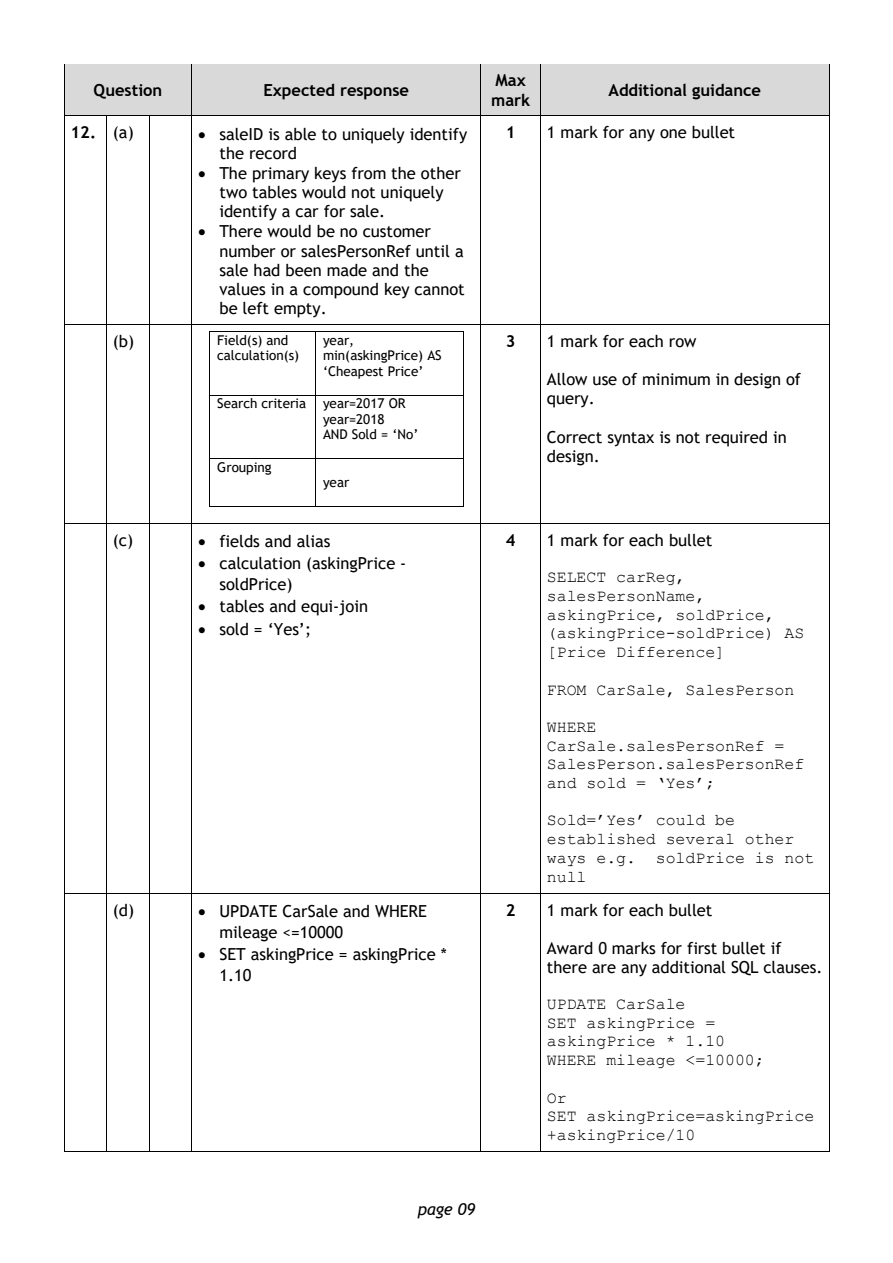
Selectable page text
Max
   Question       Expected response               Additional guidance
                                       mark
12. (a)     • saleID is able to uniquely identify 1 1 mark for any one bullet
              the record
            • The primary keys from the other
              two tables would not uniquely
              identify a car for sale.
            • There would be no customer
              number or salesPersonRef until a
              sale had been made and the
              values in a compound key cannot
              be left empty.
    (b)       Field(s) and year,         3  1 mark for each row
              calculation(s) min(askingPrice) AS
                        ‘Cheapest Price’
                                            Allow use of minimum in design of
                                            query.
              Search criteria year=2017 OR
                        year=2018
                        AND Sold = ‘No’     Correct syntax is not required in
                                            design.
              Grouping
                        year
    (c)     • fields and alias           4  1 mark for each bullet
            • calculation (askingPrice -
                                            SELECT carReg,
              soldPrice)
                                            salesPersonName,
            • tables and equi-join
                                            askingPrice, soldPrice,
            • sold = ‘Yes’;                 (askingPrice-soldPrice) AS
                                            [Price Difference]
                                            FROM CarSale, SalesPerson
                                            WHERE
                                            CarSale.salesPersonRef =
                                            SalesPerson.salesPersonRef
                                            and sold = ‘Yes’;
                                            Sold=’Yes’ could be
                                            established several other
                                            ways e.g. soldPrice is not
                                            null
    (d)     • UPDATE CarSale and WHERE   2  1 mark for each bullet
              mileage <=10000
                                            Award 0 marks for first bullet if
            • SET askingPrice = askingPrice *
                                            there are any additional SQL clauses.
              1.10
                                            UPDATE CarSale
                                            SET askingPrice =
                                            askingPrice * 1.10
                                            WHERE mileage <=10000;
                                            Or
                                            SET askingPrice=askingPrice
                                            +askingPrice/10

                                page 09
PDF page 10
Question 13Question 14Question 15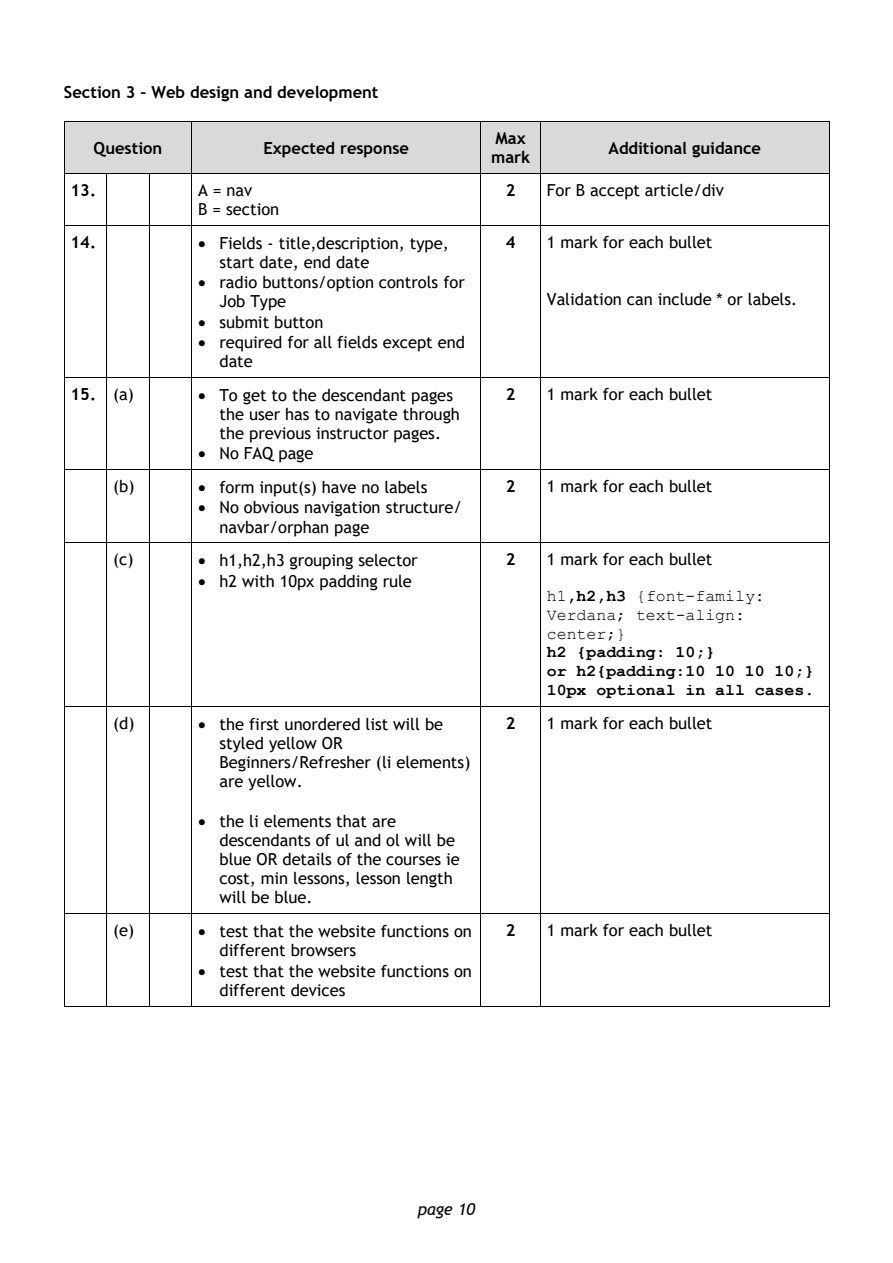
Selectable page text
Section 3 – Web design and development

                                        Max
   Question       Expected response               Additional guidance
                                       mark
13.         A = nav                      2  For B accept article/div
            B = section
14.         • Fields - title,description, type, 4 1 mark for each bullet
              start date, end date
            • radio buttons/option controls for
              Job Type                      Validation can include * or labels.
            • submit button
            • required for all fields except end
              date

15. (a)     • To get to the descendant pages 2 1 mark for each bullet
              the user has to navigate through
              the previous instructor pages.
            • No FAQ page

    (b)     • form input(s) have no labels 2 1 mark for each bullet
            • No obvious navigation structure/
              navbar/orphan page
    (c)     • h1,h2,h3 grouping selector 2  1 mark for each bullet
            • h2 with 10px padding rule
                                            h1,h2,h3 {font-family:
                                            Verdana; text-align:
                                            center;}
                                            h2 {padding: 10;}
                                            or h2{padding:10 10 10 10;}
                                            10px optional in all cases.

    (d)     • the first unordered list will be 2 1 mark for each bullet
              styled yellow OR
              Beginners/Refresher (li elements)
              are yellow.

            • the li elements that are
              descendants of ul and ol will be
              blue OR details of the courses ie
              cost, min lessons, lesson length
              will be blue.
    (e)     • test that the website functions on 2 1 mark for each bullet
              different browsers
            • test that the website functions on
              different devices

                                page 10
PDF page 11
Question 16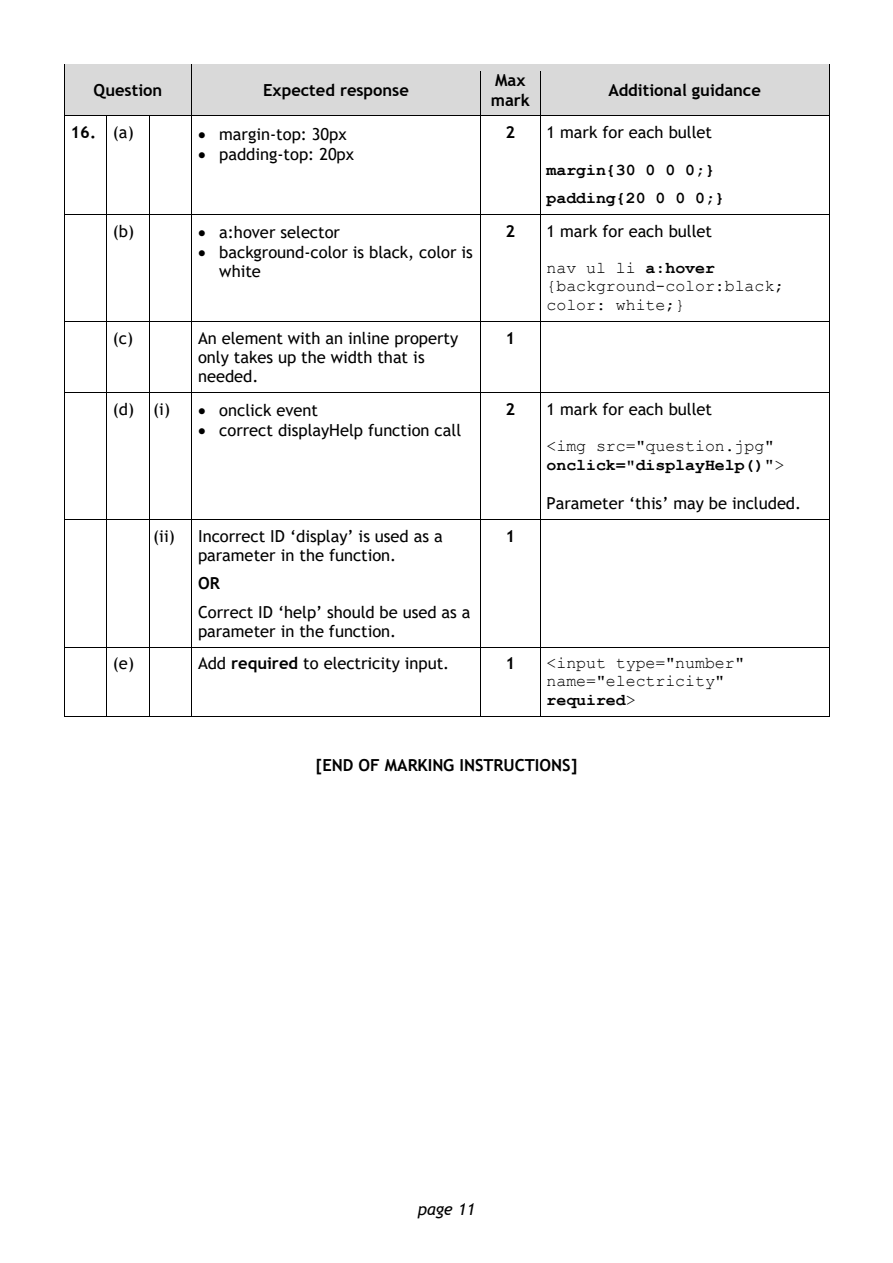
Selectable page text
Max
   Question       Expected response               Additional guidance
                                       mark
16. (a)     • margin-top: 30px          2   1 mark for each bullet
            • padding-top: 20px
                                            margin{30 0 0 0;}
                                            padding{20 0 0 0;}
    (b)     • a:hover selector          2   1 mark for each bullet

            • background-color is black, color is
              white                         nav ul li a:hover
                                            {background-color:black;
                                            color: white;}
    (c)     An element with an inline property 1
            only takes up the width that is
            needed.

    (d) (i) • onclick event             2   1 mark for each bullet
            • correct displayHelp function call
                                            <img src="question.jpg"
                                            onclick="displayHelp()">
                                            Parameter ‘this’ may be included.

        (ii) Incorrect ID ‘display’ is used as a 1
            parameter in the function.

            OR
            Correct ID ‘help’ should be used as a
            parameter in the function.

    (e)     Add required to electricity input. 1 <input type="number"
                                            name="electricity"
                                            required>

                       [END OF MARKING INSTRUCTIONS]

                                page 11