2024 Advanced Higher Computing Science marking instructions
Source: Scottish Qualifications Authority (SQA) / Qualifications Scotland. This is a StemInteract HTML companion, not an official HTML edition. Selectable text is supplied alongside original page images. Use the images or original PDF for equations, powers, fractions, vector notation, tables and diagrams; text extraction cannot fully preserve mathematical layout.
Jump to a question
PDF page 1

Selectable page text
National

                   Qualifications
                   2024

                2024   Computing      Science

                     Advanced     Higher

  Question     Paper   Finalised   Marking    Instructions

© Scottish Qualifications Authority 2024

These marking instructions have been prepared by examination teams for use by SQA appointed
markers when marking external course assessments.
The information in this document may be reproduced in support of SQA qualifications only on a non-
commercial basis. If it is reproduced, SQA must be clearly acknowledged as the source. If it is to be
reproduced for any other purpose, written permission must be obtained from permissions@sqa.org.uk.
PDF page 2
Selectable page text
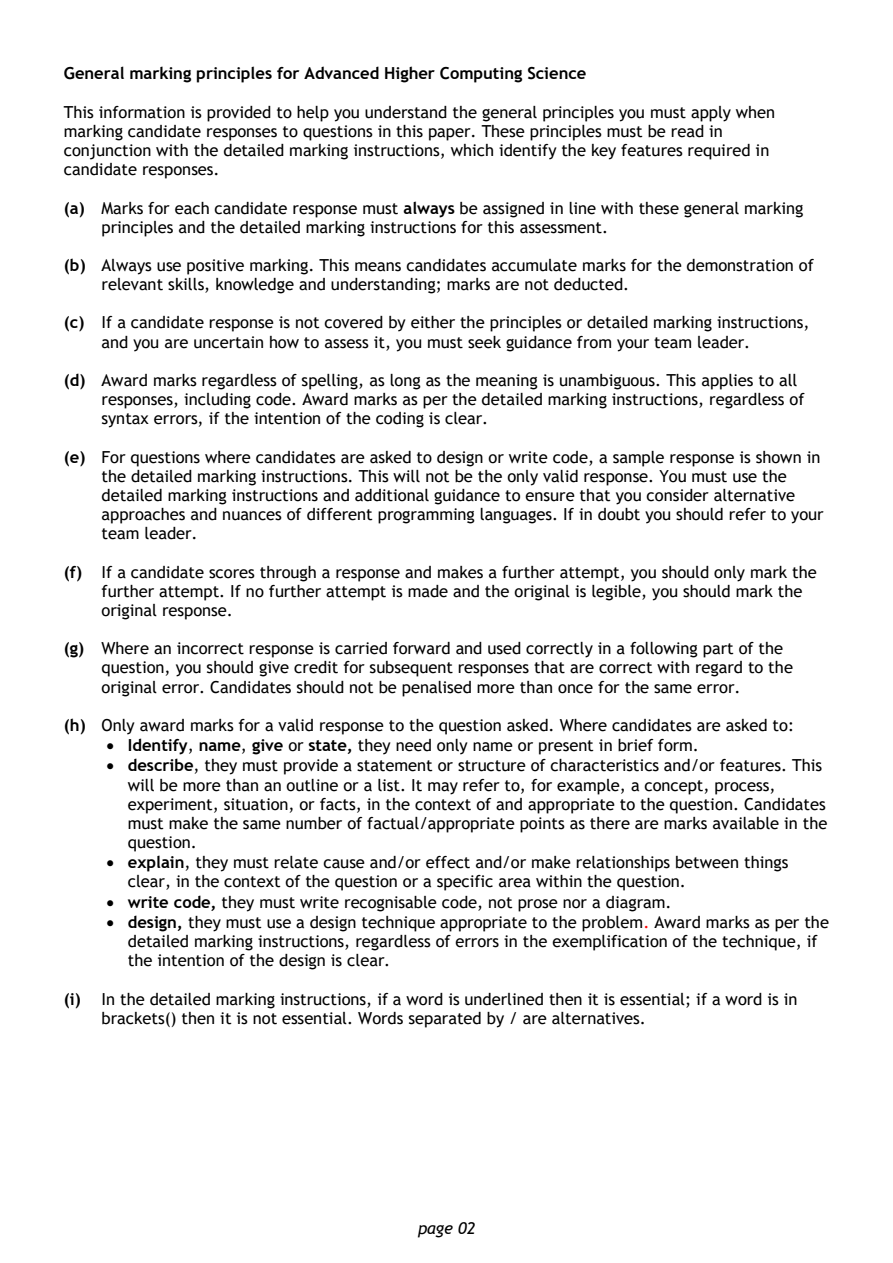
General marking principles for Advanced Higher Computing Science

This information is provided to help you understand the general principles you must apply when
marking candidate responses to questions in this paper. These principles must be read in
conjunction with the detailed marking instructions, which identify the key features required in
candidate responses.

(a) Marks for each candidate response must always be assigned in line with these general marking
   principles and the detailed marking instructions for this assessment.

(b) Always use positive marking. This means candidates accumulate marks for the demonstration of
   relevant skills, knowledge and understanding; marks are not deducted.

(c) If a candidate response is not covered by either the principles or detailed marking instructions,
   and you are uncertain how to assess it, you must seek guidance from your team leader.

(d) Award marks regardless of spelling, as long as the meaning is unambiguous. This applies to all
   responses, including code. Award marks as per the detailed marking instructions, regardless of
   syntax errors, if the intention of the coding is clear.

(e) For questions where candidates are asked to design or write code, a sample response is shown in
   the detailed marking instructions. This will not be the only valid response. You must use the
   detailed marking instructions and additional guidance to ensure that you consider alternative
   approaches and nuances of different programming languages. If in doubt you should refer to your
   team leader.

(f) If a candidate scores through a response and makes a further attempt, you should only mark the
   further attempt. If no further attempt is made and the original is legible, you should mark the
   original response.

(g) Where an incorrect response is carried forward and used correctly in a following part of the
   question, you should give credit for subsequent responses that are correct with regard to the
   original error. Candidates should not be penalised more than once for the same error.

(h) Only award marks for a valid response to the question asked. Where candidates are asked to:
    • Identify, name, give or state, they need only name or present in brief form.
    • describe, they must provide a statement or structure of characteristics and/or features. This
      will be more than an outline or a list. It may refer to, for example, a concept, process,
      experiment, situation, or facts, in the context of and appropriate to the question. Candidates
      must make the same number of factual/appropriate points as there are marks available in the
      question.
    • explain, they must relate cause and/or effect and/or make relationships between things
      clear, in the context of the question or a specific area within the question.
    • write code, they must write recognisable code, not prose nor a diagram.
    • design, they must use a design technique appropriate to the problem. Award marks as per the
      detailed marking instructions, regardless of errors in the exemplification of the technique, if
      the intention of the design is clear.

(i) In the detailed marking instructions, if a word is underlined then it is essential; if a word is in
   brackets() then it is not essential. Words separated by / are alternatives.

                                page 02
PDF page 3
Question 1Question 2Question 3Question 4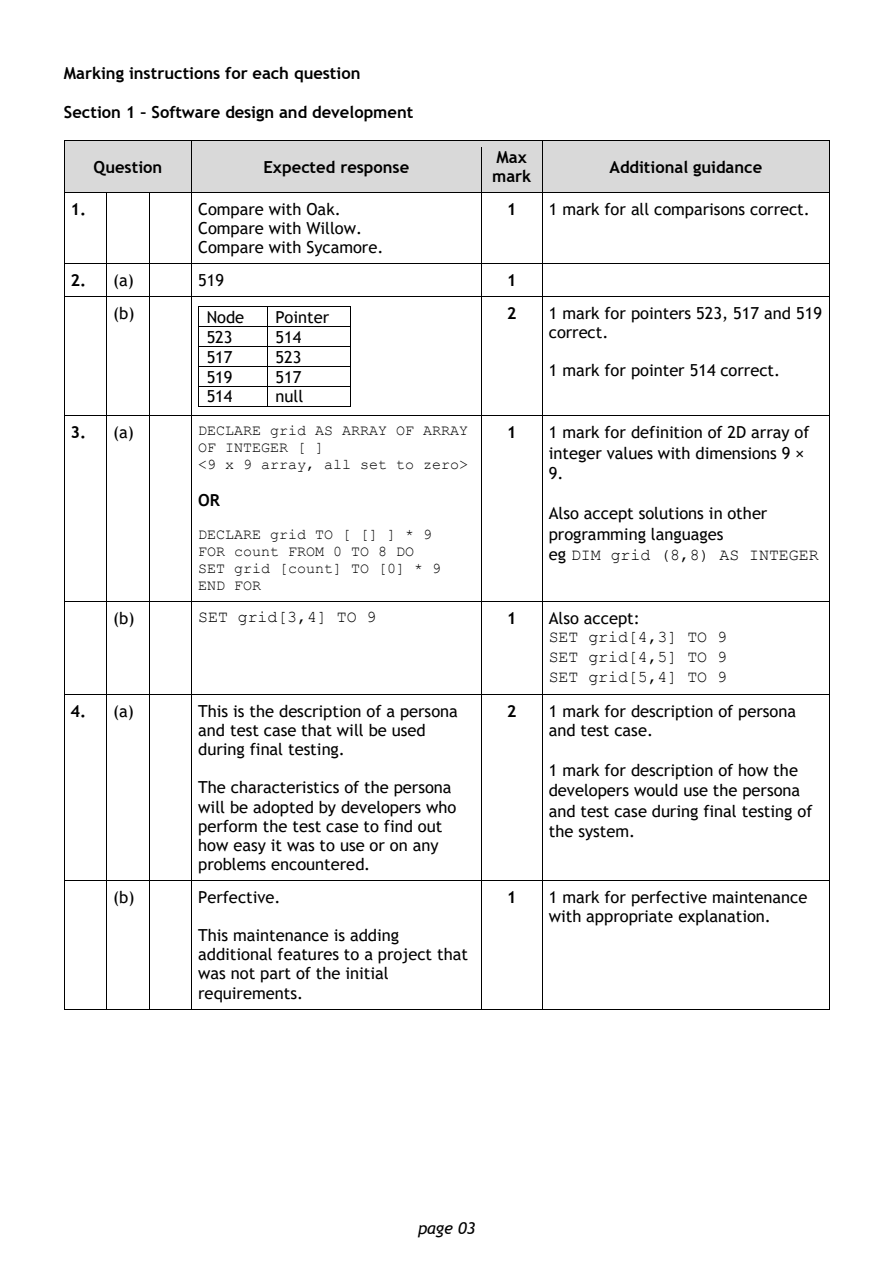
Selectable page text
Marking instructions for each question

Section 1 – Software design and development

                                        Max
   Question       Expected response               Additional guidance
                                       mark
1.          Compare with Oak.            1  1 mark for all comparisons correct.
            Compare with Willow.
            Compare with Sycamore.
2.  (a)     519                          1

    (b)      Node  Pointer               2  1 mark for pointers 523, 517 and 519
                                            correct.
             523   514
             517   523
                                            1 mark for pointer 514 correct.
             519   517
             514   null
3.  (a)     DECLARE grid AS ARRAY OF ARRAY 1 1 mark for definition of 2D array of
            OF INTEGER [ ]
                                            integer values with dimensions 9 ×
            <9 x 9 array, all set to zero>
                                            9.
            OR
                                            Also accept solutions in other
            DECLARE grid TO [ [] ] * 9      programming languages
            FOR count FROM 0 TO 8 DO        eg DIM grid (8,8) AS INTEGER
            SET grid [count] TO [0] *
                                  9
            END FOR
    (b)     SET grid[3,4] TO 9           1  Also accept:
                                            SET grid[4,3] TO 9
                                            SET grid[4,5] TO 9
                                            SET grid[5,4] TO 9
4.  (a)     This is the description of a persona 2 1 mark for description of persona
            and test case that will be used and test case.
            during final testing.
                                            1 mark for description of how the
            The characteristics of the persona developers would use the persona
            will be adopted by developers who and test case during final testing of
            perform the test case to find out
                                            the system.
            how easy it was to use or on any
            problems encountered.
    (b)     Perfective.                  1  1 mark for perfective maintenance
                                            with appropriate explanation.
            This maintenance is adding
            additional features to a project that
            was not part of the initial
            requirements.

                                page 03
PDF page 4
Question 5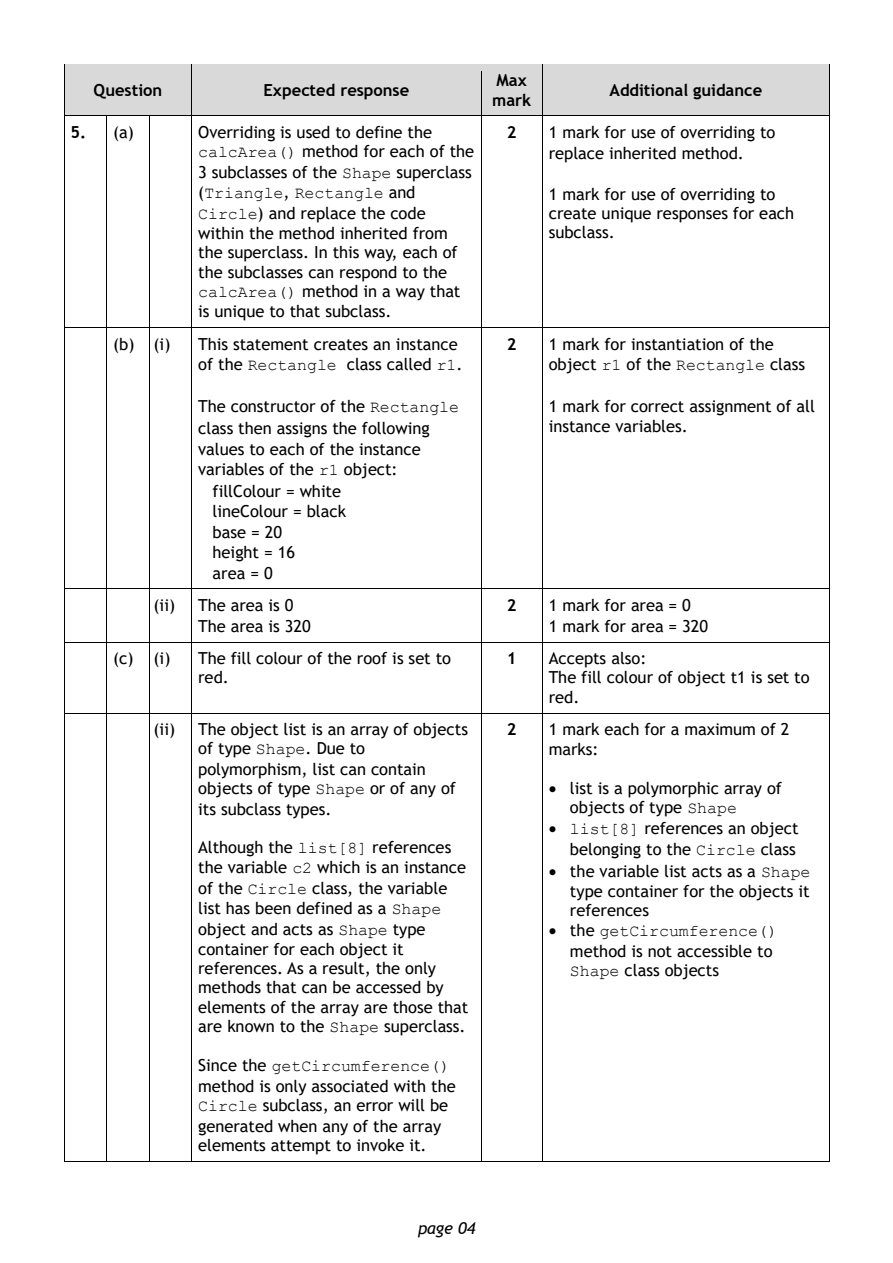
Selectable page text
Max
   Question       Expected response               Additional guidance
                                       mark
5.  (a)     Overriding is used to define the 2 1 mark for use of overriding to
            calcArea() method for each of the replace inherited method.
            3 subclasses of the Shape superclass
            (Triangle, Rectangle and        1 mark for use of overriding to
            Circle) and replace the code    create unique responses for each
            within the method inherited from subclass.
            the superclass. In this way, each of
            the subclasses can respond to the
            calcArea() method in a way that
            is unique to that subclass.
    (b) (i) This statement creates an instance 2 1 mark for instantiation of the
            of the Rectangle class called r1. object r1 of the Rectangle class

            The constructor of the Rectangle 1 mark for correct assignment of all

            class then assigns the following instance variables.
            values to each of the instance
            variables of the r1 object:
              fillColour = white
              lineColour = black
              base = 20
              height = 16
              area = 0

        (ii) The area is 0               2  1 mark for area = 0
            The area is 320                 1 mark for area = 320
    (c) (i) The fill colour of the roof is set to 1 Accepts also:
            red.                            The fill colour of object t1 is set to
                                            red.

        (ii) The object list is an array of objects 2 1 mark each for a maximum of 2
            of type Shape. Due to           marks:
            polymorphism, list can contain
            objects of type Shape or of any of • list is a polymorphic array of
            its subclass types.               objects of type Shape
                                            • list[8] references an object
            Although the list[8] references   belonging to the Circle class
            the variable c2 which is an instance • the variable list acts as a Shape
            of the Circle class, the variable type container for the objects it
            list has been defined as a Shape  references
            object and acts as Shape type   • the getCircumference()
            container for each object it      method is not accessible to
            references. As a result, the only Shape class objects
            methods that can be accessed by
            elements of the array are those that
            are known to the Shape superclass.

            Since the getCircumference()
            method is only associated with the
            Circle subclass, an error will be
            generated when any of the array
            elements attempt to invoke it.

                                page 04
PDF page 5
Question 6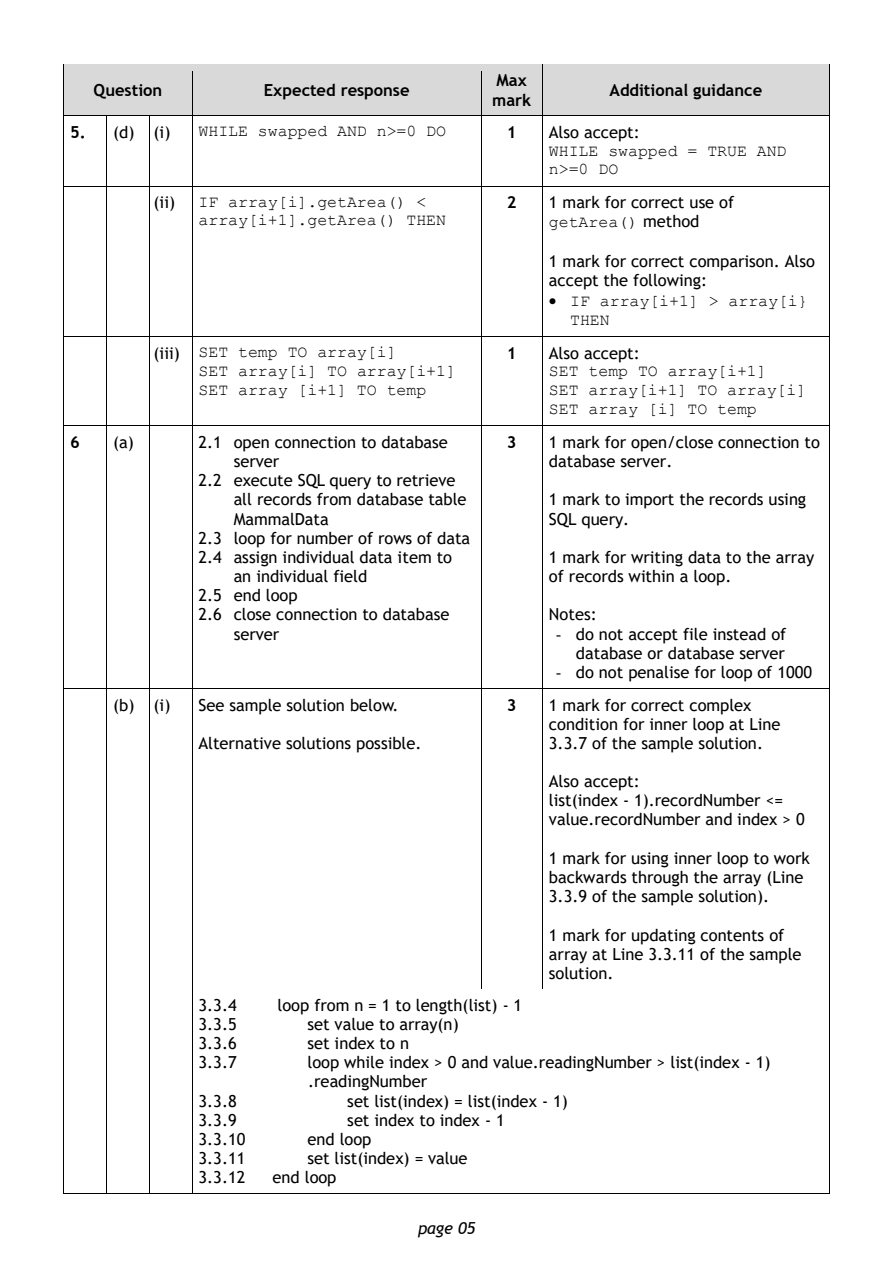
Selectable page text
Max
   Question       Expected response               Additional guidance
                                       mark
5.  (d) (i) WHILE swapped AND n>=0 DO    1  Also accept:
                                            WHILE swapped = TRUE AND
                                            n>=0 DO
        (ii) IF array[i].getArea() <     2  1 mark for correct use of
            array[i+1].getArea() THEN       getArea() method

                                            1 mark for correct comparison. Also
                                            accept the following:
                                            • IF array[i+1] > array[i}
                                              THEN

        (iii) SET temp TO array[i]       1  Also accept:
            SET array[i] TO array[i+1]      SET temp TO array[i+1]
            SET array [i+1] TO temp         SET array[i+1] TO array[i]
                                            SET array [i] TO temp
6   (a)     2.1 open connection to database 3 1 mark for open/close connection to
               server                       database server.
            2.2 execute SQL query to retrieve
               all records from database table 1 mark to import the records using
               MammalData                   SQL query.
            2.3 loop for number of rows of data
            2.4 assign individual data item to 1 mark for writing data to the array
               an individual field          of records within a loop.
            2.5 end loop
            2.6 close connection to database Notes:
               server                        - do not accept file instead of
                                               database or database server
                                             - do not penalise for loop of 1000

    (b) (i) See sample solution below.   3  1 mark for correct complex
                                            condition for inner loop at Line
            Alternative solutions possible. 3.3.7 of the sample solution.

                                            Also accept:
                                            list(index - 1).recordNumber <=
                                            value.recordNumber and index > 0

                                            1 mark for using inner loop to work
                                            backwards through the array (Line
                                            3.3.9 of the sample solution).

                                            1 mark for updating contents of
                                            array at Line 3.3.11 of the sample
                                            solution.
            3.3.4   loop from n = 1 to length(list) - 1
            3.3.5     set value to array(n)
            3.3.6     set index to n
            3.3.7     loop while index > 0 and value.readingNumber > list(index - 1)
                      .readingNumber
            3.3.8         set list(index) = list(index - 1)
            3.3.9         set index to index - 1
            3.3.10    end loop
            3.3.11    set list(index) = value
            3.3.12 end loop

                                page 05
PDF page 6
Selectable page text
Max
   Question       Expected response               Additional guidance
                                       mark
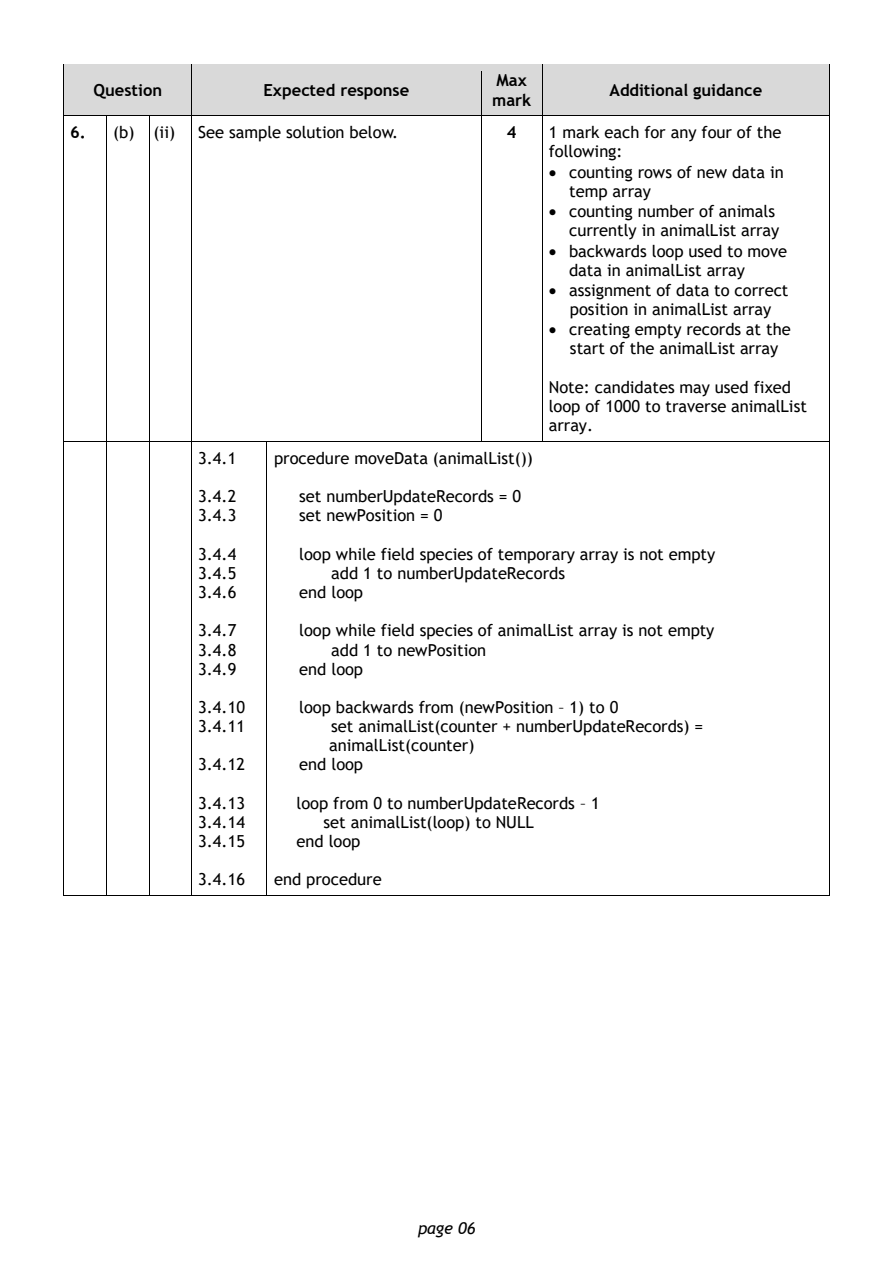
6.  (b) (ii) See sample solution below.  4  1 mark each for any four of the
                                            following:
                                            • counting rows of new data in
                                              temp array
                                            • counting number of animals
                                              currently in animalList array
                                            • backwards loop used to move
                                              data in animalList array
                                            • assignment of data to correct
                                              position in animalList array
                                            • creating empty records at the
                                              start of the animalList array
                                            Note: candidates may used fixed
                                            loop of 1000 to traverse animalList
                                            array.

            3.4.1  procedure moveData (animalList())

            3.4.2     set numberUpdateRecords = 0
            3.4.3     set newPosition = 0

            3.4.4     loop while field species of temporary array is not empty
            3.4.5       add 1 to numberUpdateRecords
            3.4.6     end loop

            3.4.7     loop while field species of animalList array is not empty
            3.4.8       add 1 to newPosition
            3.4.9     end loop

            3.4.10    loop backwards from (newPosition – 1) to 0
            3.4.11      set animalList(counter + numberUpdateRecords) =
                        animalList(counter)
            3.4.12    end loop

            3.4.13   loop from 0 to numberUpdateRecords – 1
            3.4.14      set animalList(loop) to NULL
            3.4.15   end loop

            3.4.16 end procedure

                                page 06
PDF page 7
Selectable page text
Max
   Question       Expected response               Additional guidance
                                       mark
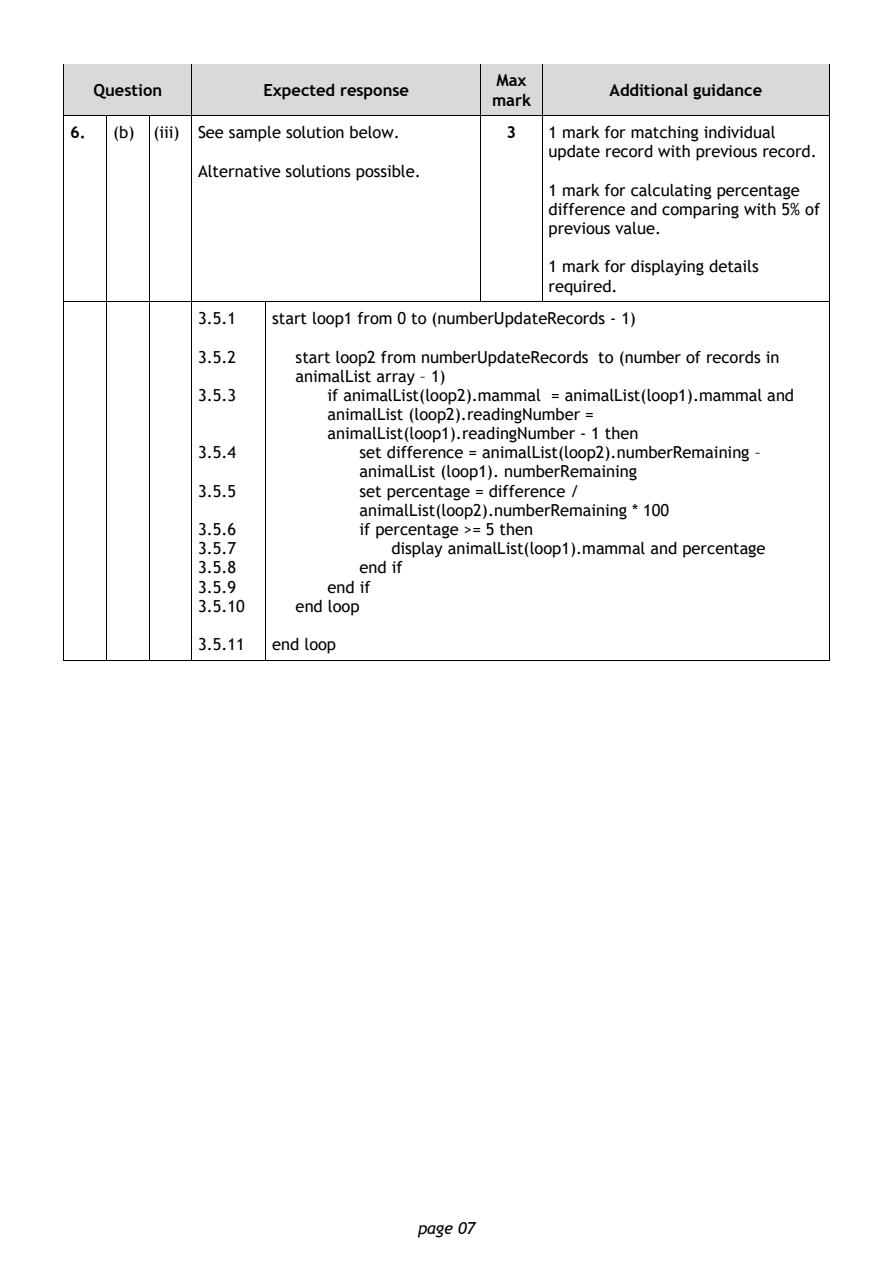
6.  (b) (iii) See sample solution below. 3  1 mark for matching individual
                                            update record with previous record.
            Alternative solutions possible.
                                            1 mark for calculating percentage
                                            difference and comparing with 5% of
                                            previous value.
                                            1 mark for displaying details
                                            required.

            3.5.1  start loop1 from 0 to (numberUpdateRecords - 1)

            3.5.2    start loop2 from numberUpdateRecords to (number of records in
                     animalList array – 1)
            3.5.3       if animalList(loop2).mammal = animalList(loop1).mammal and
                        animalList (loop2).readingNumber =
                        animalList(loop1).readingNumber - 1 then
            3.5.4          set difference = animalList(loop2).numberRemaining –
                           animalList (loop1). numberRemaining
            3.5.5          set percentage = difference /
                           animalList(loop2).numberRemaining * 100
            3.5.6          if percentage >= 5 then
            3.5.7             display animalList(loop1).mammal and percentage
            3.5.8          end if
            3.5.9       end if
            3.5.10   end loop

            3.5.11 end loop

                                page 07
PDF page 8
Question 7Question 8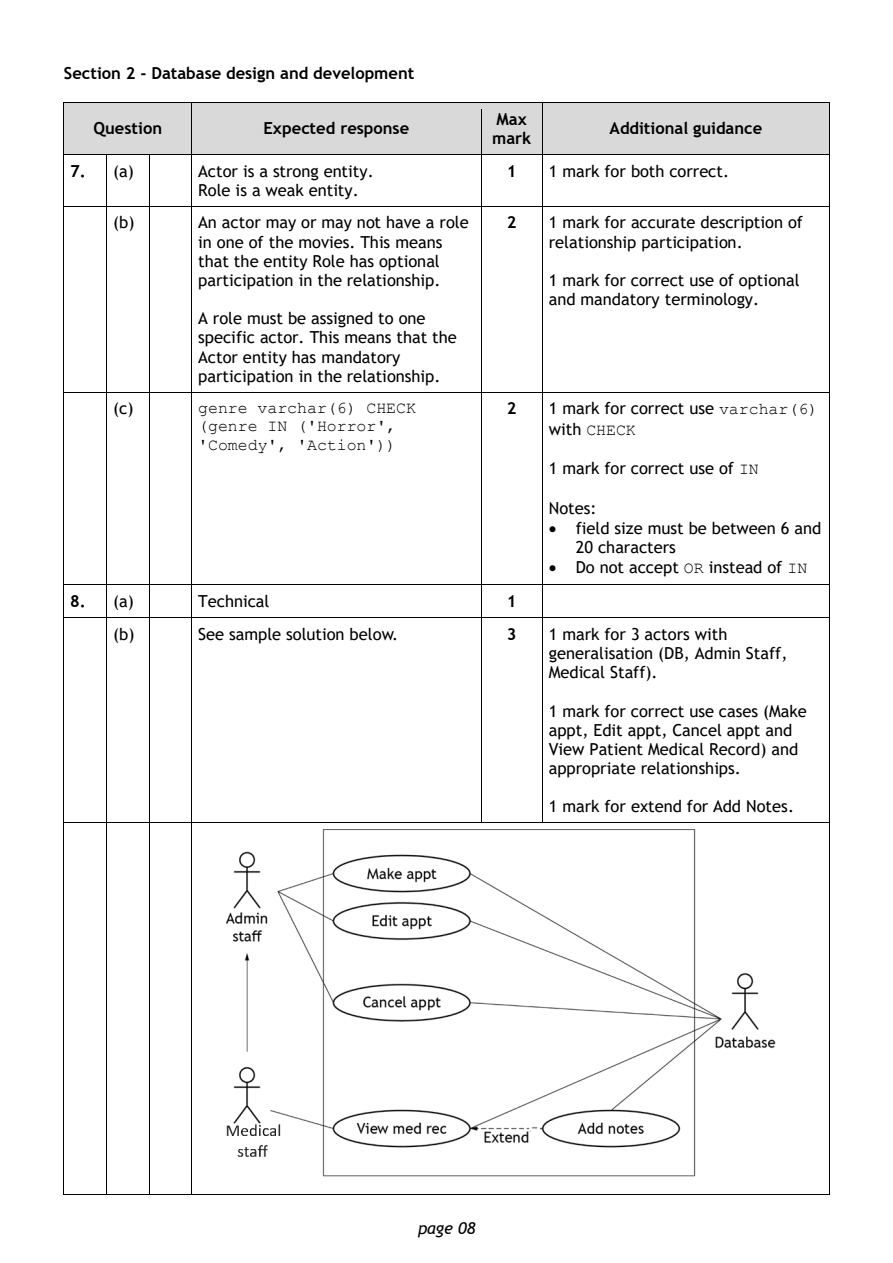
Selectable page text
Section 2 - Database design and development

                                        Max
   Question       Expected response               Additional guidance
                                       mark
7.  (a)     Actor is a strong entity.    1  1 mark for both correct.
            Role is a weak entity.
    (b)     An actor may or may not have a role 2 1 mark for accurate description of
            in one of the movies. This means relationship participation.
            that the entity Role has optional
            participation in the relationship. 1 mark for correct use of optional
                                            and mandatory terminology.
            A role must be assigned to one
            specific actor. This means that the
            Actor entity has mandatory
            participation in the relationship.

    (c)     genre varchar(6) CHECK       2  1 mark for correct use varchar(6)
            (genre IN ('Horror',            with CHECK
            'Comedy', 'Action'))
                                            1 mark for correct use of IN

                                            Notes:
                                            •  field size must be between 6 and
                                               20 characters
                                            •  Do not accept OR instead of IN
8.  (a)     Technical                    1

    (b)     See sample solution below.   3  1 mark for 3 actors with
                                            generalisation (DB, Admin Staff,
                                            Medical Staff).

                                            1 mark for correct use cases (Make
                                            appt, Edit appt, Cancel appt and
                                            View Patient Medical Record) and
                                            appropriate relationships.

                                            1 mark for extend for Add Notes.

                                page 08
PDF page 9
Selectable page text
Max
   Question       Expected response               Additional guidance
                                       mark
8.  (c)     Search would be improved, for 2 1 mark for each of two benefits of a
            example, reduces the amount of  surrogate key relating to scenario.
            data entered to retrieve details for a
            particular appointment.         Note: accept ‘reduced search time’
                                            but not ‘faster’.
            Automatically incremented and
            added at the time the record is
            created meaning no chance of
            duplication.
            It is simpler to create join conditions
            on complex queries.

            Surrogate keys are immutable;
            without a surrogate, changing an
            appointment would mean changing
            part of the primary key.

            Easier to reference historical data.

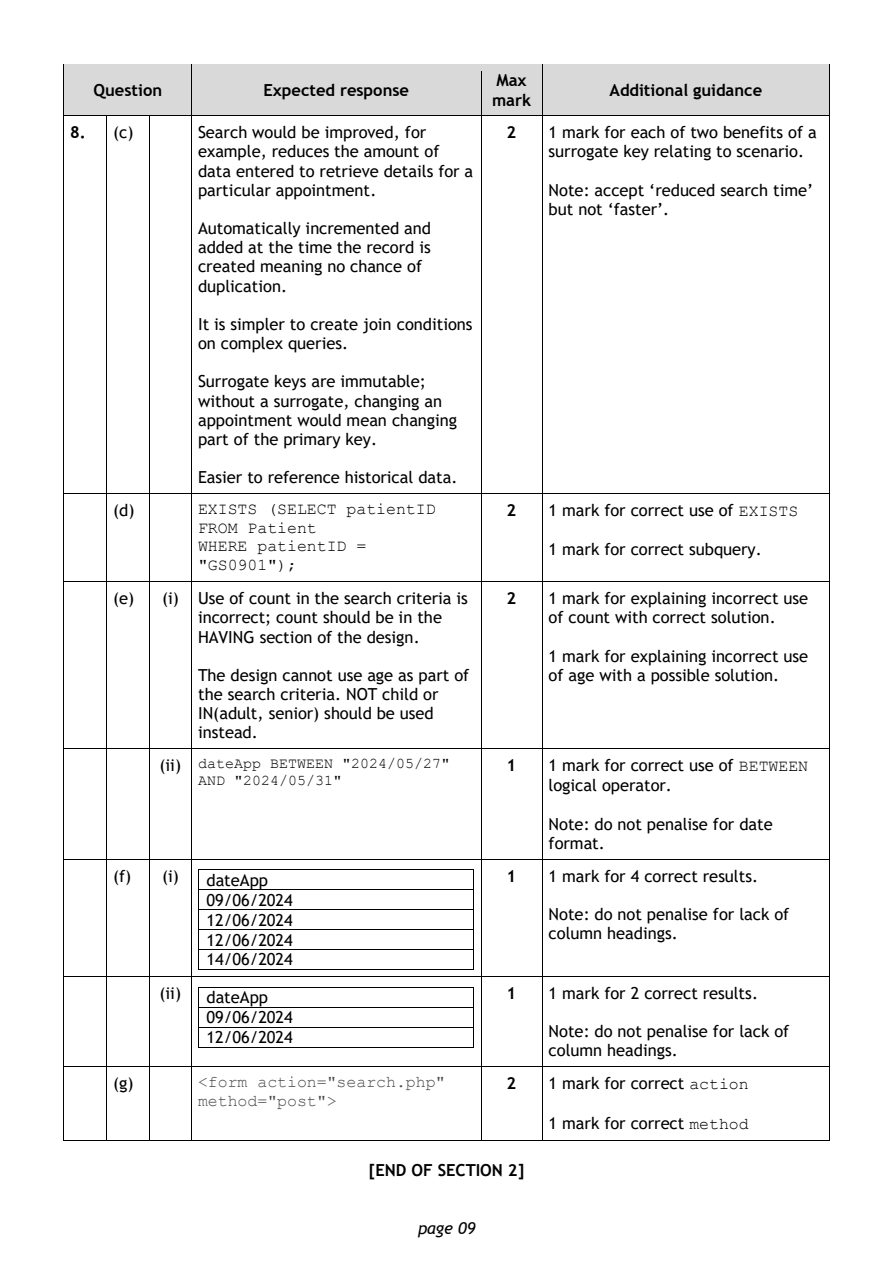
    (d)     EXISTS (SELECT patientID     2  1 mark for correct use of EXISTS
            FROM Patient
            WHERE patientID =               1 mark for correct subquery.
            "GS0901");
    (e)  (i) Use of count in the search criteria is 2 1 mark for explaining incorrect use
            incorrect; count should be in the of count with correct solution.
            HAVING section of the design.
                                            1 mark for explaining incorrect use
            The design cannot use age as part of of age with a possible solution.
            the search criteria. NOT child or
            IN(adult, senior) should be used
            instead.

         (ii) dateApp BETWEEN "2024/05/27" 1 1 mark for correct use of BETWEEN
            AND "2024/05/31"
                                            logical operator.
                                            Note: do not penalise for date
                                            format.

    (f)  (i) dateApp                     1  1 mark for 4 correct results.
             09/06/2024
                                            Note: do not penalise for lack of
             12/06/2024
                                            column headings.
             12/06/2024
             14/06/2024
         (ii) dateApp                    1  1 mark for 2 correct results.
             09/06/2024
                                            Note: do not penalise for lack of
             12/06/2024
                                            column headings.
    (g)     <form action="search.php"    2  1 mark for correct action
            method="post">
                                            1 mark for correct method
                            [END OF SECTION 2]

                                page 09
PDF page 10
Question 9Question 10Question 11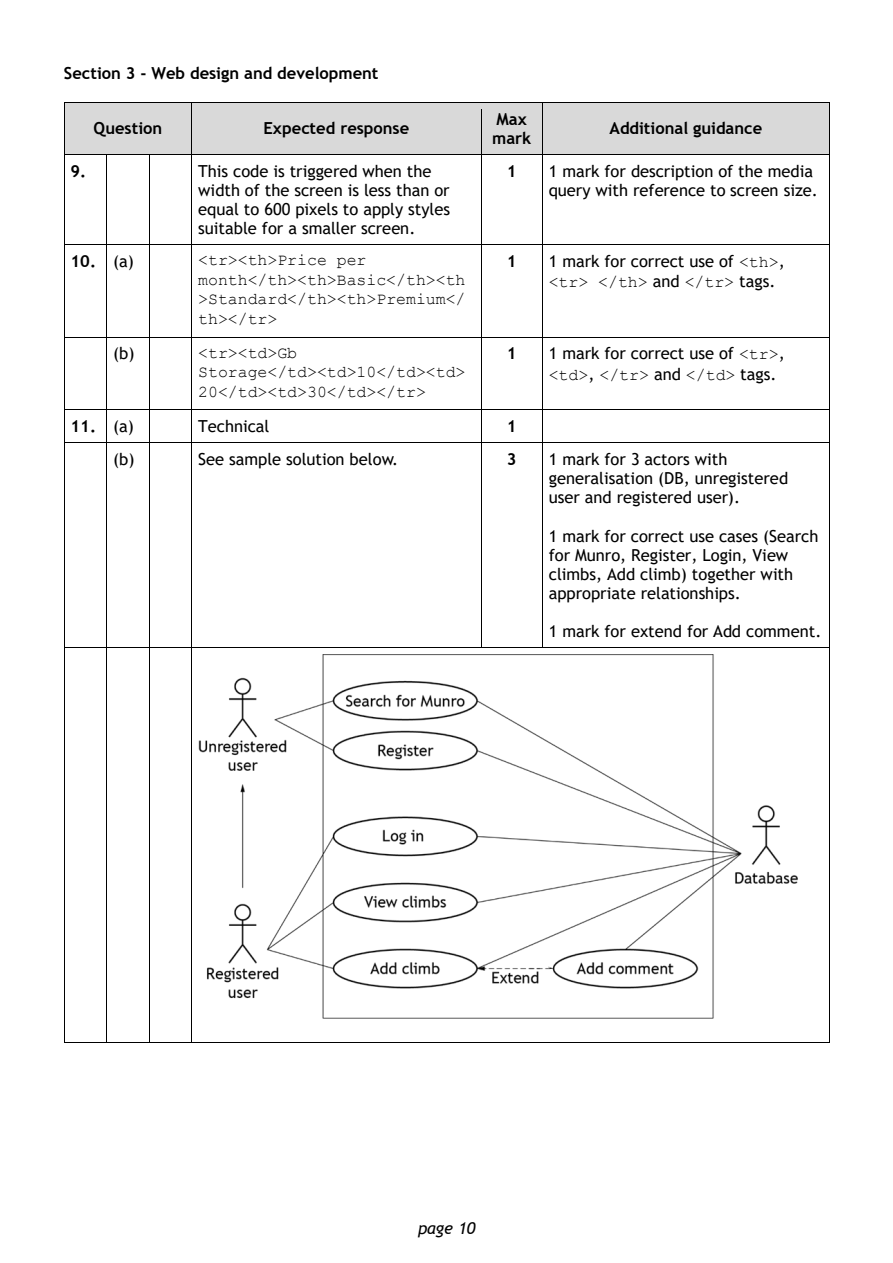
Selectable page text
Section 3 - Web design and development

                                        Max
   Question       Expected response               Additional guidance
                                       mark
9.          This code is triggered when the 1 1 mark for description of the media
            width of the screen is less than or query with reference to screen size.
            equal to 600 pixels to apply styles
            suitable for a smaller screen.
10. (a)     <tr><th>Price per            1  1 mark for correct use of <th>,
            month</th><th>Basic</th><th     <tr> </th> and </tr> tags.
            >Standard</th><th>Premium</
            th></tr>

    (b)     <tr><td>Gb                   1  1 mark for correct use of <tr>,
            Storage</td><td>10</td><td>     <td>, </tr> and </td> tags.
            20</td><td>30</td></tr>
11. (a)     Technical                    1

    (b)     See sample solution below.   3  1 mark for 3 actors with
                                            generalisation (DB, unregistered
                                            user and registered user).

                                            1 mark for correct use cases (Search
                                            for Munro, Register, Login, View
                                            climbs, Add climb) together with
                                            appropriate relationships.

                                            1 mark for extend for Add comment.

                                page 10
PDF page 11
Selectable page text
Max
   Question       Expected response               Additional guidance
                                       mark
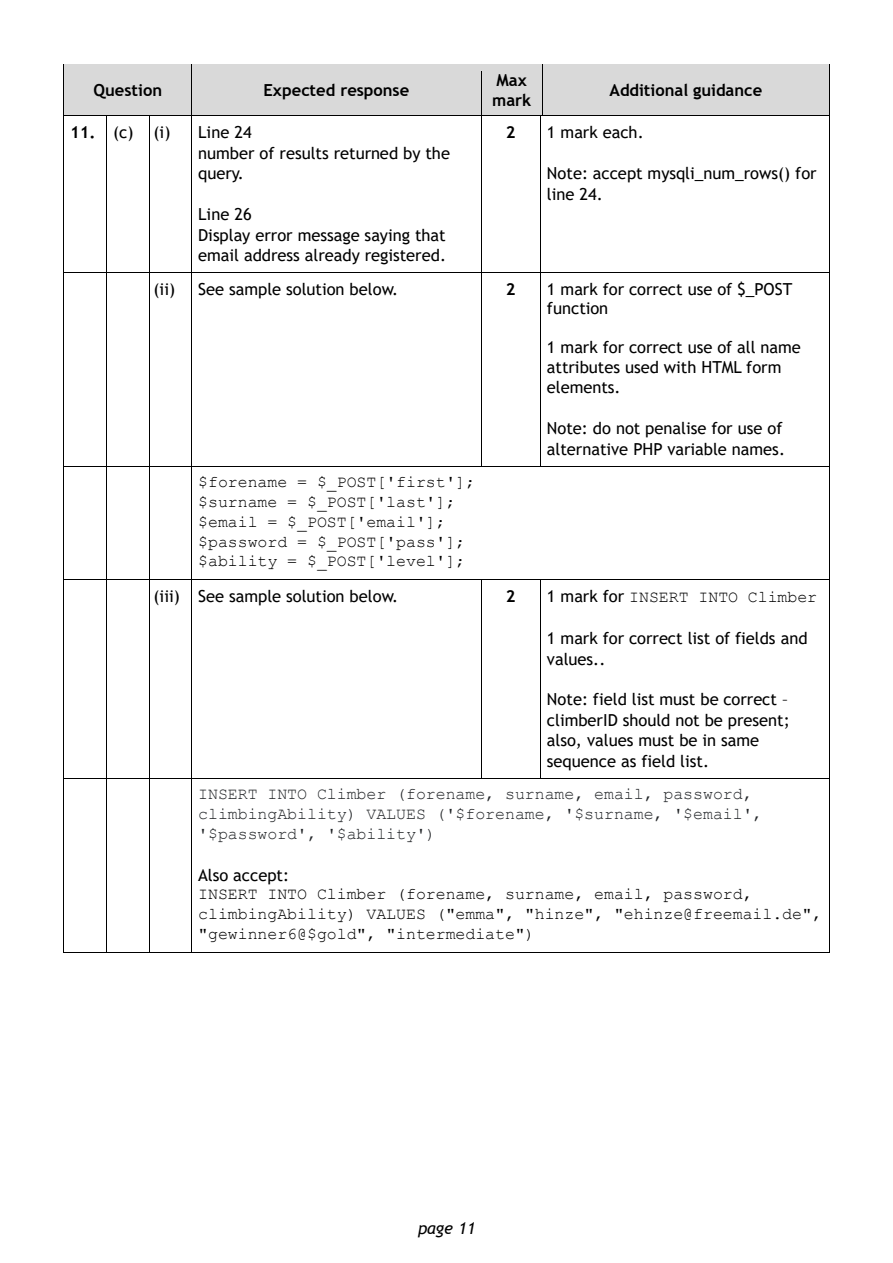
11. (c) (i) Line 24                      2  1 mark each.
            number of results returned by the
            query.                          Note: accept mysqli_num_rows() for
                                            line 24.
            Line 26
            Display error message saying that
            email address already registered.
        (ii) See sample solution below.  2  1 mark for correct use of $_POST
                                            function

                                            1 mark for correct use of all name
                                            attributes used with HTML form
                                            elements.

                                            Note: do not penalise for use of
                                            alternative PHP variable names.
            $forename = $_POST['first'];
            $surname = $_POST['last'];
            $email = $_POST['email'];
            $password = $_POST['pass'];
            $ability = $_POST['level'];

        (iii) See sample solution below. 2  1 mark for INSERT INTO Climber

                                            1 mark for correct list of fields and
                                            values..

                                            Note: field list must be correct –

                                            climberID should not be present;
                                            also, values must be in same
                                            sequence as field list.
            INSERT INTO Climber (forename, surname, email, password,
            climbingAbility) VALUES ('$forename, '$surname, '$email',
            '$password', '$ability')

            Also accept:
            INSERT INTO Climber (forename, surname, email, password,
            climbingAbility) VALUES ("emma", "hinze", "ehinze@freemail.de",
            "gewinner6@$gold", "intermediate")

                                page 11
PDF page 12
Selectable page text
Max
   Question       Expected response               Additional guidance
                                       mark
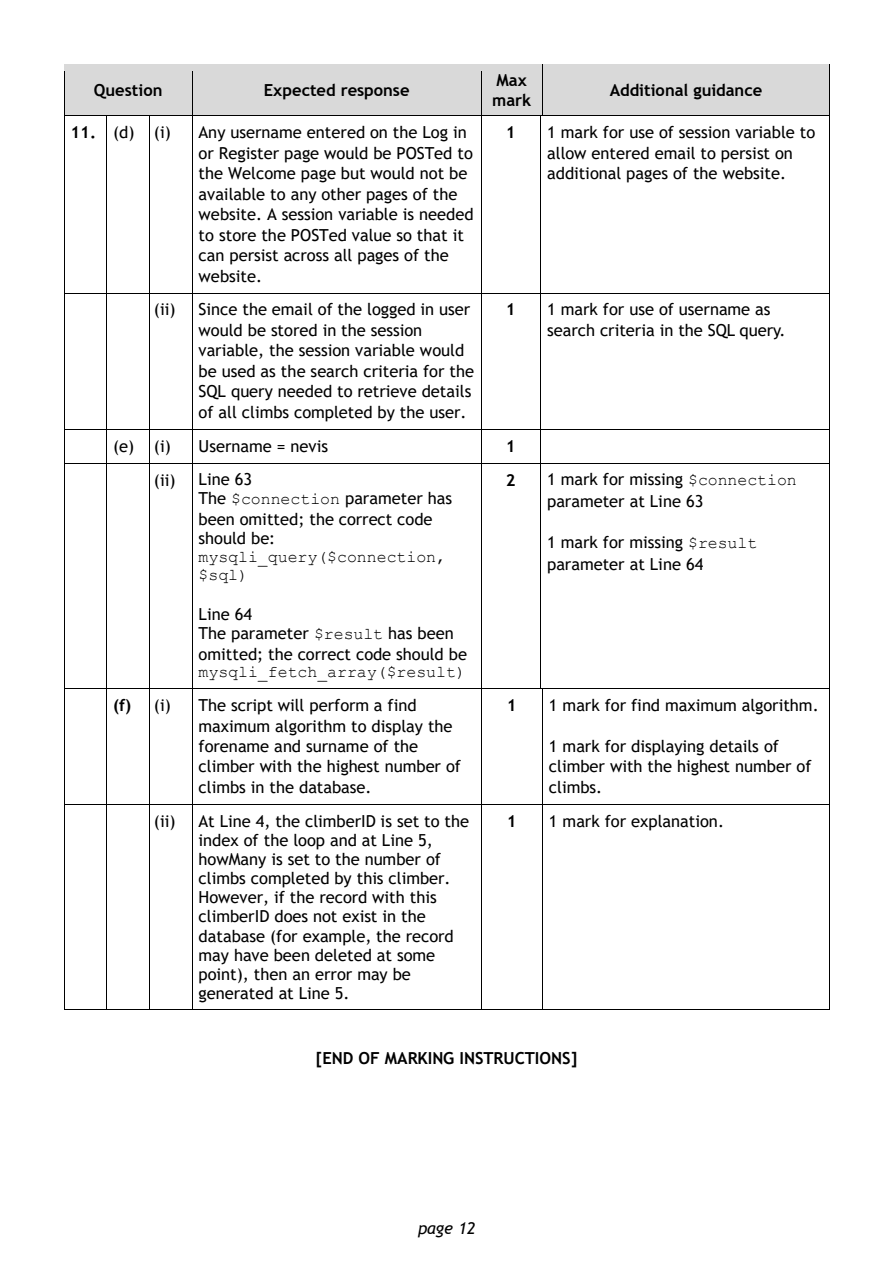
11. (d) (i) Any username entered on the Log in 1 1 mark for use of session variable to
            or Register page would be POSTed to allow entered email to persist on
            the Welcome page but would not be additional pages of the website.
            available to any other pages of the
            website. A session variable is needed
            to store the POSTed value so that it
            can persist across all pages of the
            website.
        (ii) Since the email of the logged in user 1 1 mark for use of username as

            would be stored in the session  search criteria in the SQL query.
            variable, the session variable would
            be used as the search criteria for the
            SQL query needed to retrieve details
            of all climbs completed by the user.
    (e) (i) Username = nevis             1

        (ii) Line 63                     2  1 mark for missing $connection
            The $connection parameter has   parameter at Line 63
            been omitted; the correct code
            should be:                      1 mark for missing $result
            mysqli_query($connection,
                                            parameter at Line 64
            $sql)
            Line 64
            The parameter $result has been
            omitted; the correct code should be
            mysqli_fetch_array($result)

    (f) (i) The script will perform a find 1 1 mark for find maximum algorithm.
            maximum algorithm to display the
            forename and surname of the     1 mark for displaying details of
            climber with the highest number of climber with the highest number of
            climbs in the database.         climbs.

        (ii) At Line 4, the climberID is set to the 1 1 mark for explanation.
            index of the loop and at Line 5,
            howMany is set to the number of
            climbs completed by this climber.
            However, if the record with this
            climberID does not exist in the
            database (for example, the record
            may have been deleted at some
            point), then an error may be
            generated at Line 5.

                       [END OF MARKING INSTRUCTIONS]

                                page 12